User Manual
Page: 19
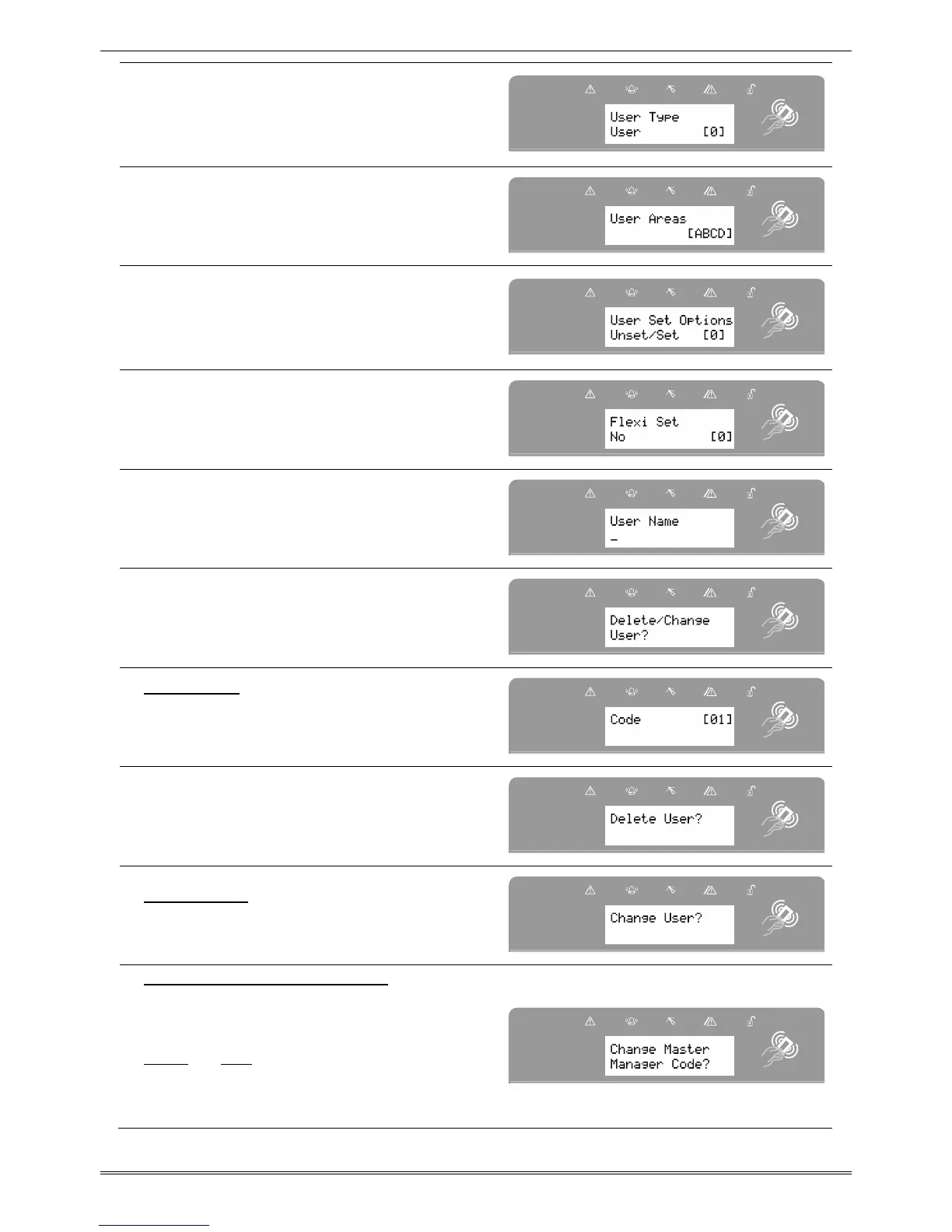
Press [ or ] to choose between
'User' or 'Manager'. Press I
NOTE: This screen will not be displayed
if you have programmed a wireless
keyfob.
Select the areas that the user will be
assigned to: A, B, C or D.
Press I.
Press [ or ] to choose between
'Unset/Set', 'Unset Only', 'Set Only' or
'None'. Press I.
(This screen will not be displayed if you
have programmed a wireless keyfob)
Press [ or ] to enable or disable
'Flexi-Set'. Press I.
(This screen will not be displayed if you
have programmed a wireless keyfob)
Enter the user name (for help on
predictive text please see page 7)
Press I.
Press I to delete or change a user.
Delete User
Press [ or ] to scroll through the
users, or enter the user number and
press I.
Press I to delete a user, or press A
to change a user.
Change User
Press I to change a user code, and
follow the screen shots previously.
Change Master Manager Code
To edit the Master Manager Code, press
I.
Enter the new code, present a tag or
press and hold a keyfob button until the
display changes. Press
.
I
Repeat the same procedure mentioned
previously.








 To Next Page