User Manual
Page: 20
13.6 Review Logs
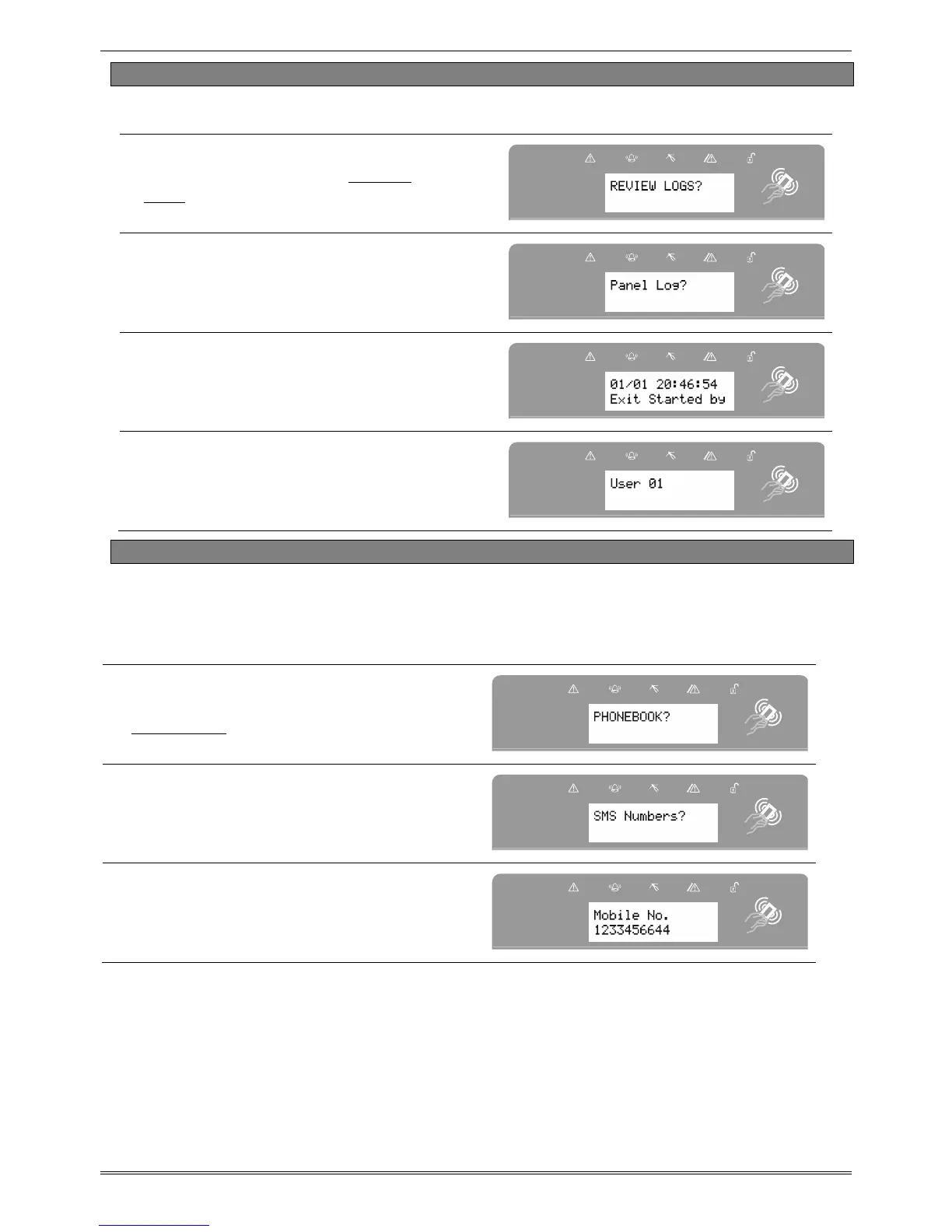
The ‘Review Logs’ function monitors all operational information of the wireless alarm system,
such as setting/unsetting information and alarm activations etc.
Press b or A to scroll to ‘REVIEW
LOGS’. Press I.
Press I.
The most recent event will be displayed,
press b or D to scroll backwards and
forwards through the log.
Press the c key to show more
information (such as which input
activated, or which user set the system
etc)
13.7 Phonebook
If SMS texting is programmed, there will be up to 4 mobile numbers also programmed which
can be changed in this function. If any numbers are added, you will need to enable each one
and also perform a CHC SMS test to activate each call (see page 21). If “do not use” is shown
on the display of a number, then a telephone number already exists that is communicating to
an Alarm Receiving Centre (this can only be changed by your engineer).
Press
bor A to scroll to
‘PHONEBOOK’. Press I
.
Press b or D to scroll through the
different telephone numbers.
Enter the mobile number. Press I.
Press [ or ] to enable or disable the
number. Press I.








 To Next Page