4 Installaon
4.1 Baery Installaon
The SP-210 is powered by four alkaline baeries. Typical baery life lasts for 10,000 measurements or 10
months. When the baery capacity is crically low, the SP-210 will display a ”LOW BATTERY” warning for 5
seconds and then automacally turn o.
*
NOTE
*
Do not use rechargeable nickel cadmium (NiCad) or lithium baeries.
Replace the baeries to resume operaon of the SP-210 aer the baery warning. The SP-210 will auto-
macally turn on in the measurement mode aer new baeries are installaon.
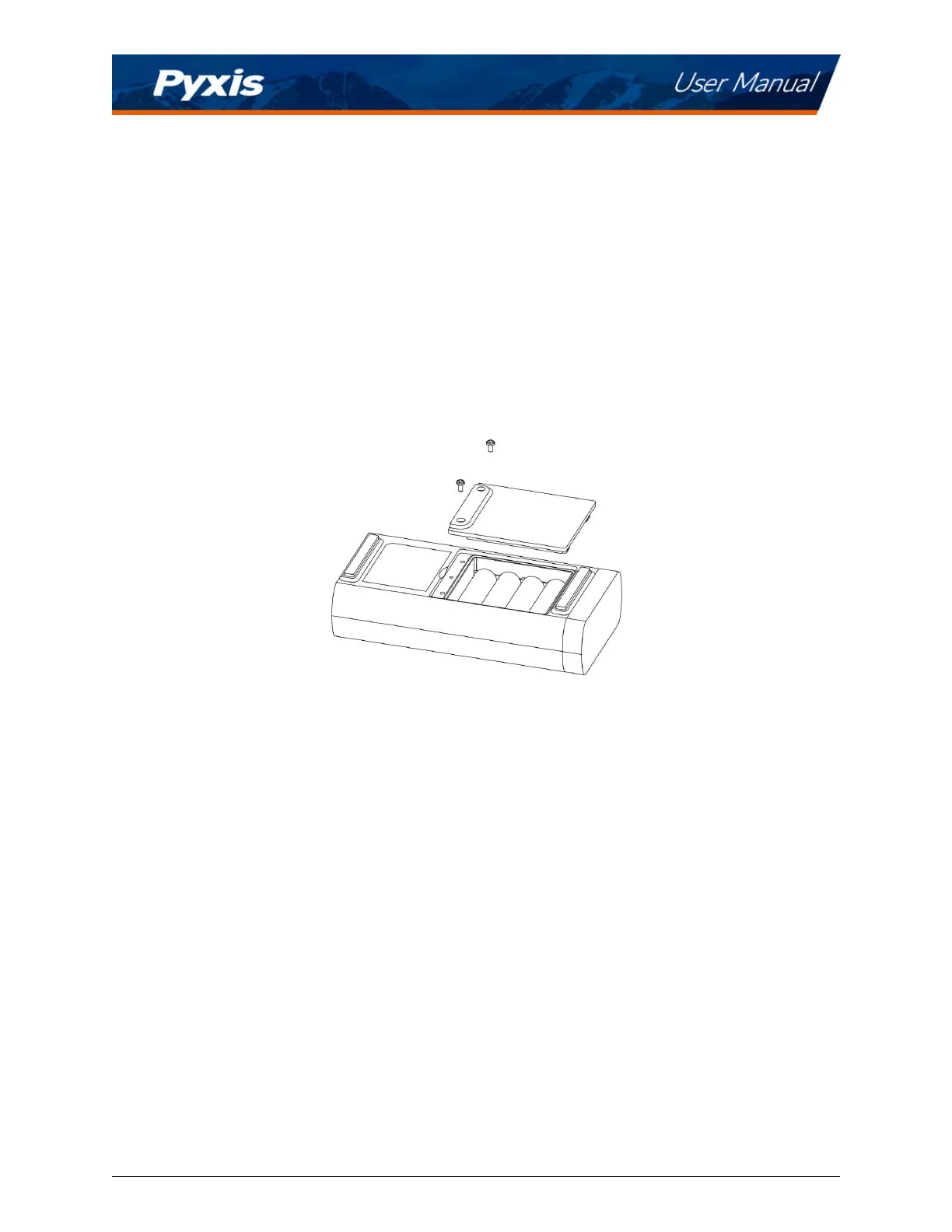
The SP-210 baery compartment, shown in Figure 1, is on the back side of the instrument. Baeries are
held in place by a cover secured with two Phillips-head screws.
Figure 1. The SP-210 baery compartment
Install baeries using the following steps:
1. Remove the baery compartment cover by loosening the two screws.
2. Remove old baeries and dispose of them properly.
3. Following the posive and negave terminal signs in the compartment boom, snap four new AA
alkaline baeries rmly into the baery holder.
4. Replace the baery compartment cover and ensure that the sealing O-ring is lying at on the baery
holder.
5. Fasten the two screws.
*
NOTE
*
Failure to properly seat the O-ring may result in water damage to the SP-210.
SP-210 User Manual service@pyxis-lab.com | +1 (866) 203-8397 4



 To Next Page