Getting Started | 21
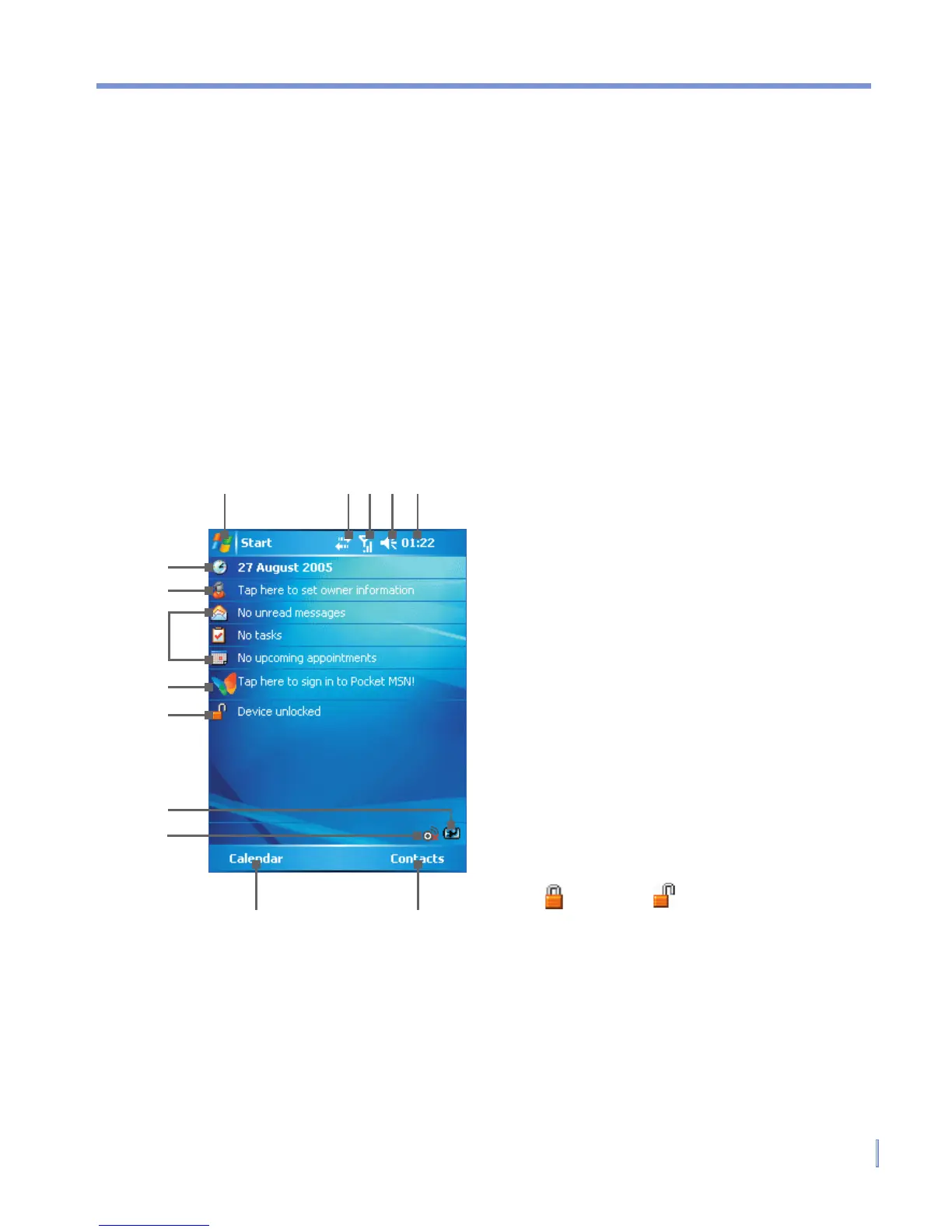
1.5 The Today Screen
The Today screen displays important information, such as upcoming
appointments and status indicators. You can tap a section on the
screen to open the associated program.
• To access the Today screen, tap Start > Today.
• To customize the Today screen display, including the background
image, tap Start > Settings > Personal tab > Today.
1 Tap to open the Start menu.
2 Tap to view connectivity status.
3 Indicates the radio signal strength.
Tap to configure the phone
settings.
4 Tap to control device/ringer
volume level.
5 Displays the current time. Tap and
hold to change the clock mode:
Analog or Digital.
6 Displays the current date. Tap to
setup date, time, alarm, and more.
7 Tap to set owner information.
8 Your day at a glance with
reminders. Tap to open the related
program: messages, tasks, and
appointments.
9 Tap to open MSN sign-in screen.
10 Tap to lock or unlock the device.
: locked;
: unlocked.
11 Indicates the battery status. Tap to
open the Power Settings screen.
12 Tap to start Comm Manager.
13 Tap to open the Calendar screen.
14 Tap to open the Contacts screen.
1 2 3 5
6
8
9
13 14
11
4
7
12
10



 To Next Page