Getting Started | 23
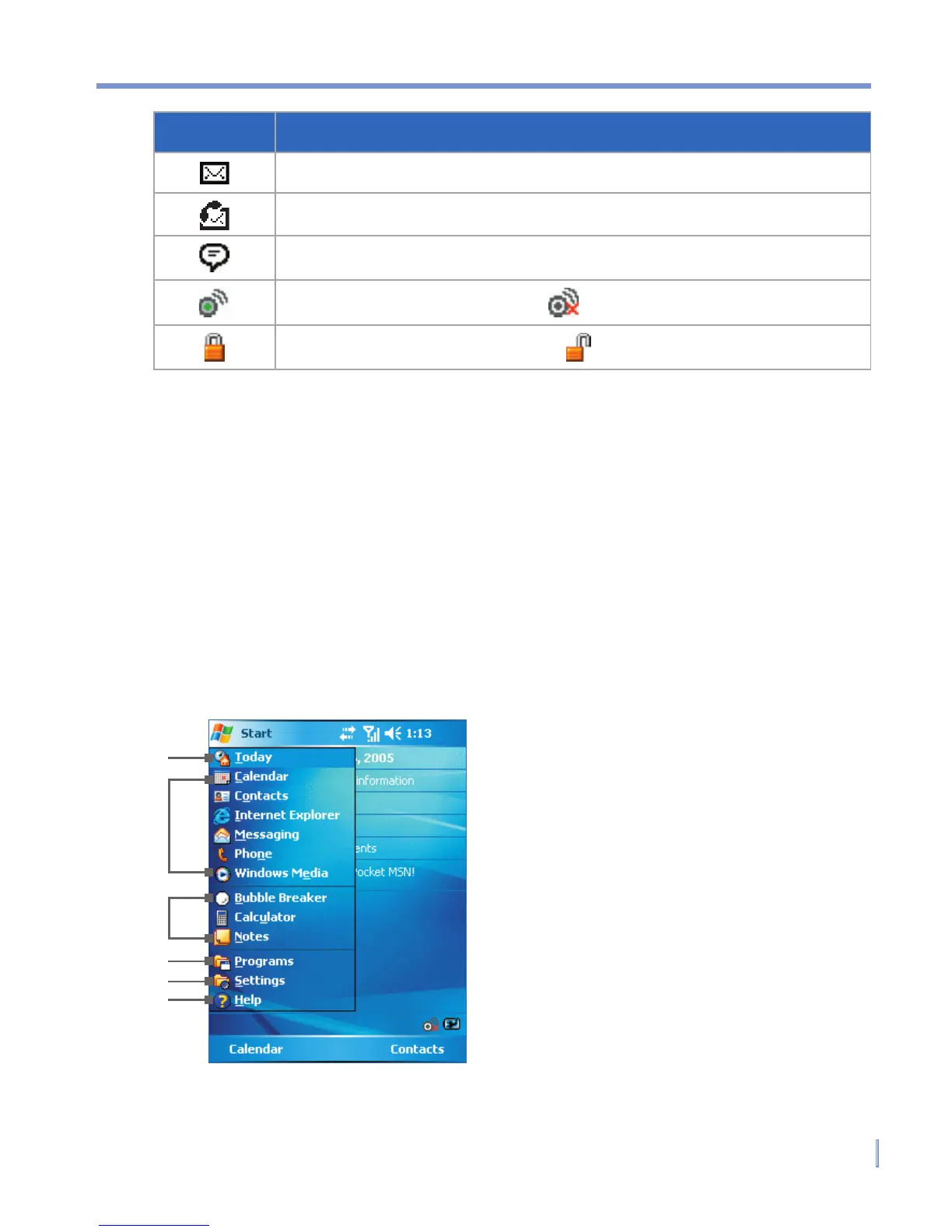
1.6 Using the Start Menu
The Start menu, located at the top left corner of the Today screen,
displays a list of programs. It lets you close a screen and switch from
one program to another. You can start a program by scrolling through
the programs list and then pressing ENTER, or by tapping a program
with the stylus.
1
2
3
4
5
6
1 Tap to open the Today screen.
2 Tap to start a program. The items
displayed in Start menu can be
customized by tapping Start
> Settings > Personal tab >
Menus.
3 Tap to start a recently-used
program.
4 Tap to view and select more
programs that are installed in your
device.
5 Tap to change device settings.
6 Tap to see a Help topic for the
current screen.
Icon Description
New e-mail or text messages.
New voice mail
There are more notifications. Tap the icon to view all.
Indicates Wi-Fi is turned on. : Wi-Fi off.
Indicates the device is locked. : Device unlocked.



 To Next Page