For Apple iOS users:
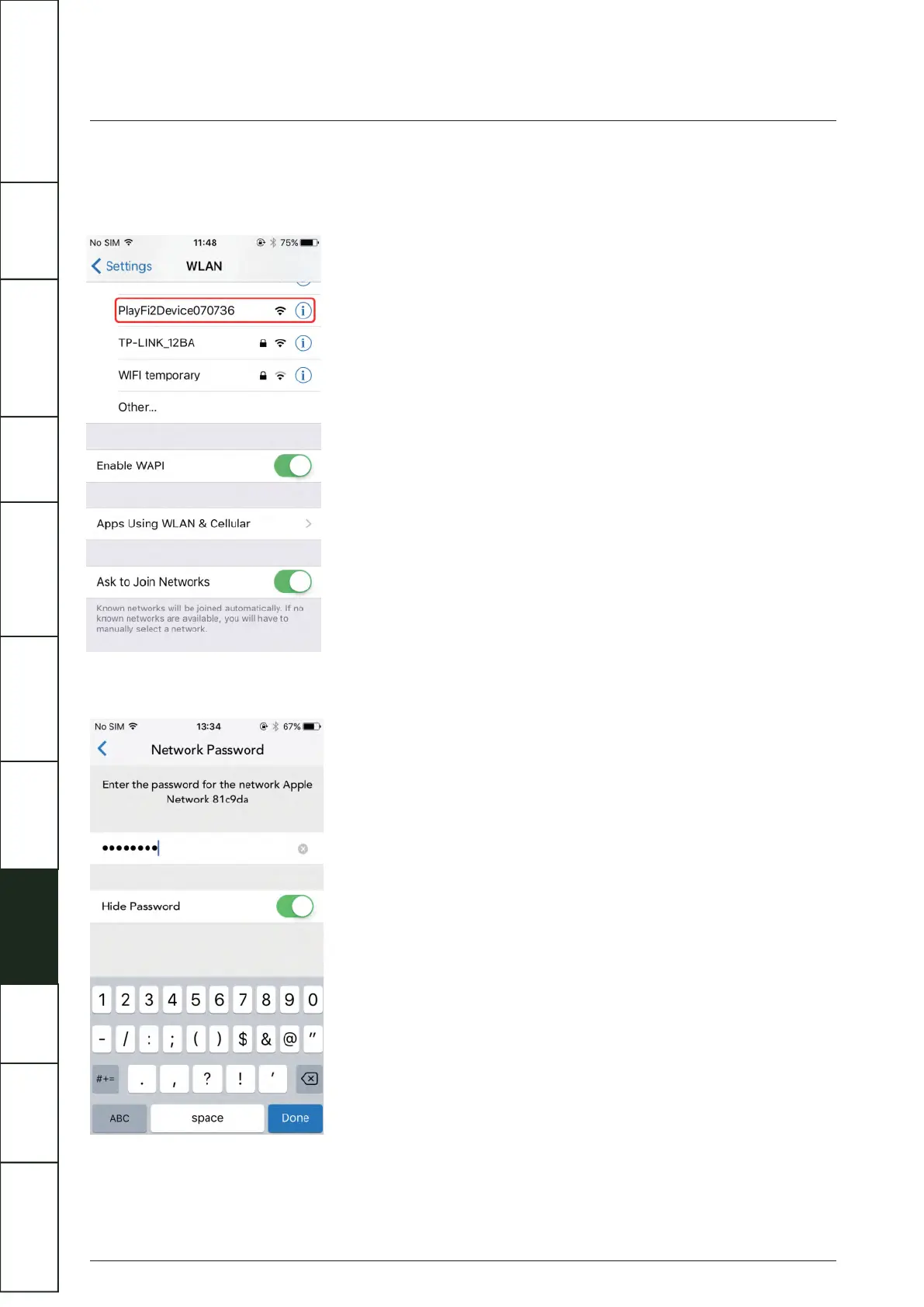
(1) Download the Play-Fi APP. Before opening the APP please switch to the Settings - Wi-Fi menu on your smartphone or tablet
(1) and select 'PlayFiXDeviceXXXXXX' from the options.
22
(2) Open the Play-Fi APP and find the Artera Solus Play Play-Fi Device name. Select it and enter your wireless network password.
(3) During installation the APP will find and upgrade the Artera Solus Play Play-Fi settings which may take a few minutes.
(4) After completing the network set-up and upgrading you can set a name for your Artera Solus Play Device and use it.
IMPORTANT
SAFETY INFORMATION
REMOTE
HANDSET
CONTROLS AND
FUNCTIONS
CONNECTIONS
SYSTEM
OPERATIONS
DTS PLAY-FI
®
WIRELESS...
MENU
OPTIONS
SPECIFICATIONS CONTENTSINTRODUCTION
WARRANTY
COVERAGE



 To Next Page