1
2
3
4
5
6
7
8
9
10
11
12
13
14
15
16
17
18
19
20
21
22
23
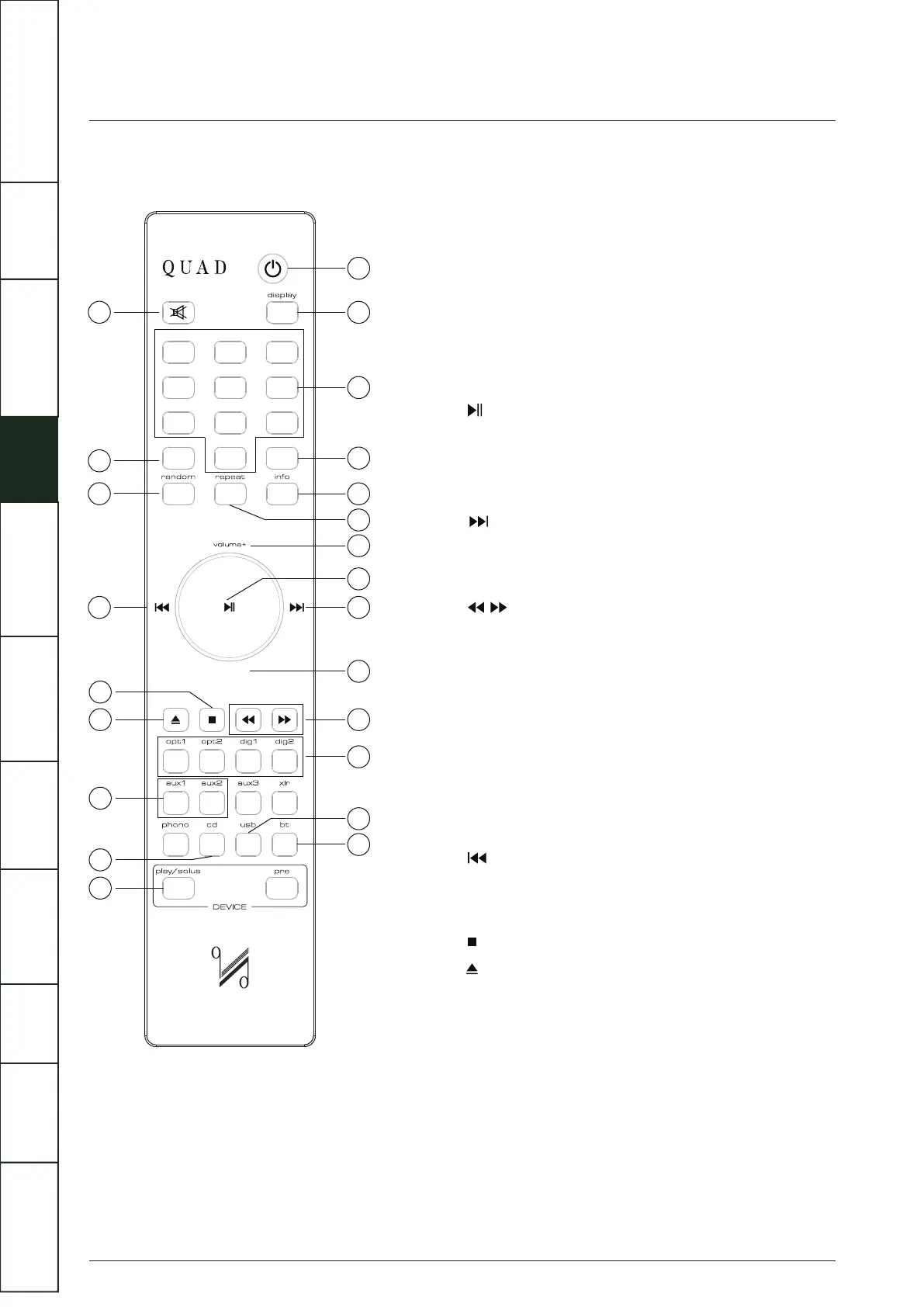
Standby
Display
Number keys
Store
Info
Repeat
Volume+
Volume-
Digital
USB
BT
Mute
Prog
Random
Aux1/Aux2
CD
Play/Solus
Press to enable/disable standby
Press to alter the display ON/OFF
Select tracks
Press to store a track in Program mode
Press to display more information
Press to select a repeat mode
Increase volume
Play/Pause, for CD/USB / BT / Play-Fi/ Spotify
playback
Press and hold to disconnect the Bluetooth device
The menu setting enter key
Select next track
Press to switch the Menu setting
Decrease volume
Press and hold to Fast reverse/Fast forward search
Press to select Digital inputs
Press and hold to select DPLL bandwidth
Press to select the USB input
Press to select Bluetooth
Press to mute/unmute the sound
Press to enter a program of tracks
Press and hold to enter Menu setting
Press to select/deselect random play
Press once to replay the current track
Press again to move to the previous track
Press to switch the Menu setting
Press to stop CD Playback
Press to eject/load the disc
Press to select analogue inputs
Press to select CD playback
Press to select Artera Solus Play mode
4
REMOTE HANDSET
1 2
3
4
5 6
7
8 9
store
prog
0
volume-
1
2
3
4
5
9
11
12
14
23
21
20
18
17
16
15
19
22
13
10
7
6
8
XX
X
X
IMPORTANT
SAFETY INFORMATION
REMOTE
HANDSET
CONTROLS AND
FUNCTIONS
CONNECTIONS
SYSTEM
OPERATIONS
DTS PLAY-FI
®
WIRELESS...
MENU
OPTIONS
SPECIFICATIONS CONTENTSINTRODUCTION
WARRANTY
COVERAGE



 To Next Page