21
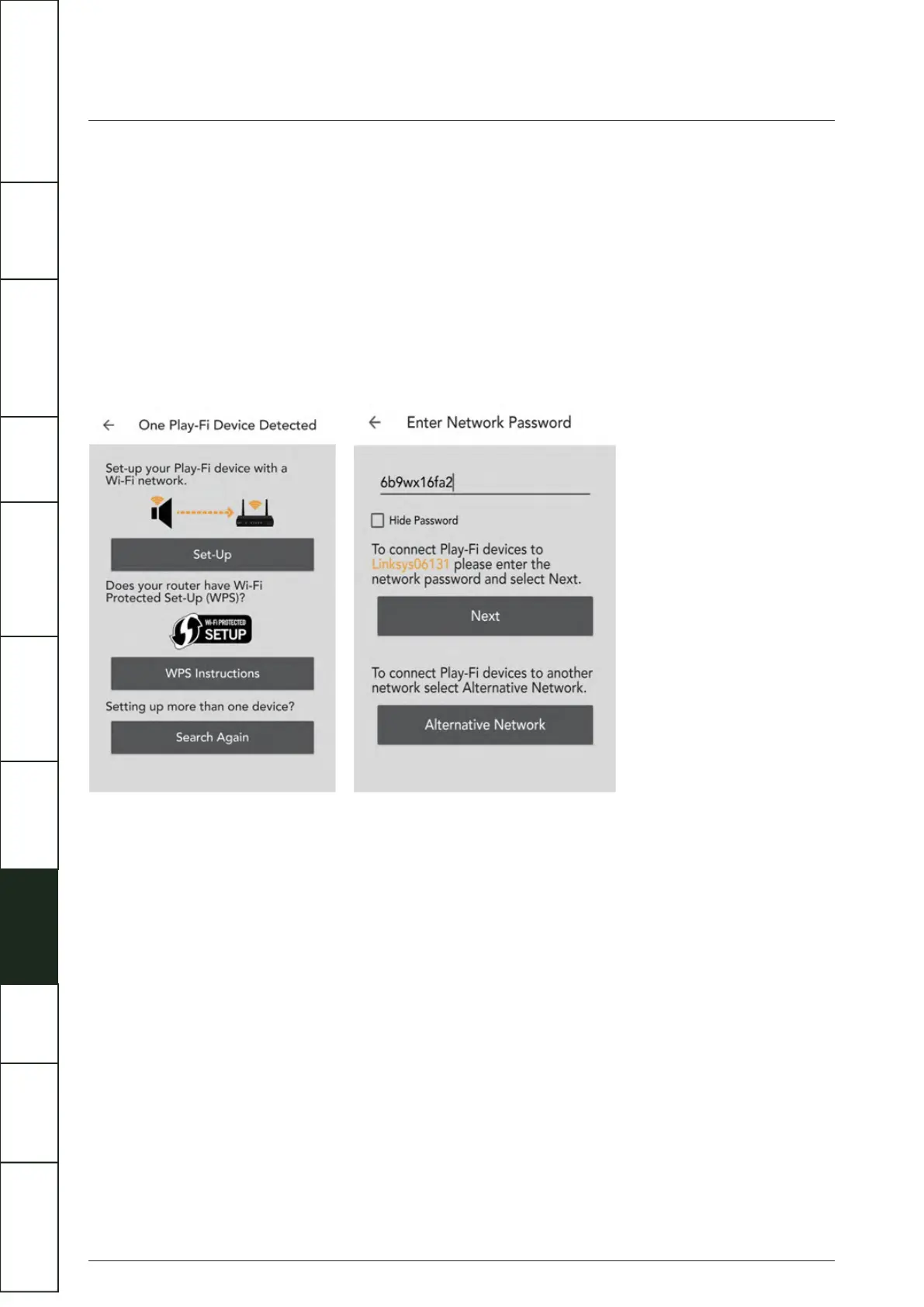
For Android users:
(1) Open the DTS Play-Fi APP, then click the 'Set-up your Play-Fi device' button.
(2) When it has found the Artera Solus Play click the 'Set-Up'. Next input the Wi-Fi password for your wireless network. Then click
(2)the 'Next' button.
(3) During installation the APP will find and update the Artera Solus Play Play-Fi settings to the latest version, this may take a few
(2)minutes.
(4) After completing the network set-up and update, you can set a name for your Artera Solus Play device and begin enjoying the
(4) wireless streaming functionality.
WI-FI CONNECTION USING THE APP
IMPORTANT
SAFETY INFORMATION
REMOTE
HANDSET
CONTROLS AND
FUNCTIONS
CONNECTIONS
SYSTEM
OPERATIONS
DTS PLAY-FI
®
WIRELESS...
MENU
OPTIONS
SPECIFICATIONS CONTENTSINTRODUCTION
WARRANTY
COVERAGE



 To Next Page