Description of the operating surface
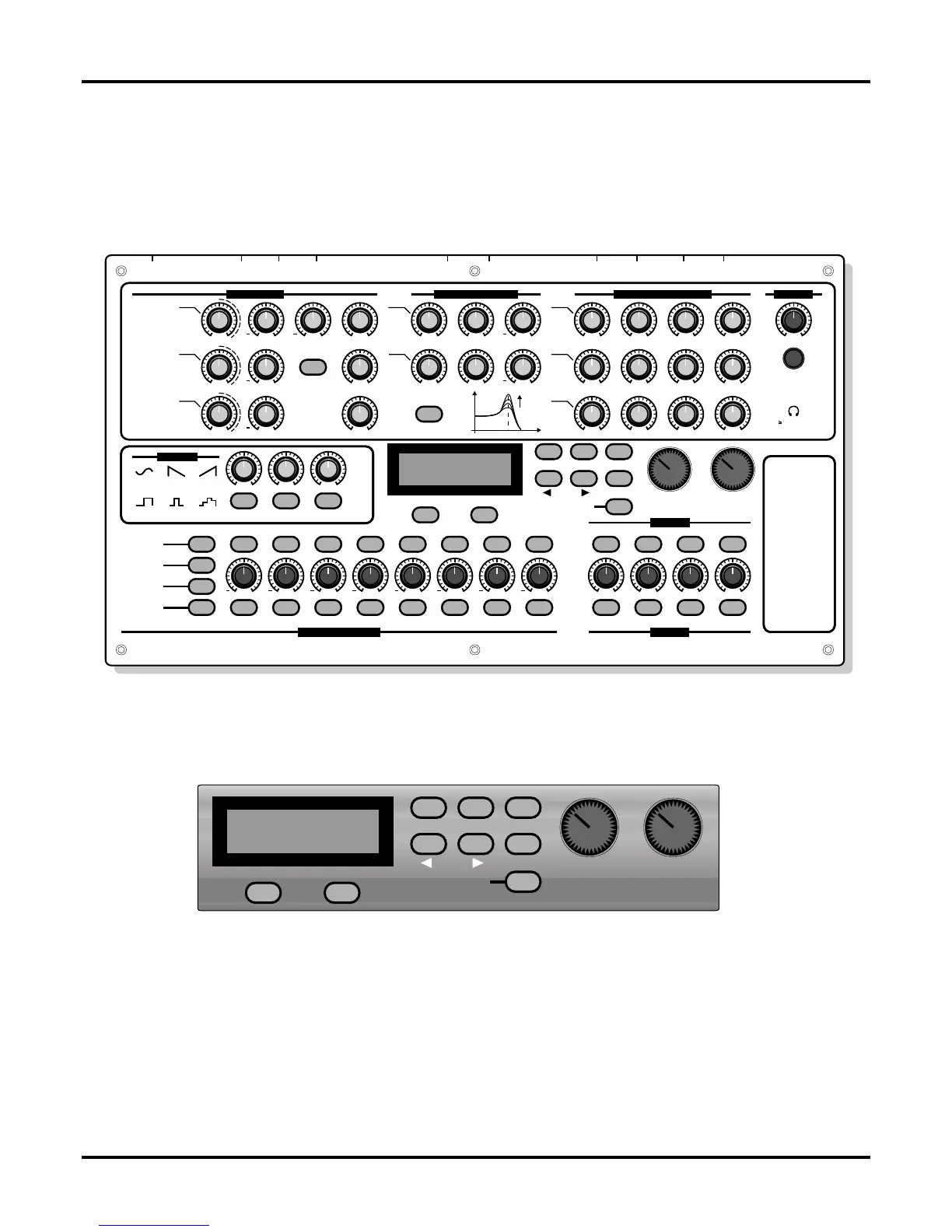
On the illustration below you see the operator controls of the POLYMORPH. This diagram in
conjunction with the explanations will clarify 80% of the operation of the POLYMORPH.
In this chapter you'll find the answers to most of your questions.
An overview of the operating elements
The functions of the controls and buttons
DISPLAY AREA
On the right and directly beneath the display you will find more buttons and dials, whose functions
are dependant upon the respective menu.
[F1] AND [F2] SOFTKEYS
These buttons are found directly below the display. Their present function is shown in brackets in
the display. If a parameter value is displayed above [F2], it can be set to a standard value by
pressing [F2].
[EDIT] - CALLING UP THE EDIT MENU
With this button you can go into different menus for extensive editing of the sounds, sequences,
effects etc. There you find all of the parameters of the operating surface and many more.
12
Basics
32 OHM
++
+
+
+ + + + + + + +
+
+
P
W
PW
PW
EXPANSION-SLOTS
SEE BOTTOM-PLATE
QUASIMIDI POLYMORPH
RESONANCE-FILTERS ENVELOPE-GENERATORS
OUTPUT
MODE
ANALOG-EMULATION-SYNTHESIS BY QUASIMIDI
POWER
ON / OFF
INMIDI: OUT-1OUT OUT-2 AUDIOTHRU OUT-3 IN-1OUT-4 IN-2
PAG E
WAVE-1
WAVE-2
WAVE-3
LFO-WAVE
VALUE VALUE VALUE VALUE VALUE VALUE VALUE VALUE MIX-VOL-1 MIX-VOL-2 MIX-VOL-3 MIX-VOL-4
PWM
SQR
SIN
TRL
SWD
RND
SWU
PITCH
STEP-MUTE
STEP-HOLD
CYCLE-
LENGTH
SEQUENCE-
SELECT
1 2 3 4 5 6 7 8 SEL-1 SEL-2 SEL-3 SEL-4
LINE-1 LINE-2 LINE-3 FORWARDNOTE-FWD BACKWARD RANDOM
UNISON ROTATE MULTI STACK
VCO-FM VCF-MOD
F1 F2
LFO-RATE LFO-DEPTH
TUNE ENV-MOD
TUNE SYNC
TUNE
LEVEL-1 CUTOFF RESONANCE ENV-MOD ATTACK
ATTAC K
ATTAC K
EDIT
COMPARE
WRITE
EXIT
START/STOP
VALUE-TEMPO SOUND
DECAY
DECAY
DECAY
SUSTAIN
SUSTAIN
SUSTAIN
RELEASE
RELEASE
RELEASE
ENV-MODRESONANCECUTOFFLEVEL-2
LEVEL-3 LP 24 dB
VOLUME
PHONES
OSCILLATOR-1
HIGH-
PA SS
HP-ENV
LP-ENV
VCA-ENV
LOW-
PA SS
OSCILLATOR-2
OSCILLATOR-3
OR EXTERNAL
INPUTS
dB
RESO.
CUTOFF-FREQ.
Space-Distortion 1
Space-Distortion 2
Bright-Distortion 1
Bright-Distortion 2
EQ-Pan-Delay
Super-Chorus
Super-Flanger
Multitap-Delay
MULTI-EFFECT-
ALGORITHMS
OSCILLATORS
RESONANCE-FILTERS ENVELOPE-GENERATORS
OUTPUT
MODE
LFO 1-3
OSCILLATORS
MIXER
MORPH-SEQUENCER


 To Next Page