not only are the relevant channel faders muted, but also any aux sends, effects sends, direct outs,
inserts, or bus routing switches on these channels as they too can pass the dangerous noises on
from that channel's input to their destinations.
Pressing the [START/STOP] button on the POLYMORPH will begin a drum pattern, which you can
use as a test signal. Start with the <MAIN VOLUME> knob low and gradually bring it up to a
reasonable level.
If your mixer has a gain pot, start at the lowest setting, bring the faders up to unity and gradually
increase the gain pot until you get a healthy signal level, checking that it is not distorting anywhere
along the signal path. If you have a mixer with a Line/Phono input switch, such as many DJ
turntable mixing desks, then select the Line input. (The phono input is for low level turntable
cartridges only and will be severely overloaded by the high level output of the POLYMORPH.)
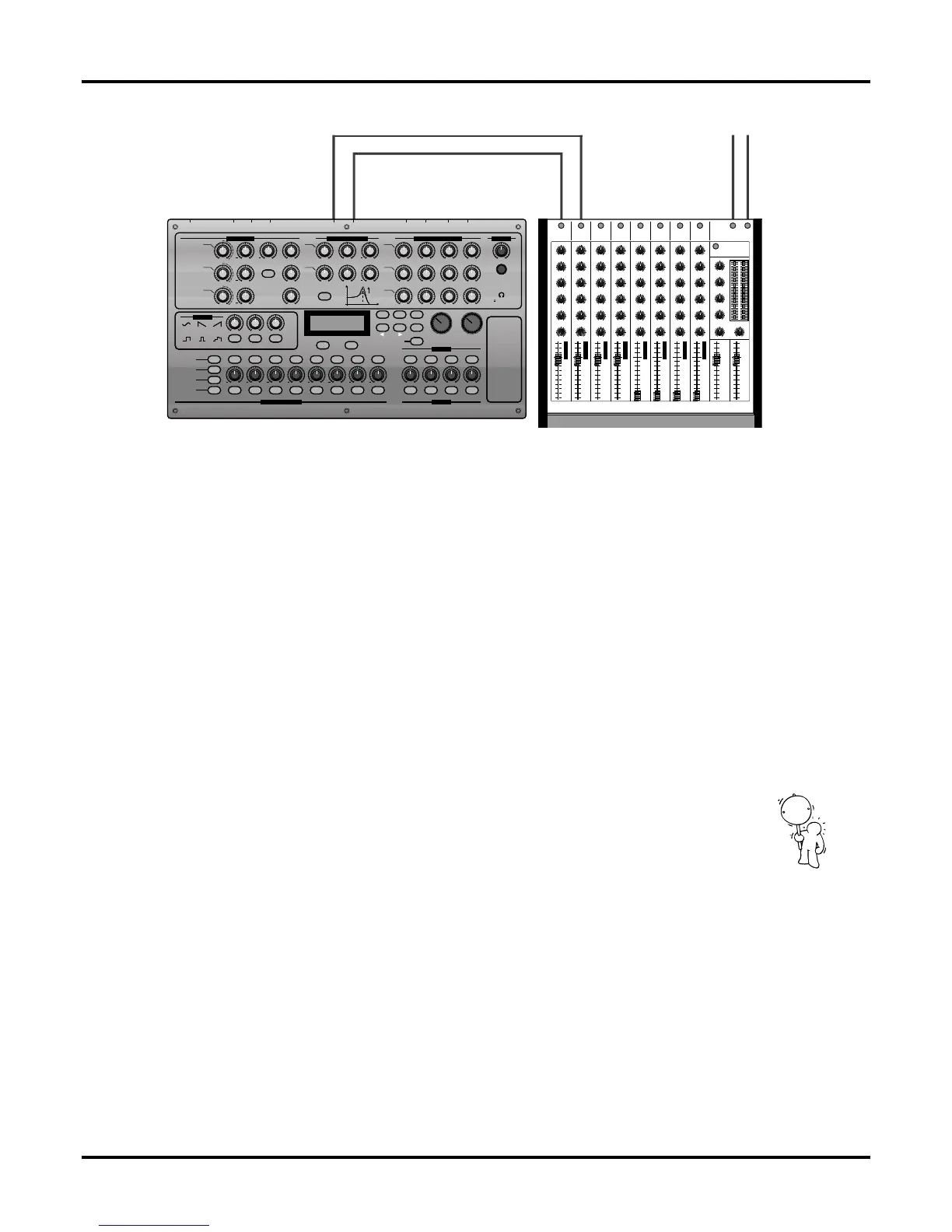
If you have stereo inputs on your mixer, the left/right balance knob should be set to the centre
position. If you use two separate input channels, then the panpot for POLYMORPH channel 1
should be panned to the left and POLYMORPH channel 2 should be panned to the right.
Connecting the POLYMORPH to a hi-fi system or portable stereo etc.
From the point of view of connections, the POLYMORPH can be treated as if it were another CD
player. Its output will be a similarly high line level and require a similar high impedance audio
input stage such as any labelled LINE, AUX, TAPE, CD, DAT which usually have RCA/phono plugs
and hence will fit the cables supplied by QUASIMIDI with your POLYMORPH. However, you
should never use the record player / MC / MM / PHONO input because the high level output of
the POLYMORPH will overload it.
(If the only available input is something else such as a 5-pin DIN plug, or two XLR inputs then you
will need to purchase the appropriate adaptor or cable for your application.)
Make sure that the volumes are turned fully off before plugging in and powering up, preferably the
hi-fi amplifier should be the last component to switch on, and the first to switch off. Press the
[START/STOP] button on the POLYMORPH to begin a drum pattern to listen to, and starting with
the volumes at low levels, gradually increase them to a comfortable level. If your portable stereo
has a "Loudness" button or some kind of "Hyper / Mega Bass Boost" button it is probably best to
turn it off at first unless you are listening at low volumes because the POLYMORPH has resonant
filters that can tune down to very low / subsonic frequencies that may easily distort with these
processes applied, and this could damage your speakers etc
.
9
Basics
A
U
D
I
O
-
1
R
I
G
H
T
A
U
D
I
O
-
2
L
E
F
T
A
mplifier
I
N
I
N
I
N
I
N
I
N
I
N
I
N
I
N
LR
AUX-SEND
MAIN-OUT
1234
5 6 7 8
LR
MIX
3
2OHM
++
+
+
+ + + + + + + +
+
+
P
W
PW
PW
E
XPANSION-SLOTS
SEE BOTTOM-PLATE
QUASIMIDI POLYMORPH
RESONANCE-FILTERS ENVELOPE-GENERATORS
OUTPUT
MODE
A
NALOG-EMULATION-SYNTHESIS BY QUASIMIDI
P
OWER
ON / OFF
INMIDI: OUT-1OUT OUT-2 AUDIOTHRU OUT-3 IN-1OUT-4 IN-2
PAG E
W
AVE-1
WAVE-2
WAVE-3
LFO-WAVE
VALUE VALUE VALUE VALUE VALUE VALUE VALUE VALUE MIX-VOL-1 MIX-VOL-2 MIX-VOL-3 MIX-VOL-4
PWM
SQR
SIN
TRL
SWD
RND
SWU
PITCH
STEP-MUTE
STEP-HOLD
CYCLE-
LENGTH
SEQUENCE-
SELECT
1 2 3 4 5 6 7 8 SEL-1 SEL-2 SEL-3 SEL-4
LINE-1 LINE-2 LINE-3 FORWARDNOTE-FWD BACKWARD RANDOM
UNISON ROTATE MULTI STACK
VCO-FM VCF- MOD
F1 F2
LFO-RATE LFO-DEPTH
TUNE ENV-MOD
TUNE SYNC
TUNE
LEVEL-1 CUTOFF RESONANCE ENV-MOD ATTACK
ATTA CK
ATTA CK
EDIT
COMPARE
WRITE
EXIT
START/STOP
VALUE-TEMPO SOUND
DECAY
DECAY
DECAY
SUSTAIN
SUSTAIN
SUSTAIN
RELEASE
RELEASE
RELEASE
ENV-MODRESONANCECUTOFFLEVEL-2
LEVEL-3 LP 24 dB
VOLU ME
PHONES
O
SCILLATOR-1
HIGH-
PAS S
HP-ENV
LP-ENV
VCA-ENV
LOW-
PAS S
OSCILLATOR-2
OSCILLATOR-3
OR EXTERNAL
INPUTS
d
B
RESO.
CUTOFF-FREQ.
S
pace-Distortion 1
Space-Distortion 2
Bright-Distortion 1
Bright-Distortion 2
EQ-Pan-Delay
Super-Chorus
Super-Flanger
Multitap-Delay
MULTI-EFFECT-
ALGORITHMS
OSCILLATORS
RESONANCE-FILTERS ENVELOPE-GENERATORS
OUTPUT
MODE
LFO 1-3
O
SCILLATORS
MIXER
MORPH-SEQUENCER


 To Next Page