P1520 User Guide
Version 1.2 32 04/02/07
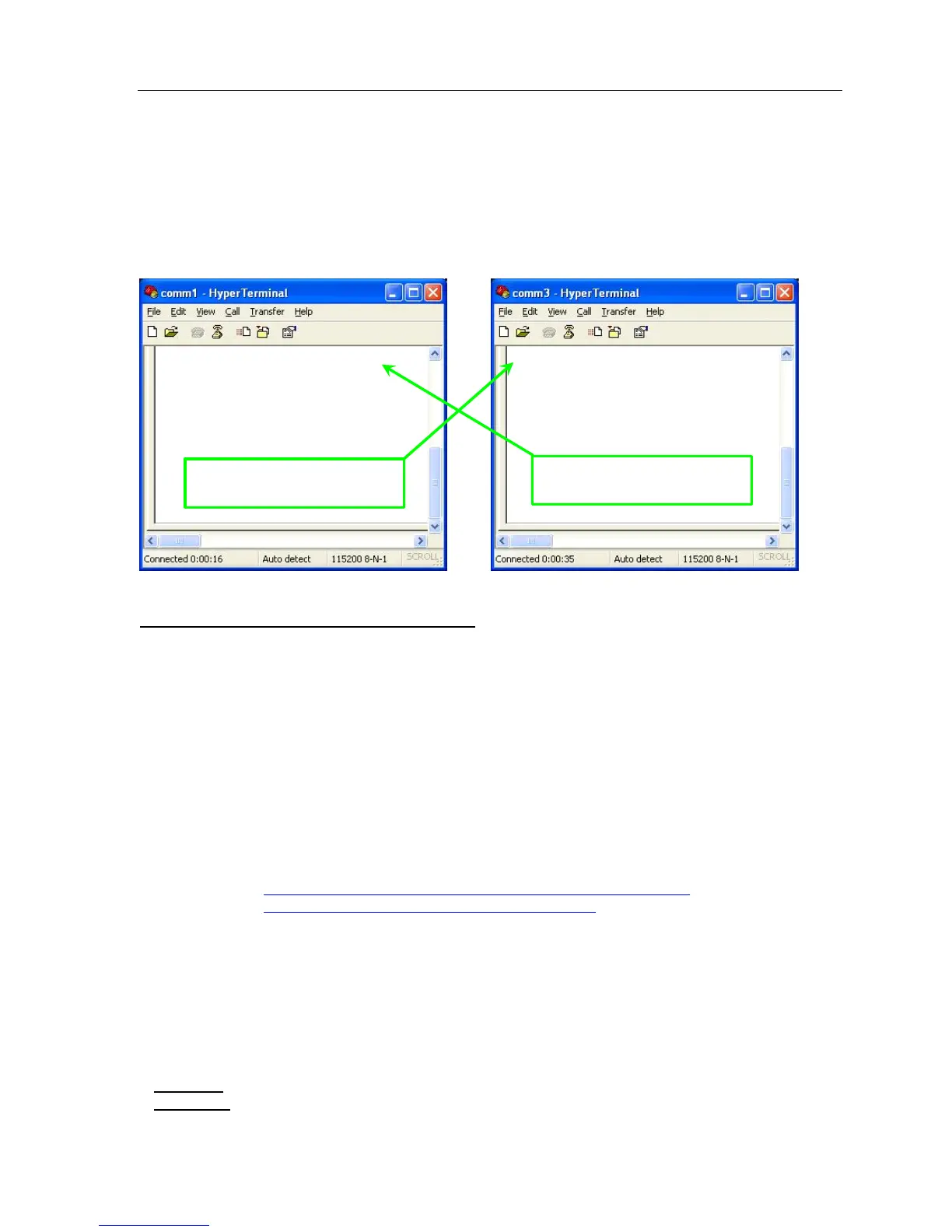
c. Make hyperterminal the default telnet program.
d. Specify any area code you wish – the program insists on having this information.
e. Just hit OK on prompt to select a location…use ‘My Location.’
f. If prompted to install a modem, click ‘No.’
g. Enter a connection name – ‘COM’ is restricted but ‘Comm1’ ‘Comm2’ etc are not.
h. Set equal bits per second, etc. Make sure you use the same ‘Flow Control’ on each – ‘None’
might be the best choice.
Capacitive Touch Screen Troubleshooting
Purpose
This outlines basic troubleshooting steps for Radiant Systems Point-of-Sale equipment using 3M Capacitive
touch screens and controllers. The driver package selected in this document covers all possible combinations
of deployed 3M Touch Controllers and Touch Glass.
The driver package covered in this document is the following:
3M Version 5.64SR4 with RUNME.bat script (5.64_SR4.zip)
Radiant custom un-install/install script RUNME.bat version 1.3
3M USBrestore.exe version 1.0
Rads3MFixOrientation.exe version 1.0
Driver Location on Point-of-Sale
C:\Drivers\3M 5.64_SR4
C:\Drivers\3M Touch\3M 5.64_SR4
Download Location
http://www.radiantsystems.com/downloads/drivers/all/5.64_SR4.zip
http://www.radiantsystems.com/hardware/drivers.asp
Recommendations
Radiant Systems recommends downloading 5.64_SR4.zip and running RUNME.bat v.1.3 for remedy the
following symptoms:
“Shaky” or “Ghostly” touch
Inverted touch
Drifting touch
Troubleshooting
Symptom:
Inverted Touch, Inaccurate Touch
Resolution:
Try calibrating the touch screen
Type here – Should show
up on other COM port
Type here – Should show
up on other COM port
COM 1
COM 3
This is a COM3 test
!@#$%^&*()_+
This is a COM1 test
!@#$%^&*()_+


 To Next Page