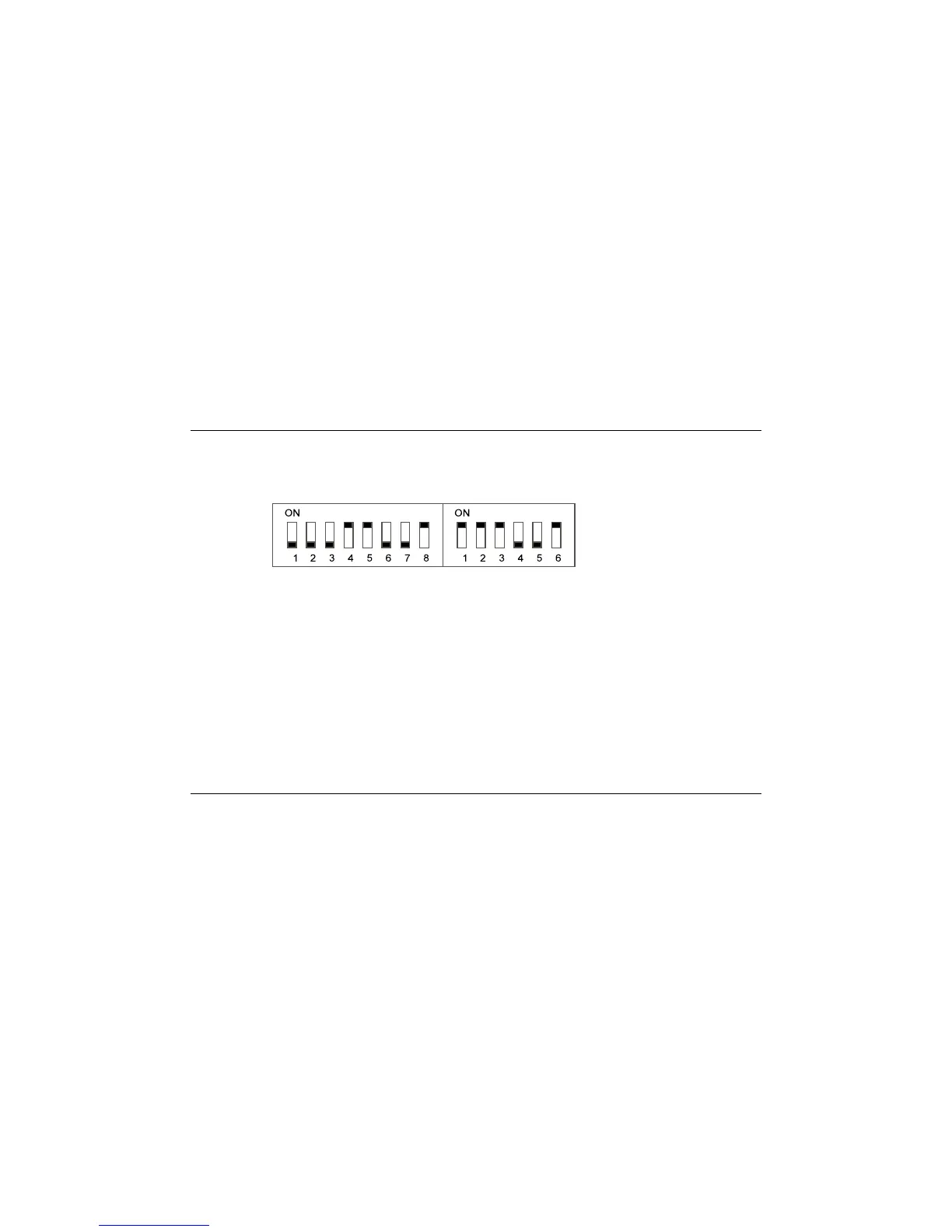
9.2 PRINTER SET-UP SEIKO DPU 411-21B
The DIP switch on the printer must be set as shown below.
Connectthe interfacecable suppliedwith the printerbetween the printer and the RS232port.
Obtain the required display on the screen, either a live trace, a recalled memory trace, or an
L & M or L – M trace.
Depress the RS232 key and select menu option 1 “PRINTER”. The display will then display
“PRINTING” as the data is transferred to the printer.
9.3 PC TRANSFER
A PC software kit, X600 TRACEability™ is available. This enables a cable database to be
established. Data from all memories can be transmitted to, and received from, a PC. See the
manual supplied with the software for full instructions.
Radiodetection Ltd. 00901209-6
T631 OPERATING MANUAL 42







 To Next Page