EasyManua.ls Logo

Rain Bird HP 8 - Programming and Operating Instructions; Initial Setup: Time and Day Cycle

Rain Bird HP 8
24 pages
Print Icon
To Next Page IconTo Next Page
To Previous Page IconTo Previous Page
Loading...
Before
Programming:
Make
sure
the
controller
is
hooked
up
to
117
Volt
AC
power
and
a
rechargeable,
NiCad
battery
has
been
installed.
HP
SERIES
CONTROLLER
OPERATING
INSTRUCTIONS
Step
1.
SET
CURRENT
TIME
by
pressing
the
“Hr./Min.”
button
and
then
the
arrow
button
to
set
the
hour.
Then
press
the
"Hr
Min."
button
again
and
then
the
arrow
button
to
set
the
minute
in
the
display.
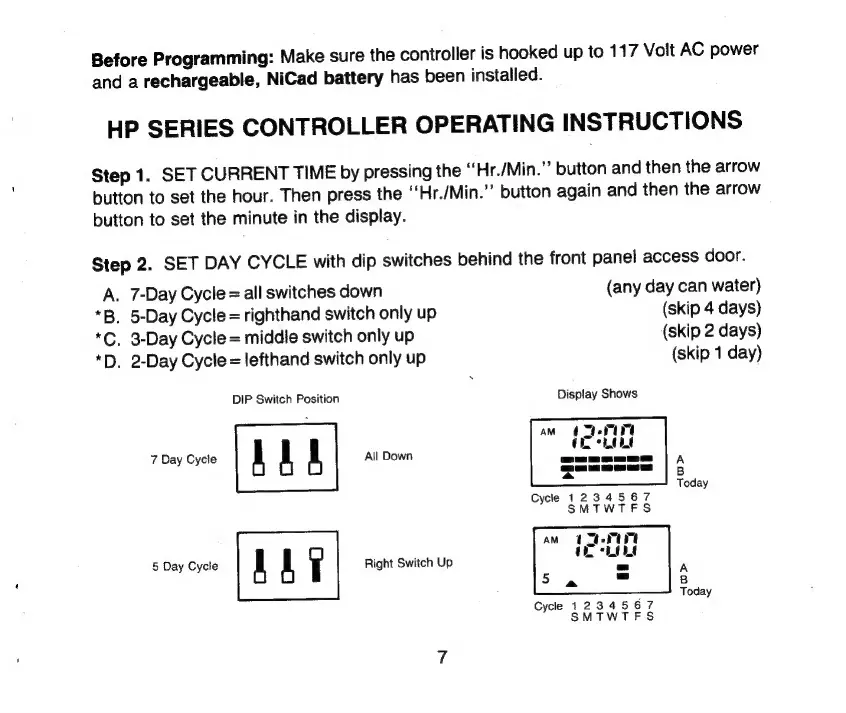
Step
2.
SET
DAY
CYCLE
with
dip
switches
behind
the
front
panel
access
door.
A.
7-Day
Cycle
=
all
switches
down
(any
day
can
water)
*B.
5-Day
Cycle
=
righthand
switch
only
up
(skip
4
days)
*C.
3-Day
Cycle
=
middle
switch
only
up
(skip
2
days)
*D.
2-Day
Cycle
=
lefthand
switch
only
up
(skip
1
day)
DIP
Switch
Position
Display
Shows
aw
(TCI
IL
Hu
7
Day
Cycle
A1)
All
Down
5
Day
Cycle
AAT
Right
Switch
Up

Related product manuals