13
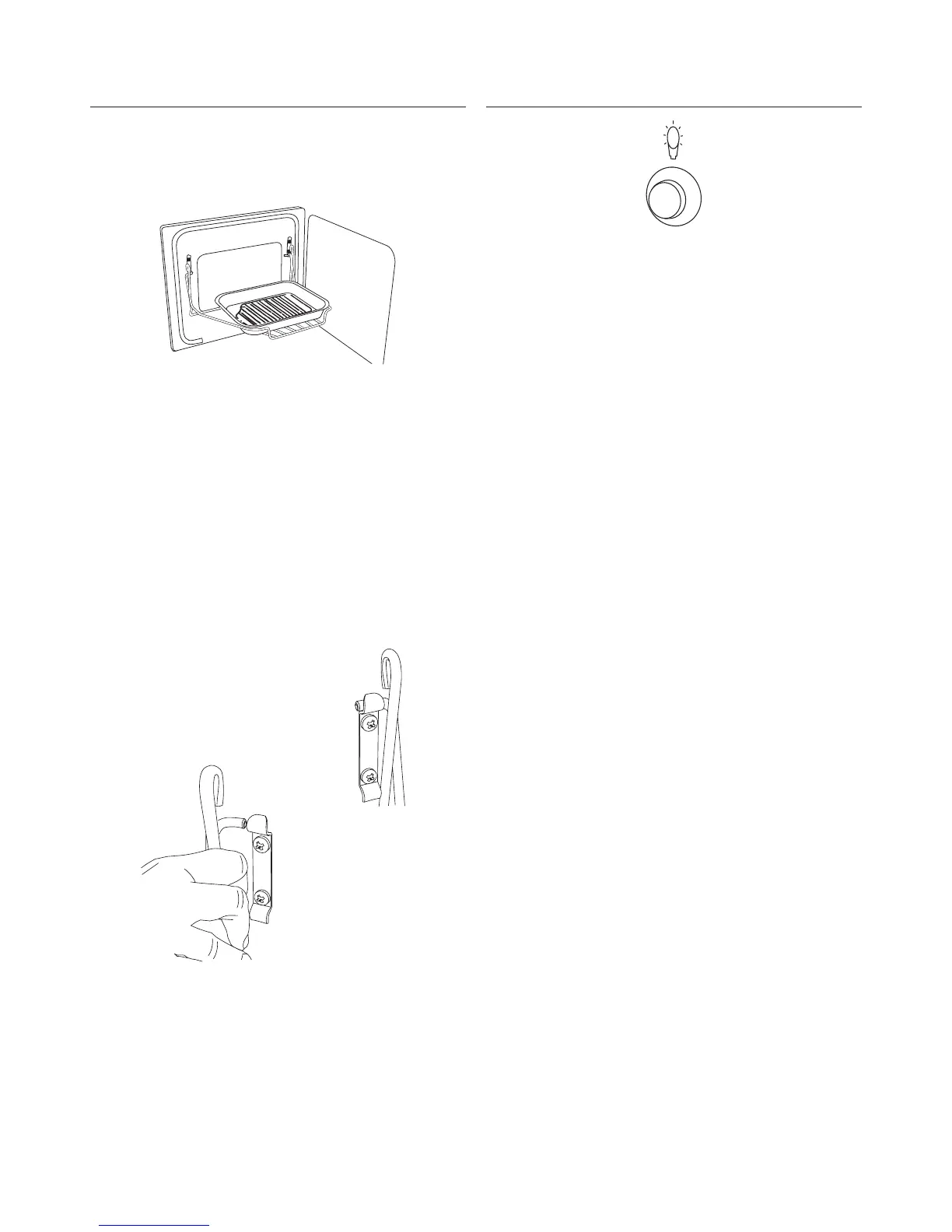
The Handyrack
The maximum weight that can be held by the
Handyrack is 5.5kg (12lb). It should only be used with
the supplied meat tin, which is designed to fit the
Handyrack. Any other vessel could be unstable.
The Handyrack fits to the left hand oven door only.
Food cooking on it is easy to attend to, because it’s
accessible when the door is open. It can be fitted at
two different heights. One of the oven shelves must
be removed and the other positioned to suit.
When the Handyrack is used in its highest position,
other dishes can be cooked on the bottom shelf
position of the oven.
When the Handyrack is used in its lowest position,
other dishes can be cooked on the second shelf
position of the oven.
To fit the Handyrack,
locate one side of it
on the door bracket.
Then spring the
other side out to
clip it onto the
other bracket.
Oven light
Press the button to turn on the oven lights.
If one of the oven lights fail, turn off the power
supply before you change the bulb. See the
‘Troubleshooting’ section for details on how to
change an oven light bulb.



 To Next Page