Checkingcameraarrangement
Images from right and left cameras can be mismatched or flipped. Use the buttons
present on this step to arrange them correctly.
Ifthissetupwizardstepisnotneededaftercompletion,itcanbeturnedoffby checking
the Don't show thisstepanymorebox.Itcanbebroughtbackbychecking the Show the
camera arrangementstepinsetupwizardboxlocatedin Settings→ Software → Cameras
menu.
Findingaworkingdistance
Thescannerhasownworkingdistance(distancetotheobject)foreach scanning area.
When youconfigureyourscanner,thisdistanceis determined bycalibrationplate.
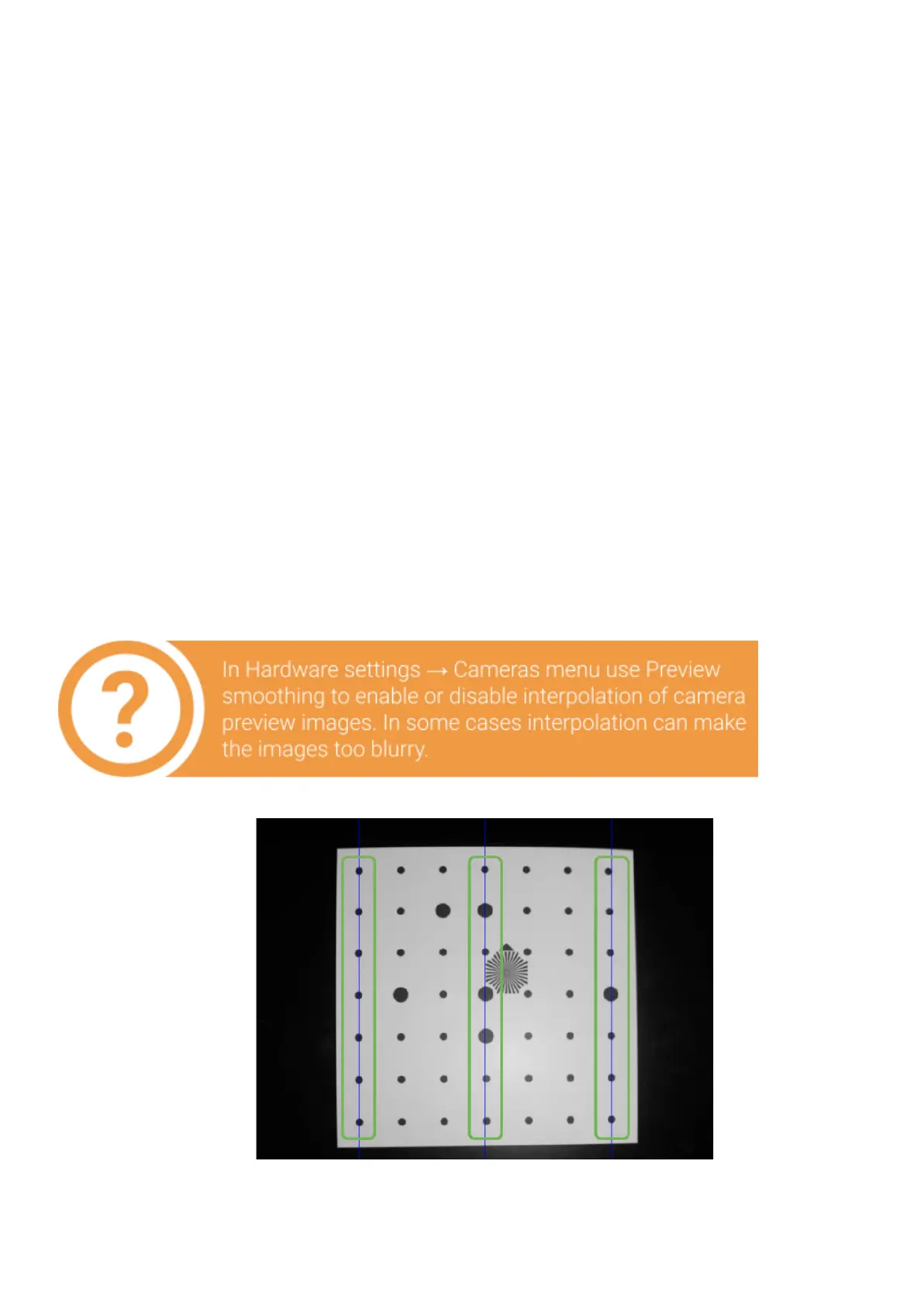
Tofindaworkingdistanceplacethecalibrationplateinfrontofoneof the cameras. By
moving thefieldclosertoorfurtherawayfromthecamera, align the far markers of
calibration platewithbluelinesonthecameraview,as shown in the figure below. Blue
vertical lines inthecameraviewmustmatchthemarks onthecalibrationplate.


 To Next Page