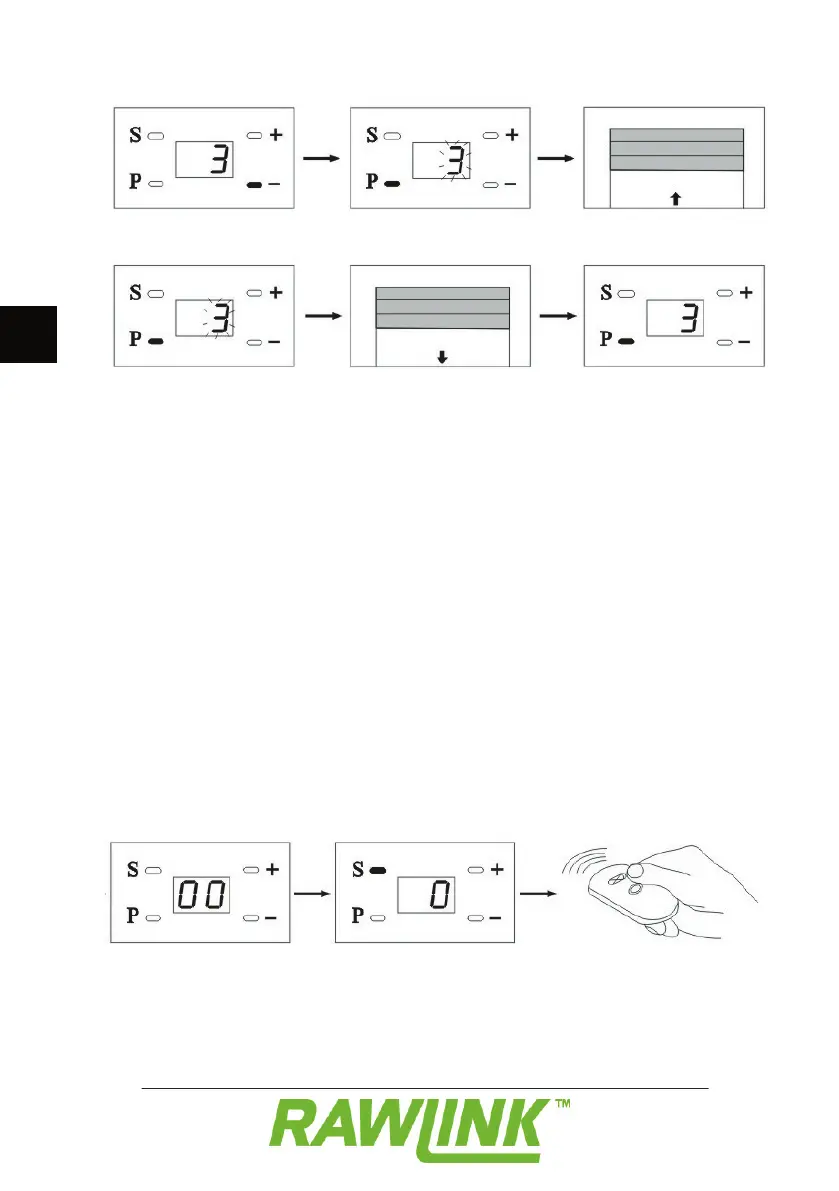
Press the – button. “3” appears on the
display to indicate that you are in menu 3.
Press the P button. “3” fl ashes on the display.
The door goes up automatically.
Press the P button twice.
Press the P button to save the setting.
Press the + button to select menu 1. Then
hold the P button down until “0” circles in
the display, to save your settings.
Programming of the door opener is now
complete. Menus 4-8 are pre-programmed
at the factory, but can be changed if
If you need to increase or reduce the
resistance tolerance (e.g. in cold weather):
- Hold down both buttons on the remote
control until the light on the door opener
The garage door automatically runs a full
circle of opening and closing the door.
After this the door opener will have
automatically registered the door’s actual
Manual registering: Press the S button.
Press the large button at the top of the
The remote control is now registered.
Do the same with the last two remote
NOTE! The remote control is already
registered to the garage door opener on


 To Next Page