EasyManua.ls Logo

Raymarine a75 - User Manual

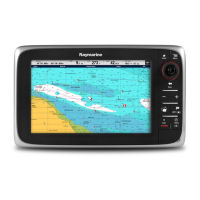
Raymarine a75
388 pages
Print Icon
To Next Page IconTo Next Page
Loading...
LightHouse™
OPERATION
INSTRUCTIONS
Release 15
English
© 2015 Raymarine UK Limited
Date: 09-2015
Document number: 81360-2-EN

Table of Contents

Questions and Answers

  • H
    Henry KempSep 2, 2025
    Why isn't the touchscreen working on my Raymarine a75 Marine Equipment?
    • M
      Meredith JacksonSep 2, 2025
      If the touchscreen on your Raymarine Marine Equipment does not operate as expected, ensure that the touch lock is disabled. The touch lock can be turned off on the home screen using the Joystick. Also, make sure you are operating the screen with bare fingers, as gloves may prevent correct operation. Calibrate the touchscreen using the setup menus. If there are saltwater deposits on the screen, carefully clean and dry the screen according to the provided instructions.
  • A
    Anthony JenkinsSep 12, 2025
    How do I get the Raymarine app on my device for Marine Equipment?
    • J
      Jeremy AshleySep 12, 2025
      If there is no Raymarine app on your device, it may not be installed and running. Download the required Raymarine app from the relevant application store and start the Raymarine app on your device.
  • B
    bleeAug 31, 2025
    Why is instrument data missing from all Raymarine Marine Equipment displays?
    • A
      Anita BartonAug 31, 2025
      If instrument, engine, or other system data is unavailable at all displays on your Raymarine Marine Equipment, check the data bus (e.g., SeaTalkng) wiring and connections to ensure data is being received at the display. Verify the overall integrity of the data bus (e.g., SeaTalkng) wiring. Check the source of the missing data (e.g., ST70 instrument or engine interface) to ensure it is operating. Also, check the power to the SeaTalk bus. If a software mismatch between equipment is suspected, contact Raymarine technical support.
  • E
    Elijah MaldonadoSep 15, 2025
    Why does the image freeze momentarily on my Raymarine Marine Equipment?
    • R
      Ray MillerSep 15, 2025
      If you experience a momentary freeze in the image on your Raymarine Marine Equipment, it is due to FFC (Flat Field Correction). The image will pause momentarily on a periodic basis during the Flat Field Correction (FFC) cycle.
  • S
    stephen30Sep 14, 2025
    Why aren't my waypoints syncing with Navionics on Raymarine a75?
    • F
      Frank GallegosSep 14, 2025
      If there is no waypoint/routes synchronization with the Navionics Marine app on your Raymarine Marine Equipment, the smartphone/tablet may not have the “Navionics Marine” app installed and running. Download the “Navionics Marine” app from the relevant app store and start the app on the device.
  • D
    davidlawsonSep 23, 2025
    What to do if Raymarine Marine GPS System won't boot up?
    • T
      Tina TylerSep 23, 2025
      If your Raymarine Marine GPS System product will not boot up or is in a re-boot loop, first refer to the solutions for 'Product does not turn on or keeps turning off'. If the issue persists, it could be due to software corruption. Try re-flashing the latest software from the Raymarine website. As a last resort, on display products, you can try to perform a ‘Power on Reset’; however, this will delete all settings/presets and user data (such as waypoints and tracks) and revert the unit back to factory defaults.
  • L
    Lauren PerryNov 24, 2025
    Why are data readings on my Raymarine a75 Marine Equipment problematic?
    • M
      Michael DavisNov 24, 2025
      If you are experiencing problematic data readings on your Raymarine Marine Equipment, check the sonar presets, gain, and frequency settings, as they may be inappropriate for the present conditions. Verify the voltage from the power supply, as a low voltage can affect the transmitting power of the unit. Ensure that the power, transducer, and all other cables to the unit are properly connected and free from damage. Check that the transducer is mounted correctly and is clean. If you have a transom mount transducer, check that the transducer hasn't kicked-up due to hitting an object. Adjust the scroll speed. Note that fish arches are not displayed if the vessel is stationary; fish will appear as straight lines. Turbulence around the transducer due to high vessel speed may also be confusing the...
  • T
    tammyhaleAug 27, 2025
    What to do if my Raymarine Monitor will not boot up (re-boot loop)?
    • C
      Catherine WangAug 27, 2025
      If your Raymarine Monitor will not boot up, it could be due to the power supply and connection issues. Also, in the unlikely event that the product's software has become corrupted, please try re-flashing the latest software from the Raymarine website. On display products, as a last resort, you can try to perform a ‘Power on Reset’; however, this will delete all settings/presets and user data and revert the unit back to factory defaults.
  • J
    Joseph LawsonAug 27, 2025
    What to do if my Raymarine Monitor displays a “No Fix” GPS status icon?
    • R
      Robert MaciasAug 27, 2025
      If your Raymarine Monitor displays a 'No Fix' GPS status icon, it could be due to your geographic location or prevailing conditions preventing a satellite fix (check periodically in better conditions or another location), a GPS connection fault (ensure external GPS connections and cabling are correct), or an external GPS antenna in a poor position (ensure the GPS antenna has a clear view of the sky).
  • J
    johnwilliamsAug 26, 2025
    Why does my Raymarine Monitor not turn on or keep turning off?
    • Z
      ztaylorAug 26, 2025
      Your Raymarine Monitor might not be turning on or keeps turning off due to several reasons: a blown fuse or tripped breaker (check and replace if necessary, and inspect for cable damage if fuses repeatedly blow), a poor or damaged power supply cable or connections (ensure the cable is fully inserted and locked, check for damage or corrosion, and flex the cable to check for reboots), incorrect power connection (ensure the installation instructions have been followed), or an insufficient power source (check the power supply voltage under load).

Raymarine a75 Specifications

General IconGeneral
BrandRaymarine
Modela75
CategoryMarine Equipment
LanguageEnglish

Related product manuals