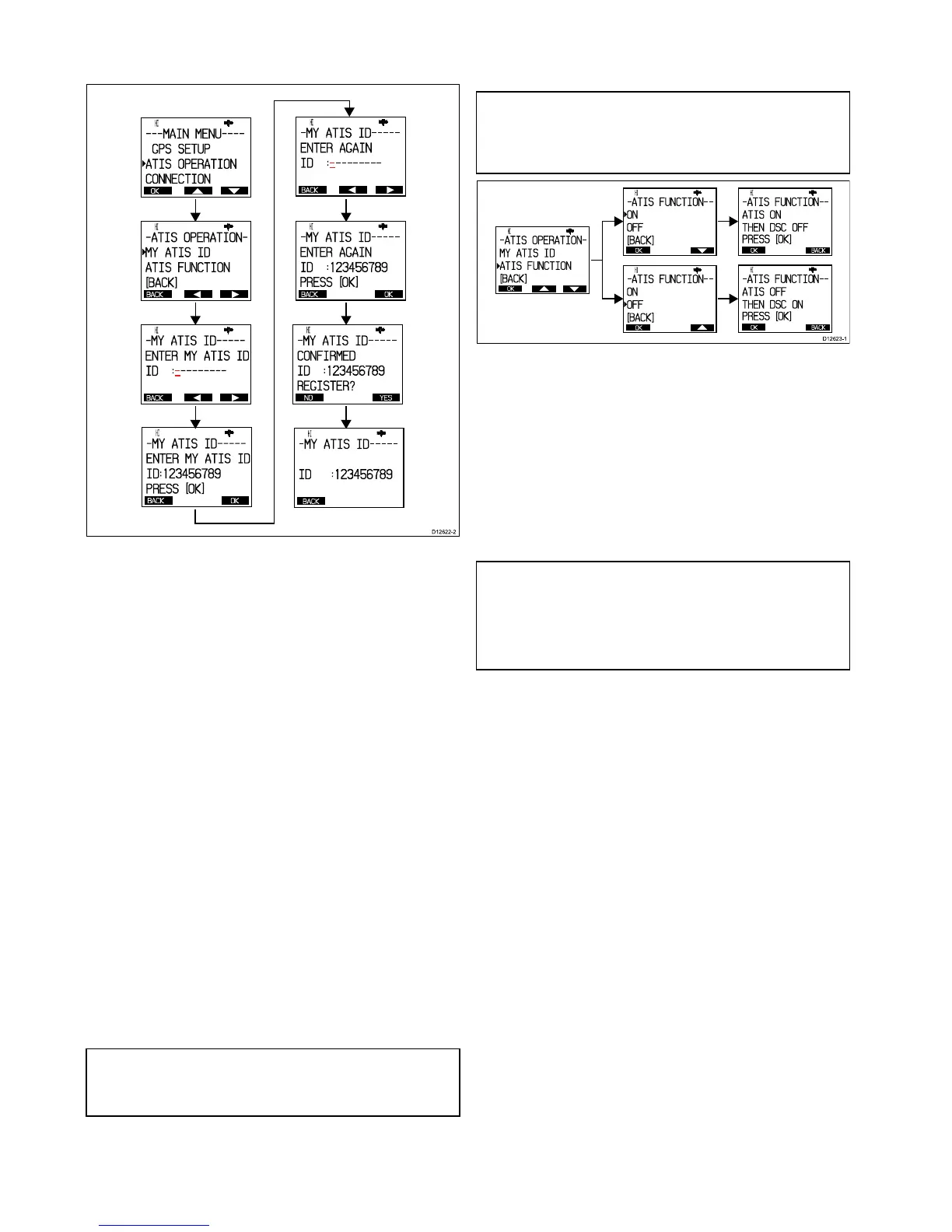
1.PressandreleasetheMENU/DSCbuttontodisplaythe
mainmenu.
2.SelectATISOPERATIONfromthemainmenuoptions.
•IfNOATISIDCONTACTDEALERisdisplayedon-screen
thenyoumustcontactyourlocalRaymarinedealerand
requestthemtoinputtheATISIDforyou.
•IfENTERMYATISIDisdisplayedthenyoucanmanually
enteryourATISID.AllATISIDsbeginwitha9,thisisset
automaticallyandnotshownonthedisplay.
3.UsetheChannelUpandDownbuttonstocyclethrough
availablenumbers.
4.SelectOktomovetothenextcharacter.
5.Repeatsteps3and4aboveuntilthefullATISIDisdisplayed
on-screen.
6.YoucanalsousetheRightarrowandLeftarrowsoft
buttonstochangewhichcharacterishighlighted.
7.WhennishedselectOktoconrmtheATISID.
YouwillberequestedconrmtheATISIDbyrepeatingthe
entry.
8.WithENTERAGAINdisplayedon-screenfollowsteps3to6
abovetoentertheATISIDagain.
9.SelectOktoconrm.
10.IfNOTCONFIRMEDisdisplayedthenselectBackandrepeat
steps2to9above.
11.IfCONFIRMEDisdisplayedthenselectYestoconrmand
registertheATISID.
ThesavedATISIDisdisplayedon-screen(e.g.ID:
123456789).
12.SelectBacktogobacktotheATISOperationmenu.
Note:YoucanonlyentertheATISIDnumberonce,ifyou
havestoredanincorrectATISIDnumberinyourproduct,the
productwillhavetoberesetbyanauthorizedRaymarine
dealer.
Enabling/DisablingtheATISfunction
WiththeATISIDprogrammedyoucannowenableordisable
theATISfunctionasrequiredbyfollowingthestepsbelow.
Note:IfyourradiohasbeenconguredtouseMarcom-C
modethenATISwillbepermanentlyenabledandyouwillnot
beabletodisableATISoperation.Marcom-Cmodeissetby
thedealeratpointofsale.Ifyouwishtoenableordisable
Marcom-C,pleasecontactyourRaymarinedealer.
FromtheATISoperationmenu:
1.SelectATISFunction.
2.SelectONtoenabletheATISfunction,or
ThemessageATISONTHENDSCOFFisdisplayed
on-screentowarnthatwhenATISisenabledthenDSC
functionsarenotavailable.
3.SelectOFFtodisabletheATISfunction.
ThemessageATISOFFTHENDSCONisdisplayed
on-screentowarnthatwhenATISisdisabledthenDSC
functionsareavailableagain.
IfnoATISIDhasbeenprogrammedthenthemessagePLEASE
INPUTATISIDFIRSTisdisplayed.
Note:WiththeATISfunctionenabledthefollowingfunctions
willbedisabled:
•DSCfunctions.
•Scanfunctions.
•Multiplewatchfunctions.
36
Ray260



 To Next Page
 Loading...




