8.7AutomaticTransmitter
IdenticationSystem(ATIS)and
Marcom-Cmode
ATISisaEuropeansystemusedonsomeinlandwaterways.
VHFradiosoperatinginanATISregionmustbeprogrammed
withauniqueATISnumber;thiscanbeobtainedfromthe
relevantlicensingauthority.TheATISnumberisattachedasa
digitalsignalattheendofeachtransmissionandidentiesyou
totherelevantauthoritieswhomonitorthesystem.
WhenoperatinginATISmode,someoftheproductsfeatures
arenotavailable:
•UseofDSCisnotpermittedinATISregions.Youwillbe
unabletomakeDSCdistressandothertypesofdigital
selectivecall.
•Dual/TriWatchoperationisnotpermittedinATISregions.
Youwillbeunabletousethesefeatures.
•ChannelscanningisnotpermittedinATISregions.Youwillbe
unabletousethescanfeatures.
•ATISregulationsrestrictthetransmitpowerto1wattforthe
followingchannels:6,8,10,11,12,13,14,71,72,74and77.
Youwillbeunabletochangethepoweronaffectedchannels.
YoucanenableordisableATISusingthemenus(excepton
Marcom-Cconguredunits).
Marcom-Cmode
Marcom-CmodeisarestrictedRay260congurationforVHF
operatorswithaMarcom-Clicense.Thisisapplicabletoradios
operatedexclusivelyinEuropeaninlandwaterwaysusingthe
ATISsystem.
AMarcom-CVHFradiohastheATISpermanentlyenabled.You
willnotbeabletodisableATISoperation.Marcom-Coperationis
setbythedealeratpointofsale.Ifyouwishtoenableordisable
Marcom-Cmode,youmustcontactyourRaymarinedealer.
ForfurtherinformationpleasecontactRaymarinetechnical
support.
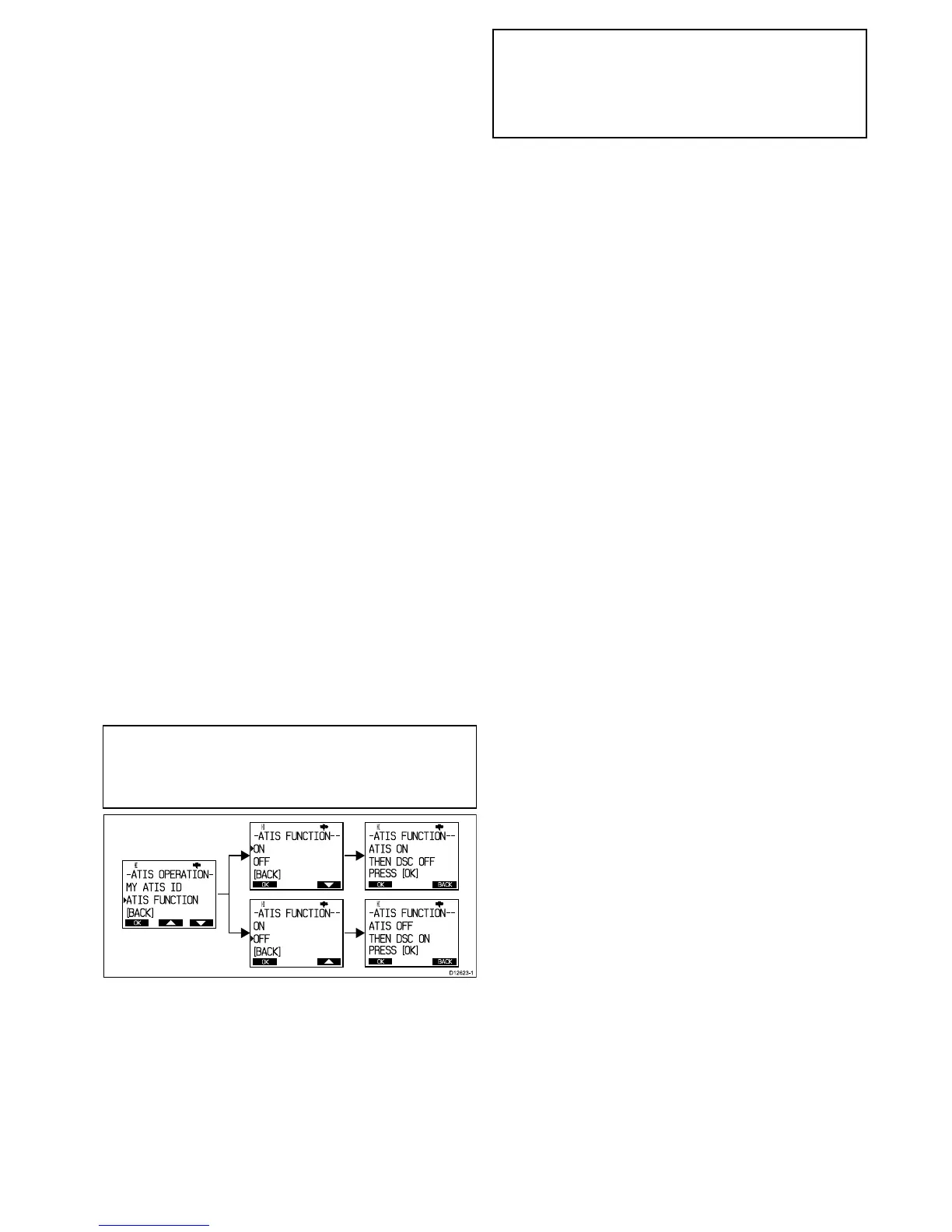
Enabling/DisablingtheATISfunction
WiththeATISIDprogrammedyoucannowenableordisable
theATISfunctionasrequiredbyfollowingthestepsbelow.
Note:IfyourradiohasbeenconguredtouseMarcom-C
modethenATISwillbepermanentlyenabledandyouwillnot
beabletodisableATISoperation.Marcom-Cmodeissetby
thedealeratpointofsale.Ifyouwishtoenableordisable
Marcom-C,pleasecontactyourRaymarinedealer.
FromtheATISoperationmenu:
1.SelectATISFunction.
2.SelectONtoenabletheATISfunction,or
ThemessageATISONTHENDSCOFFisdisplayed
on-screentowarnthatwhenATISisenabledthenDSC
functionsarenotavailable.
3.SelectOFFtodisabletheATISfunction.
ThemessageATISOFFTHENDSCONisdisplayed
on-screentowarnthatwhenATISisdisabledthenDSC
functionsareavailableagain.
IfnoATISIDhasbeenprogrammedthenthemessagePLEASE
INPUTATISIDFIRSTisdisplayed.
Note:WiththeATISfunctionenabledthefollowingfunctions
willbedisabled:
•DSCfunctions.
•Scanfunctions.
•Multiplewatchfunctions.
VHFoperations
57



 To Next Page
 Loading...




