Program Mode
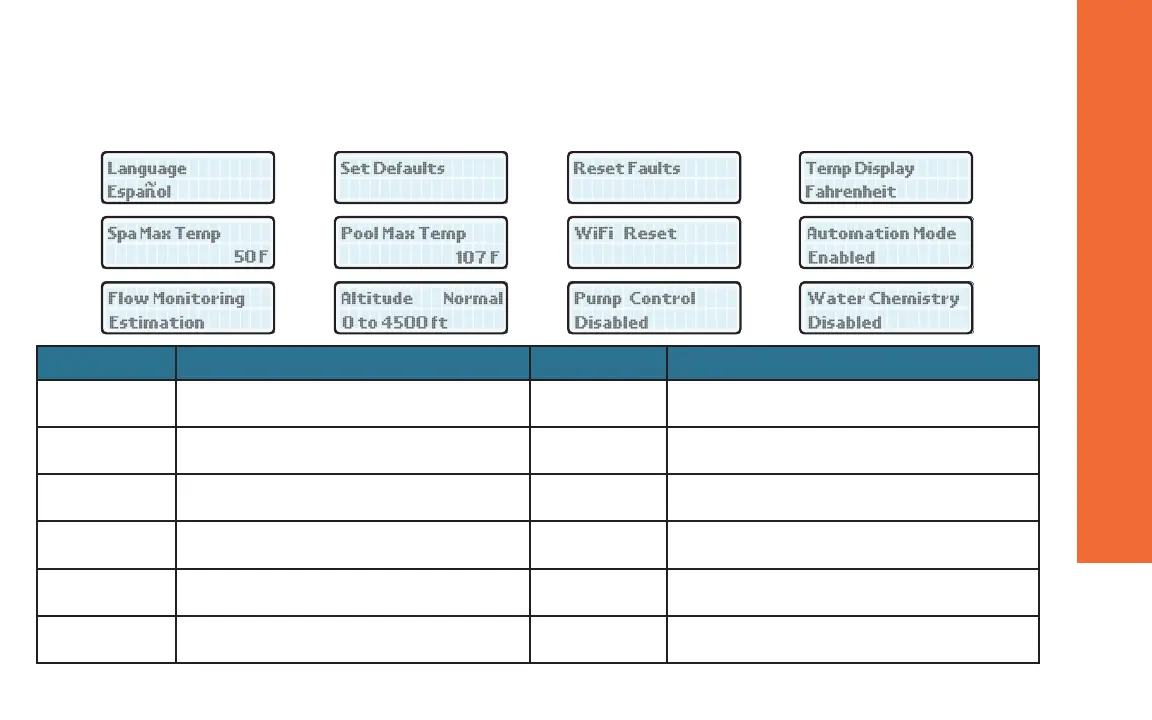
To access PROGRAM menu, press and hold SERVICE and MODE keys simultaneously for 5 to 7 seconds until
“Language” appears on the display. Press the SERVICE key sequentially until the desired program event is reached.
1 2 3 4
5a 5b 6 7
8 9 10 11
LCD Message Operation LCD Message Operation
Language The UP and DOWN keys will select English,
Spanish or French language.
WiFi Reset Hold SERVICE and MODE keys together for 3 to
5 seconds until “Wi-Fi Initialized” appears.
Set Defaults Hold SERVICE and MODE keys together for 3
to 5 seconds until “Defaults Set” appears
Automation
Mode
The UP or DOWN keys will select Enabled or
Disabled Automation mode Functionality.
Reset Faults Hold SERVICE and MODE keys together for 3
to 5 seconds until “Faults Cleared” appears.
Flow Monitoring The UP or DOWN keys will select “Estimation” or
“Flow Sensor” on the Flow Monitoring function.
Temp Display The UP or DOWN keys will select Fahrenheit or
Celsius on the temperature display.
Altitude The UP or DOWN keys will select “Normal” or
“High” on the Altitude display. (Optional Indicator)
Spa Max Temp Use Up or Down Keys to set maximum Spa
temperature(≤107°For42°C)*.
Pump Control The UP or DOWN keys will select “Enabled” or
“Disabled”.
Pool Max Temp Use Up or Down Keys to set maximum Pool
temperature(≤107°For42°C)*.
Water Chemistry The UP or DOWN keys will select “Enabled” or
“Disabled”.
* Temperatures above 104° F are not recommended.
OPERATION & CONTROLS
33




 To Next Page