22
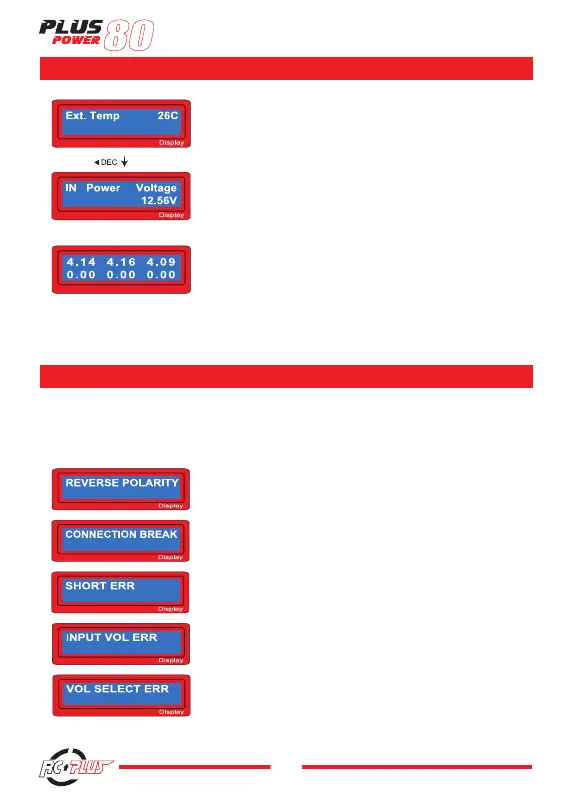
The external temperature only will be displayed when using the
thermal probe.
The present voltage of input DC power.
Using the individual connection cable to the battery, you can check
the individual voltage of each cell in the battery pack. When connect
the cable to the port on the right side of the charger the program
shows the voltage of each cells for maximum 6 cells in sequence.
To utilise this feature, the battery pack must have output connector
that linked to each cells.
It incorporates a various functions of protective and monitoring the system to verify functions and the state of
its electronics. In any case of occurring error, the screen displays the cause of error that is self- explanatory
with audible sound.
The output is connected to a battery with incorrect polarity.
This will be displayed in case of detecting an interruption of the con-
nection between battery and output or voluntarily disconnecting the
charge lead during the operation of charge or discharge on output.
There was a short-circuit at OUTPUT. Please check the charging
leads.
The voltage of input power drops below the limit.
The voltage of Lithium battery pack was selected incorrectly.
Verify the voltage of battery pack carefully.
-
18
-
The external temperature only will be displayed when
using the thermal probe.
The present voltage of input DC power.
Using the individual connection cable to the battery,
you can check the individual voltage of each cell in the
battery pack. When connect the cable to the port on
the right side of the charger the program shows the
voltage of each cells for maximum 6 cells in sequence.
To utilise this feature, the battery pack must have
output connector that linked to each cells.
13. Warning and error messages
It incorporates a various functions of protective and monitoring the system to
verify functions and the state of its electronics. In any case of occurring error, the
screen displays the cause of error that is self- explanatory with audible sound.
The output is connected to a battery with incorrect
polarity.
This will be displayed in case of detecting an
interruption of the connection between battery and
output or voluntarily disconnecting the charge lead
during the operation of charge or discharge on output.
There was a short-circuit at OUTPUT. Please check
the charging leads.
The voltage of input power drops below the limit.
The voltage of Lithium battery pack was selected
incorrectly. Verify the voltage of battery pack carefully.
-
18
-
The external temperature only will be displayed when
using the thermal probe.
The present voltage of input DC power.
Using the individual connection cable to the battery,
you can check the individual voltage of each cell in the
battery pack. When connect the cable to the port on
the right side of the charger the program shows the
voltage of each cells for maximum 6 cells in sequence.
To utilise this feature, the battery pack must have
output connector that linked to each cells.
13. Warning and error messages
It incorporates a various functions of protective and monitoring the system to
verify functions and the state of its electronics. In any case of occurring error, the
screen displays the cause of error that is self- explanatory with audible sound.
The output is connected to a battery with incorrect
polarity.
This will be displayed in case of detecting an
interruption of the connection between battery and
output or voluntarily disconnecting the charge lead
during the operation of charge or discharge on output.
There was a short-circuit at OUTPUT. Please check
the charging leads.
The voltage of input power drops below the limit.
The voltage of Lithium battery pack was selected
incorrectly. Verify the voltage of battery pack carefully.
WARNIG / ERROR MESSAGES


 To Next Page