37
ENGLISH
FRONT PANEL
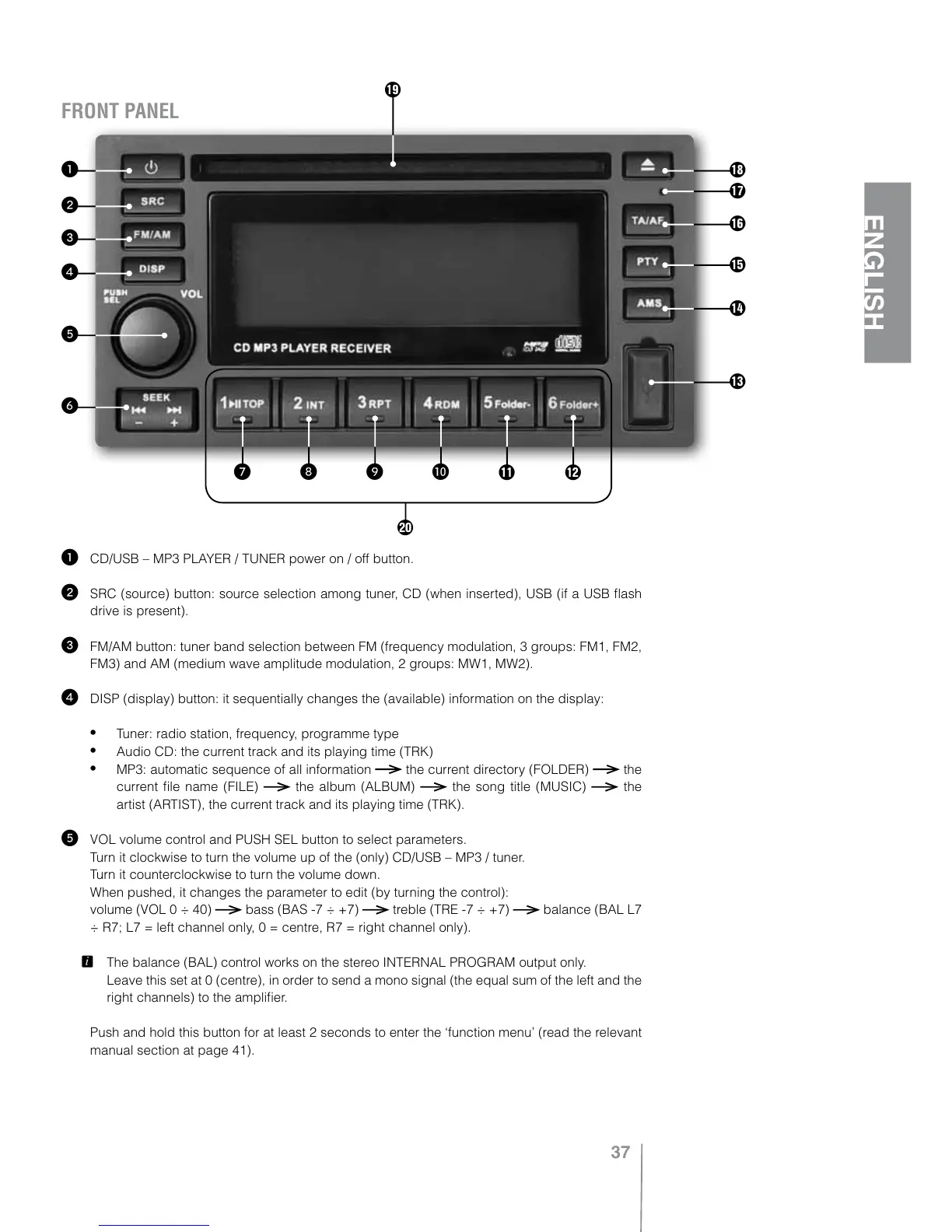
1 CD/USB – MP3 PLAYER / TUNER power on / off button.
2 SRC (source) button: source selection among tuner, CD (when inserted), USB (if a USB flash
drive is present).
3 FM/AM button: tuner band selection between FM (frequency modulation, 3 groups: FM1, FM2,
FM3) and AM (medium wave amplitude modulation, 2 groups: MW1, MW2).
4 DISP (display) button: it sequentially changes the (available) information on the display:
Tuner: radio station, frequency, programme type
Audio CD: the current track and its playing time (TRK)
MP3: automatic sequence of all information the current directory (FOLDER) the
current file name (FILE)
the album (ALBUM) the song title (MUSIC) the
artist (ARTIST), the current track and its playing time (TRK).
5 VOL volume control and PUSH SEL button to select parameters.
Turn it clockwise to turn the volume up of the (only) CD/USB – MP3 / tuner.
Turn it counterclockwise to turn the volume down.
When pushed, it changes the parameter to edit (by turning the control):
volume (VOL 0 ÷ 40)
bass (BAS -7 ÷ +7) treble (TRE -7 ÷ +7) balance (BAL L7
÷ R7; L7 = left channel only, 0 = centre, R7 = right channel only).
L
The balance (BAL) control works on the stereo INTERNAL PROGRAM output only.
Leave this set at 0 (centre), in order to send a mono signal (the equal sum of the left and the
right channels) to the amplifier.
Push and hold this button for at least 2 seconds to enter the ‘function menu’ (read the relevant
manual section at page 41).
7 8 9 0 { }
i
6
5
4
3
2
1
u
y
t
r
e
w
q



 To Next Page