42
ENGLISH
NOTES ABOUT MP3 FILES
MP3: means MPEG Audio Layer 3 and refers to an audio compression type.
This player reads MP3 files on CD-ROM, CD-R or CD-RW discs and USB flash drives; if
available, track titles, artists and albums are displayed (ID3 TAG).
CD-R – CD-RW discs formatted as ‘packet write’ mode are not supported.
The file extension must be .mp3 .
The max. directory (/ folder) level is 8, including the ‘root’.
Max. 256 MP3 files per source.
If a CD includes both audio tracks and MP3 files, only the audio tracks will be played.
When playing an MP3 file with variable bit rate (‘VBR’), the displayed time might not be correct
(and also the INT function may not work properly).
It is advisable to use MP3 files having a sampling frequency of 44.1 kHz and a fixed bit-rate of
at least 128 kbps (if higher, for instance 192 kbps, the sound quality will be better).
USB 1.1 support and also 2.0 (but at the same speed of USB 1.1)
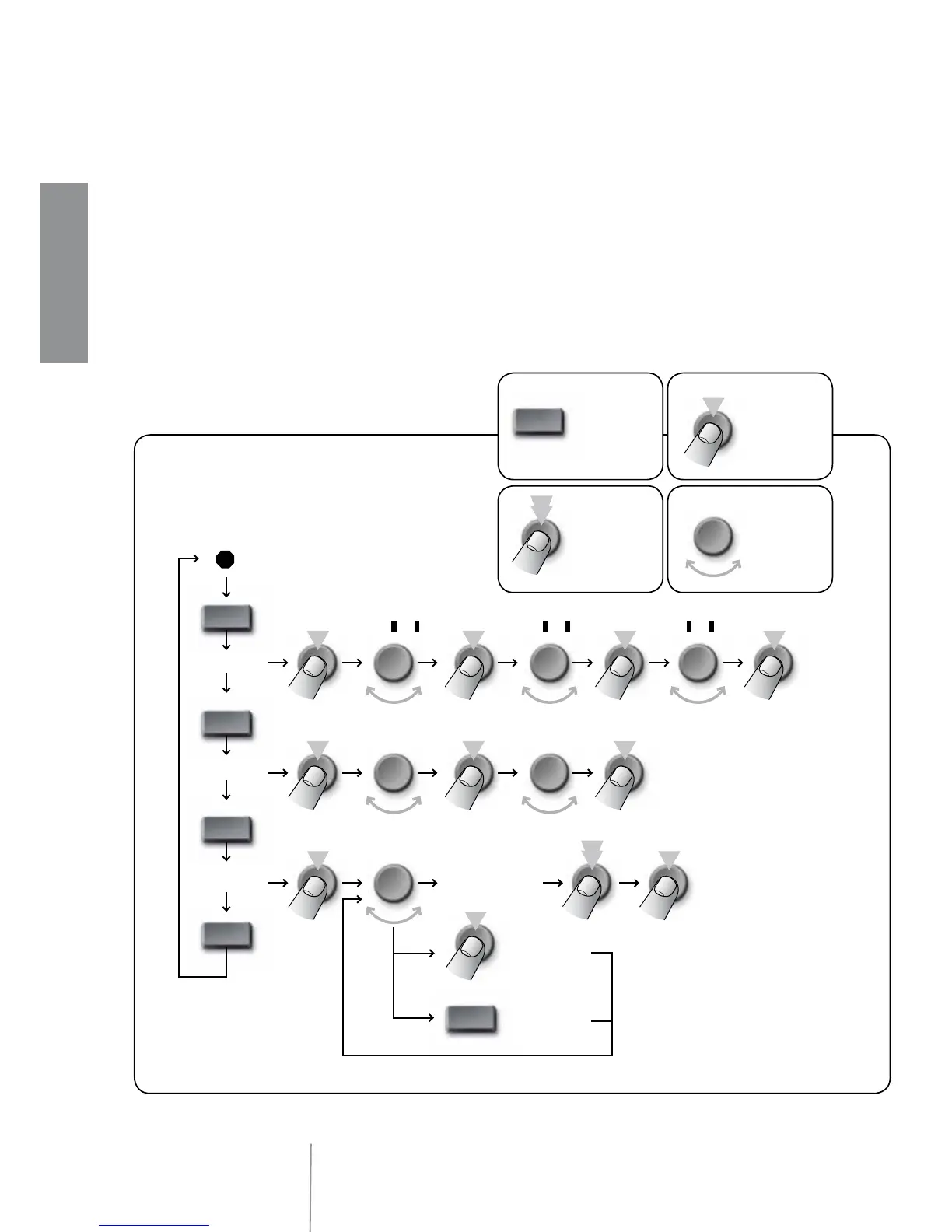
MP3 FILE SEARCH
AMS
AMS
AMS
AMS
TRK SCH
FILE SCH
CHAR SCH
PUSH VOL
SEL



 To Next Page