SEARCHING FOR ACTIVE FREQUENCIES
Use these procedures
to
search for a transmission. This
is
helpful if you
do
not have a reference to frequencies in your area.
Also, see "Guide
to
the Action Bands"
in
this manual.
Limit Search
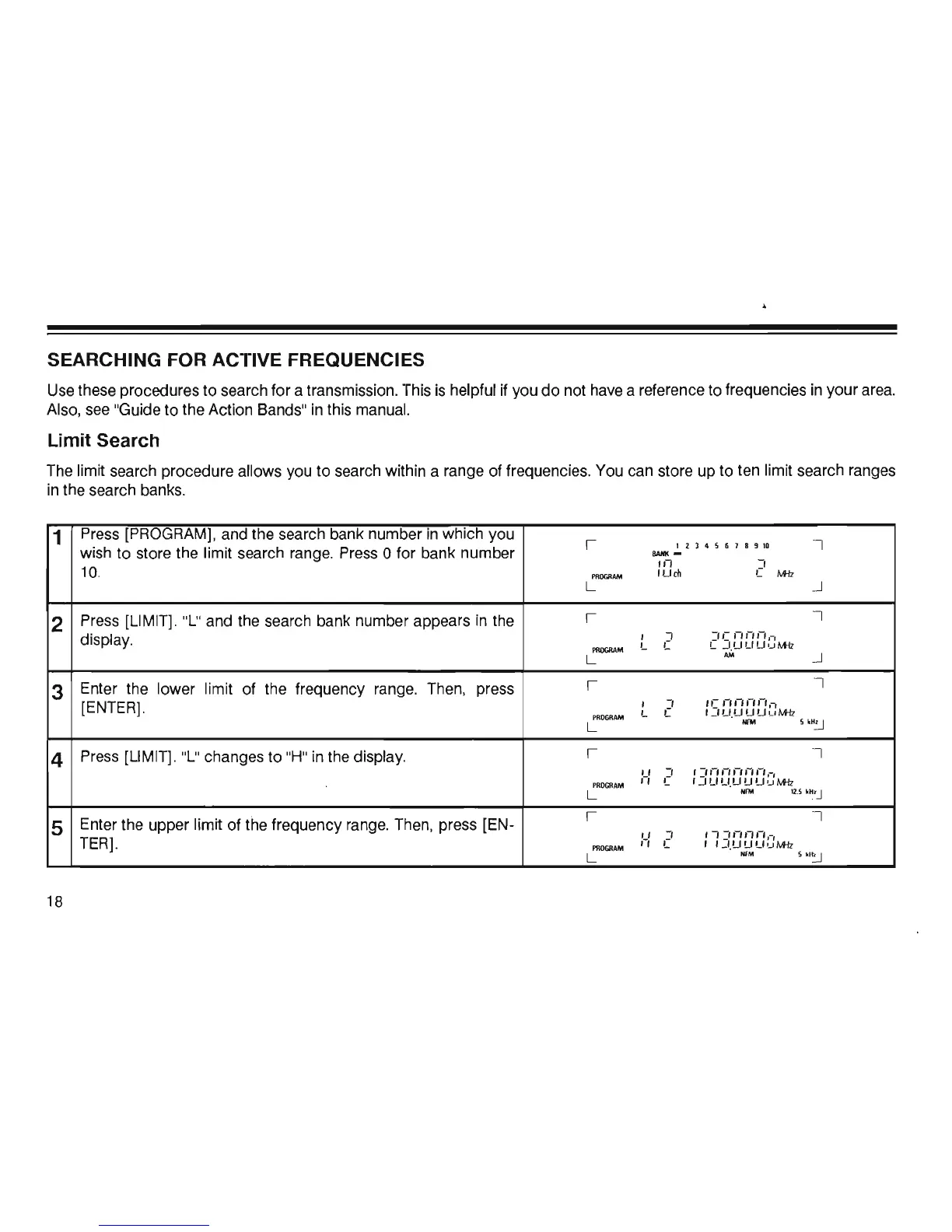
The limit search procedure allows you
to
search within a range of frequencies. You can store up
to
ten limit search ranges
in
the search banks.
1
Press [PROGRAM], and the search bank number
in
which you
I
1 2 3 4 5 6 1 8 !I
10
I
wish
to
store the limit search range. Press 0 for bank number
BANK
-
,n
-,
10.
PROGR
AM
'U
th
C
M-Iz
L
..J
2
Press [LIMIT]. "L" and the search bank number appears in the
I
I
display.
,
J
:'c
'-"-''-',
-,
PfU)GM
M
'-
'-
'-
J .U U U
,_,
M-Iz
L
AM
..J
3
Enter the lower limit of the frequency range. Then, press
I
I
[ENTER].
,
-,
'e
'-"
-
''-''-',-,
PROGRAM
L C
,
_'U
.
UUU
uM-lz
L
NFM
5
'
H
~
4
Press [LIMIT]. "
L"
changes
to
"H" in the display.
I
I
"
:'
,
:'
,-, ,-,
,-, ,-,
,-,
,-
,
P
ROGR
AM
,-,
L
,_'U
U.U U U 'JM-Iz
L
.IM
1
2
.
S
'H
~
5
Enter the upper limit of the frequency range. Then, press [EN-
I I
"
J
,-, :''-''-''-',-,
TER].
PROGRAM
,-,
L
, ' _'.U U U 'J
M-Iz
L
NfM
s
,,~
18













 To Next Page