Notes:
• When you press [DIRECT] during limit, your scanner enters direct search mode.
• When you press a numeric key during a direct search, your scanner changes to limit search mode. The key you
press corresponds with the limit-search bank number.
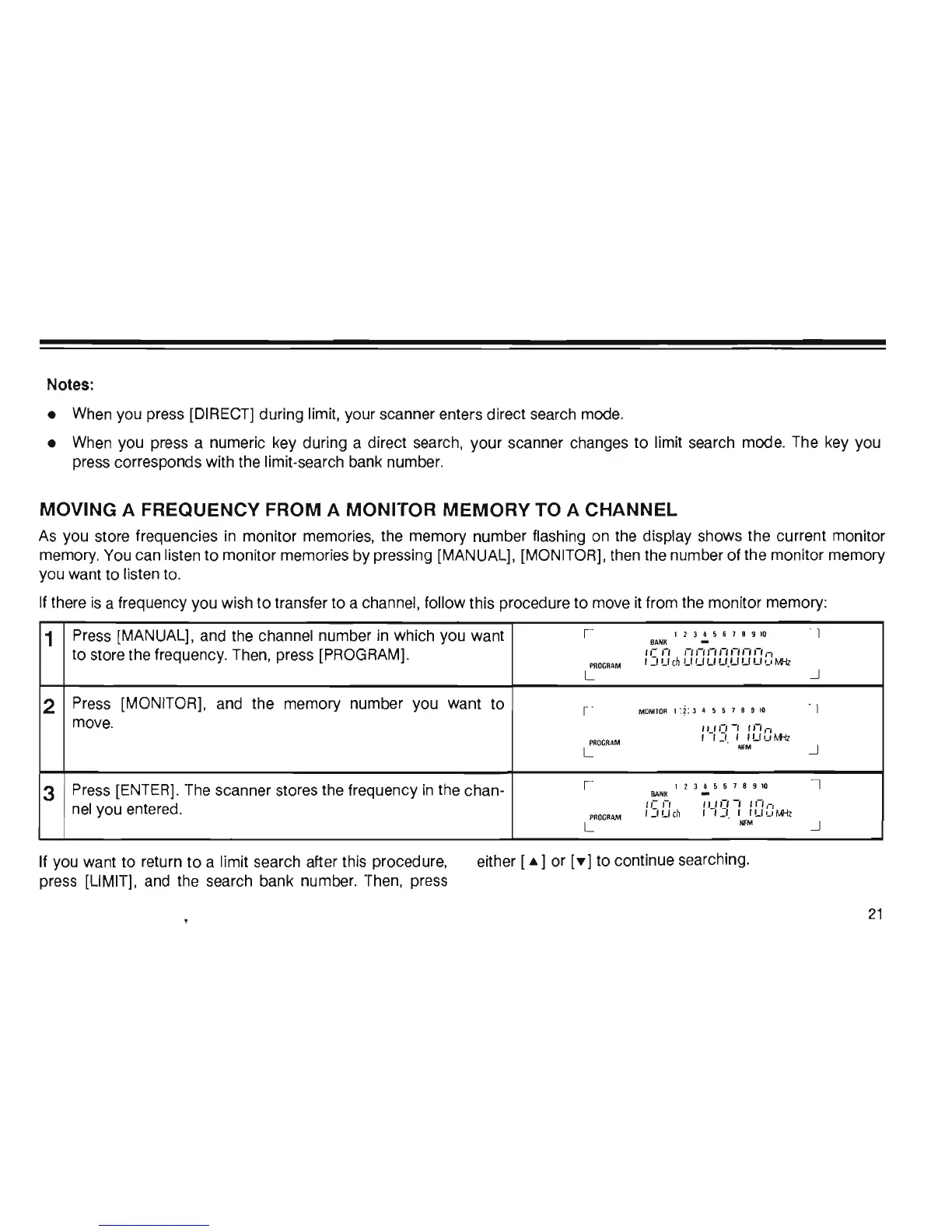
MOVING A FREQUENCY FROM A MONITOR MEMORY TO A CHANNEL
As
you store frequencies
in
monitor memories, the memory number flashing on the display shows the current monitor
memory. You can listen to monitor memories by pressing [MANUAL], [MONITOR], then the number of the monitor memory
you want to listen to.
If there
is
a frequency you wish
to
transfer to a channel, follow this procedure to move
it
from the monitor memory:
1
Press (MANUAL], and the channel number
in
which you want
I
12345618910
8ANK
to store the frequency. Then, press [PROGRAM].
'e'-'
,-,.-..-..-..-.,-,.-.,-,
PROGRAM
'_'LI
en
UUUU.UUUulMl
L
2
Press (MONITOR], and the memory number you want to
I
MONITOR
1 :?: 3 4 5 6 7 8 9
10
move.
(1)0-'
''-',-,
PROGRAM
I I_I, ,
'UuM-lz
L
NFM
3
Press [ENTER]. The scanner stores the frequency
in
the chan-
I
12345678910
BAN
K
nel
you entered.
,,-
,-,
(1)0-'
''-',-,
PROGRAM
,:,
Ue
h , , _', I ILl u
M1z
L
NfM
If you want to return
to
a limit search after this procedure,
press (LIMIT], and the search bank number. Then, press
either (
...
] or
['f']
to continue searching.
I
~
I
~
I
~
21













 To Next Page