EasyManua.ls Logo

Redback SI5000 - Comms Module Leds

Redback SI5000
24 pages
Print Icon
To Next Page IconTo Next Page
To Previous Page IconTo Previous Page
Loading...
Troubleshooting
18 Owner’s Guide Redback Smart Inverter – v1.4
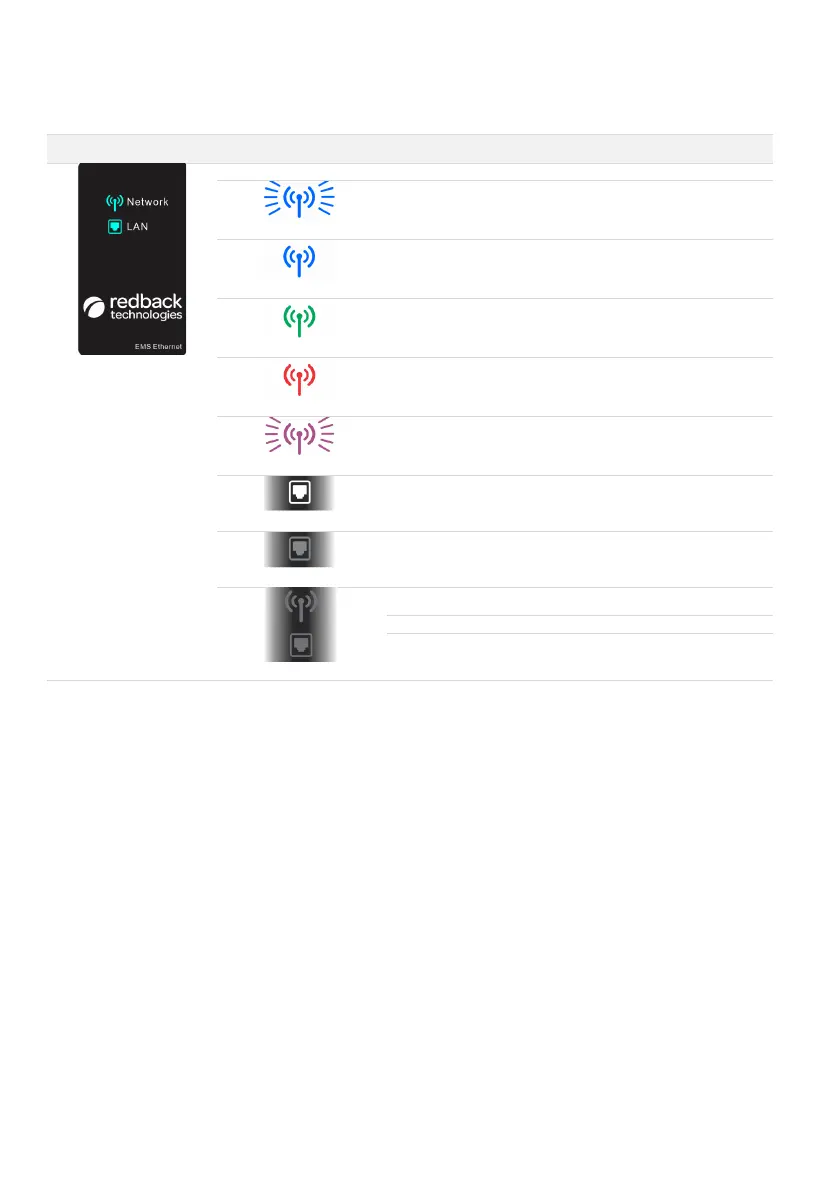
11.5.3 COMMS MODULE LEDS
INDICATION
COLOUR & PATTERN
MEANING
SOLUTION(S)
Note: LAN icon is found only
on the optional EMS
Ethernet module (illustrated)
Blue flashing
Advertising BLE
Use Redback Install app to connect
to the inverter.
Blue ON
BLE Connected
Use Redback Install app to complete
setup
Green ON
Connected to Cloud via
Wi-Fi or Ethernet
OK. No action needed.
Red ON
No connection to cloud
Wi-Fi: Complete onboarding
Ethernet: Check connection to local
network.
Purple Flashing
Error state exists.
Contact Redback
White ON
Physical ethernet
connection to a local
network.
No action needed. Ethernet
connection to LAN is automatic
when available.
OFF
No ethernet connected
Connect if needed.
BOTH OFF
No Power to inverter
Enable Grid Supply to Inverter
No power to module
Check module is correctly installed
Module faulty
Contact Redback

Related product manuals