Troubleshooting
24 Owner’s Guide – Redback ST10000 and BE14000-HV – v1.6
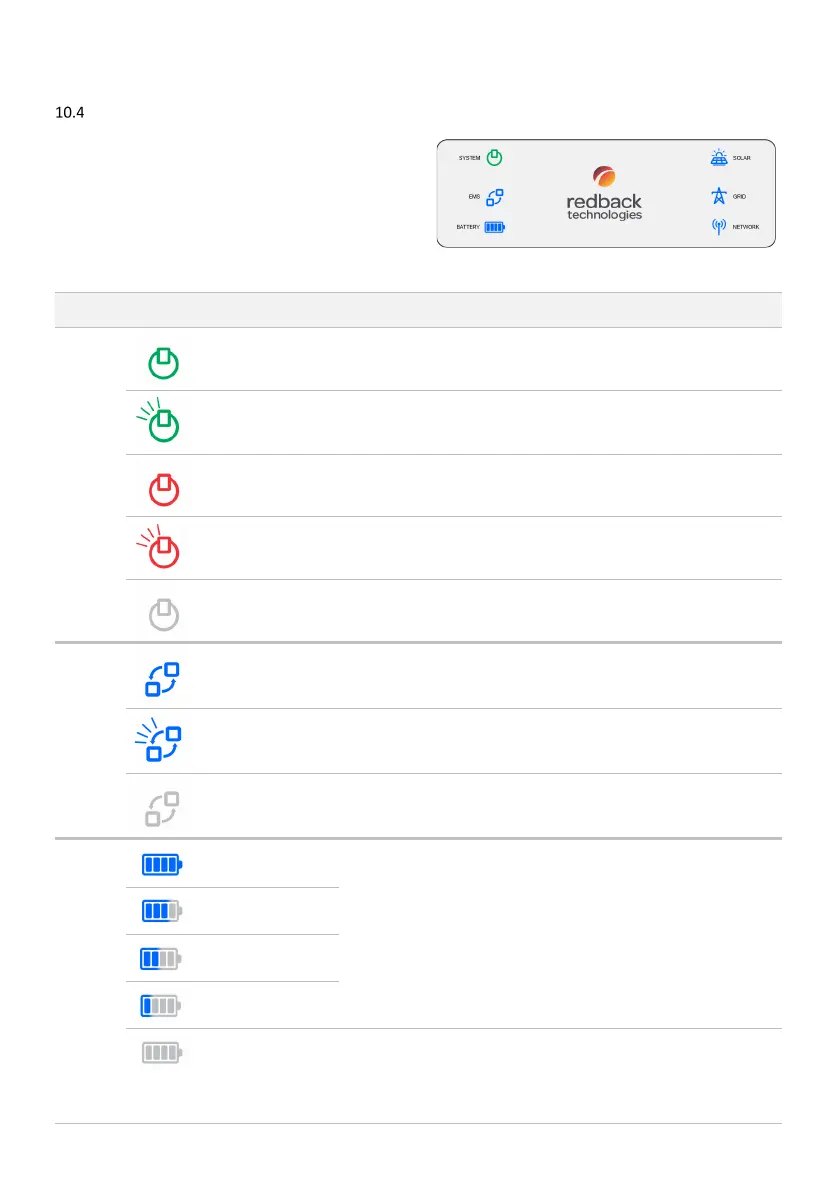
Inverter Status Icons
inverter is equipped with an icon array to indicate
system status and aid diagnosis.
The table below lists indications, probable cause
, and rectification
you can try yourself. Refer to page 9 to identify controls.
If the problem is not solved contact your installer for assistance.
Meaning and or
probable cause
System ready OK. No action required.
System is starting up
This may be normal behaviour. The system may cycle several times during
start-up: completion is indicated by the System icon stabilising to steady
green within 10 minutes.
Backup circuit is
overloaded
Reduce loads on your backup circuit.
System fault Contact your installer
System not operating If the icon remains OFF for more than one minute, contact your installer.
Communications OK OK. No action required.
Bluetooth is advertising
Inverter onboarding is available for up to 30 minutes.
Communications failure
Onboard the inverter
Batteries are
75% charged
Contact your installer if this is unexpected behaviour e.g., your battery
does not appear to be charging correctly.
Batteries are 51-75%
charged
Batteries are 25-50%
charged
Batteries are less than
25% charged
One or more batteries
are OFF, disconnected,
not active or cannot be
detected.
Contact your installer.



 To Next Page