Redback Technologies
Owner’s Guide – Redback ST10000 and BE14000-HV - v 1.6 25
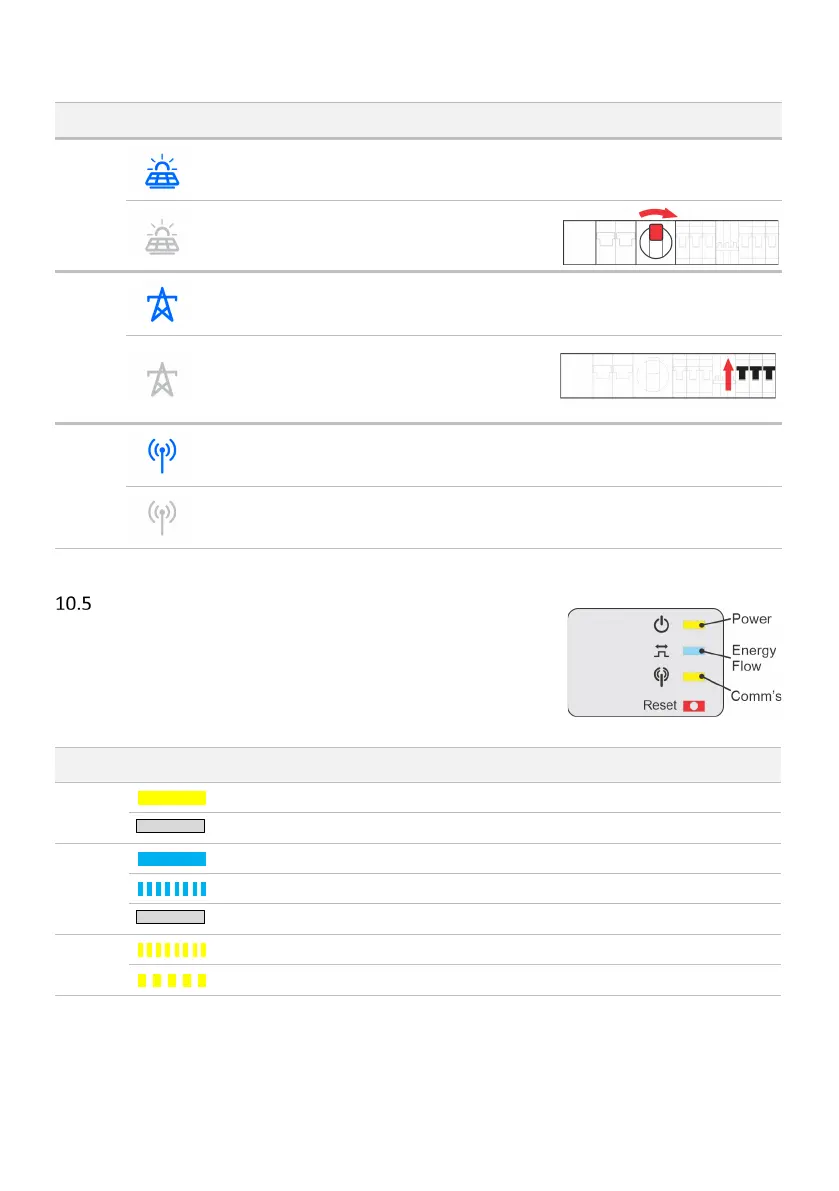
Meaning and or
probable cause
Solar is active OK. No action required.
not active
Ensure the PV ARRAY DC isolator in
ON. Contact your installer if this is
unexpected behaviour.
Grid is active No action required.
Grid not detected
Normal behaviour during a Grid
outage.
If grid is available: Switch UTILITY
GRID AC isolators on.
Wi-Fi, LAN or BT is
connected
No action required.
No Wi-Fi, LAN or BT
connected
Onboard the inverter.
SM3000 Smart Meter diagnostics
The Redback SM3000 Smart Meter is usually located at the main switchboard. It
detects the grid energy traffic of all 3 phases and indicates if the site overall is
importing or exporting energy to the grid. This information informs inverter operation.
Power
ON: Meter has power.
OFF: Meter does not have power or has failed.
Energy
Flow
ON: Site is consuming energy from the grid.
Flashing: Site is exporting energy to the grid.
OFF: Energy flow is not detectable.
Comm’s
Flashing: Transmitting data.
5x Flash: Reset in progress.



 To Next Page