46
b) Programming the Special Functions
The speed controller is already pre-programmed with the most sensible pre-settings ex works.
If a LiPo battery is used as a drive battery, check the basic settings of the speed controller for whether
undervoltage protection is activated (usually 3.0 V/cell). With the undervoltage recognition deactivated, the
LiPo battery will suffer deep discharge and be destroyed.
If a NiMH drive battery is used, switch off undervoltage recognition or set it to a lower value than for LiPo
batteries.
The programming can be performed very easily via the setup button.
Proceed as follows for programming:
• Switch on the transmitter if you haven’t done it al-
ready.
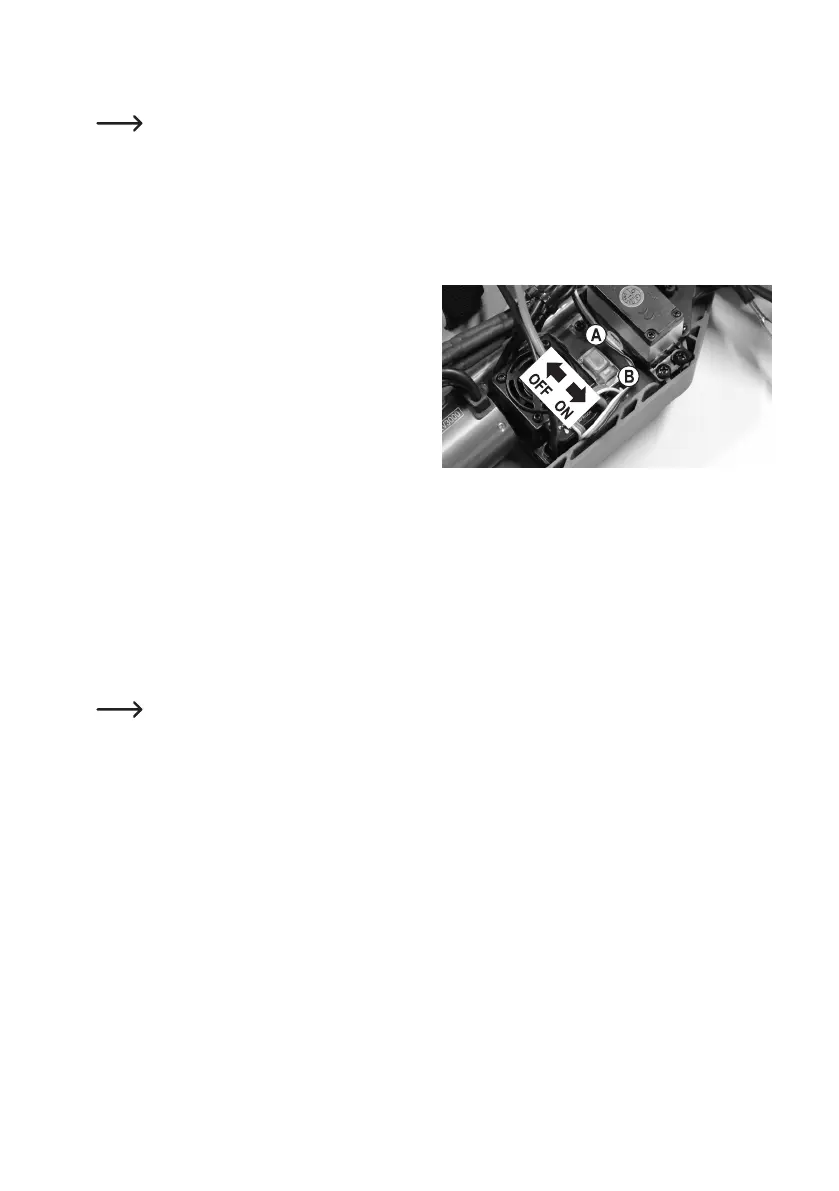
• Switch off the speed controller ("OFF").
• Keep the setup button (B) next to the on/off switch
(A) pressed and turn the speed controller on ("ON").
• Continue to push and hold the setup button (B). Don't
release it.
• TheLEDatthespeedcontrollerashesredandthemotoremitsbeeps(continuetokeepthesetupbuttonpushed).
• Aftersometime,theLEDashesgreen(keepthesetupbuttonpushed).
Thenumberofgreenashes(1x.....5x)showswhichsettingfunctioniscurrentlyselected.
LEDashesgreenonce+1beep:Drivingfunctionforward/backwardorforwardonly
LEDashesgreen2x+2beeps: MotorBrake
LEDashesgreen3x+3beeps: UndervoltagerecognitionforLiPo
LEDashesgreen4x+4beeps: Startmodewhendrivingoff
LEDashesgreen5x+5beeps: Brakeforce
The beeps are generated by a short start-up of the brushless motor. These beeps may be very low, de-
pending on the motor. In this case, observe the LED on the speed controller.
• Whenthedesiredsettingfunctionthatyouwanttochangeisdisplayed(e.g.undervoltageprotection,LEDashes
3x green + 3 beeps from the motor), release the setup button.
• NowtheLEDashesredagain.Thenumberofredashingsignalsshowswhichsettingvalueisactive(e.g.under-
voltageprotection3.0V/cell,redLEDashes4xbrieyred+4beepsfromthemotor).
• Pushingthesetupbuttonbrieychangesthesettingvalue.ThenumberofredashingsignalsoftheLED(andthe
motor beeps) changes accordingly.
• To leave the setting mode and save programming, switch off the speed controller. If you switch on the speed control-
ler then, the speed controller is ready for operation with the settings made above.
• If another setting is to be changed, proceed again as described above.




 To Next Page