14
PA OPERATION (microphone sold separately)
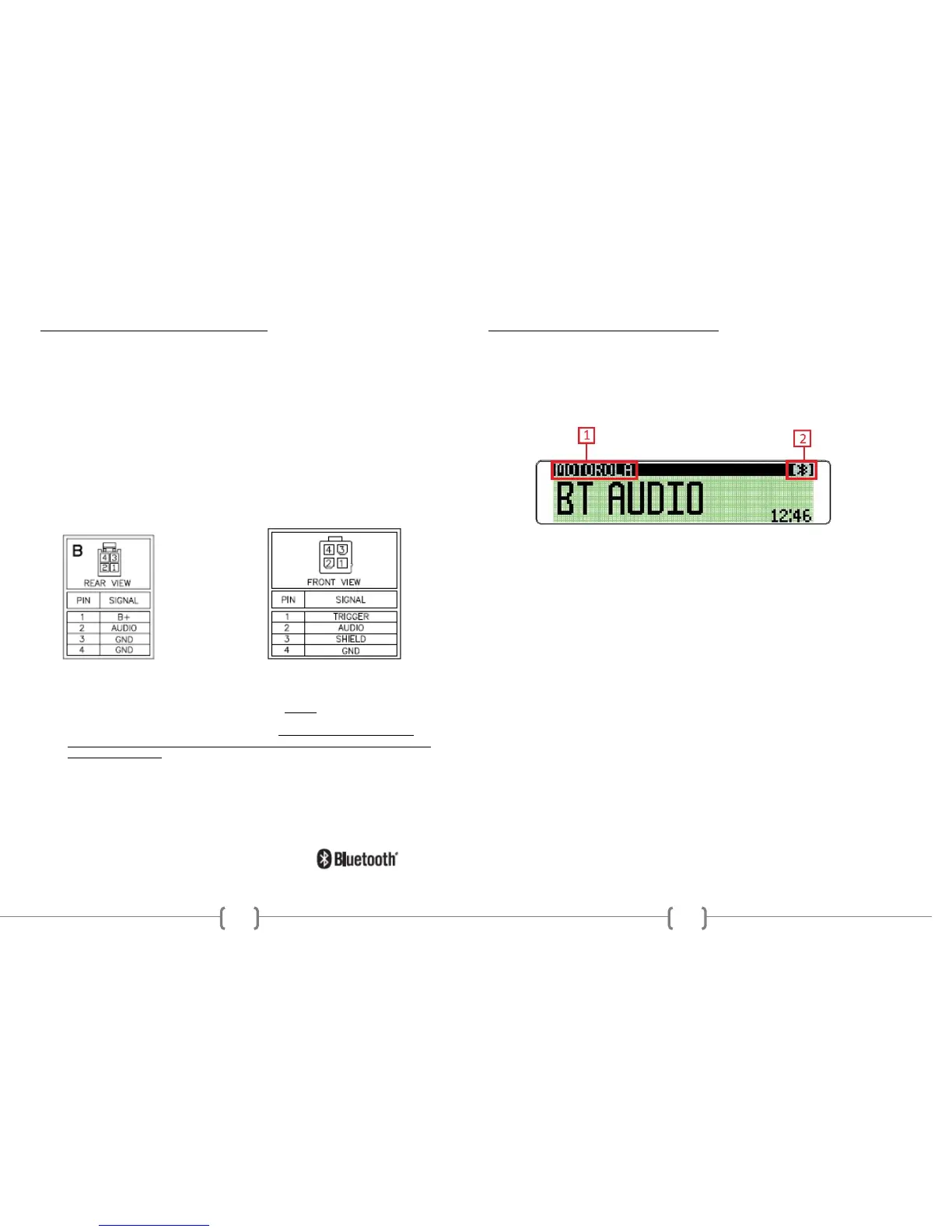
Connect a PA microphone into the 4-pin connector. Microphone has priority over
all other audio modes and mute’s the source audio being played when keyed.
When the PA is triggered, the front display will show MIC, until the trigger is
un-keyed. Once released, it will return to the previous source mode at the
previous volume level
The PA operates regardless of radio status, as long as both ACC and Battery
power is applied to the radio.
When set to CARBON mode, the volume of the PA is only adjustable on the
microphone itself. When set to DYNAMIC mode, the volume level is adjustable
only when keyed from the front using the VOL/SEL button. A rear view of the
radio’s PA pin connection option is shown below:
Carbon PA Dynamic PA
NOTE:
For easy viewing at night, the backlighting will always be on when ACC +12V
DC switched power is applied. Backlighting will only shut off when the
switched ACC +12V DC power is removed. If the radio’s LCD does NOT
come on and display the clock, verify that the BATTERY +12V DC power wire
is installed correctly.
iPod® and iPhone® are trademarks of Apple Inc., registered in the U.S. and
other countries. Functionality may vary by model number, operation is not
guaranteed.
The Bluetooth® word mark and logos are registered trademarks owned by
Bluetooth SIG, Inc. and any use of such marks by REI under license.
11
BLUETOOTH® STREAMING AUDIO MODE
The unit allows you to play back audio files from your mobile device using a
Bluetooth® connection. The Radio can control a Bluetooth® audio player via
Advanced Audio Distribution Profile (A2DP) or Audio/Video Remote Control
Profile (AVRCP). Bluetooth® audio players (or Bluetooth® adapters) compatible
with these profiles can be connected to this Radio. Verify the device is
connected via Bluetooth®, then Touch the MODE button on the front to access
BT AUDIO.
1. Bluetooth Phone ID
Displays the ID of the paired Bluetooth Phone you are trying to stream audio
from.
2. Connection Status
Displays the Bluetooth® icon connection status of the radio
Press the PLAY/PAUSE button to listen to audio. While listening to audio the
following functions are available:
SEEK UP button: Touch to play the next track.
PLAY/PAUSE button: Touch to pause playback. Touch again to resume
playback.
SEEK DOWN button: Touch to play the previous track.
NOTE:
When there is an incoming call, the song will be paused. After the incoming call is
finished, the screen will return to the music function screen and playback will
continue.
Functionality may vary depending on the profile or device used.


 To Next Page