12
iPod®/iPhone® OPERATION
To listen to audio through your apple device, verify that a 30-pin USB extension is
connected to the USB pigtail on the rear of the radio. Next, connect the 30-pin
cable to the Apple device. Once connected, the radio will automatically switch
the source to iPod® and begin charging the device. If the device has enough
battery power. It will begin playback.
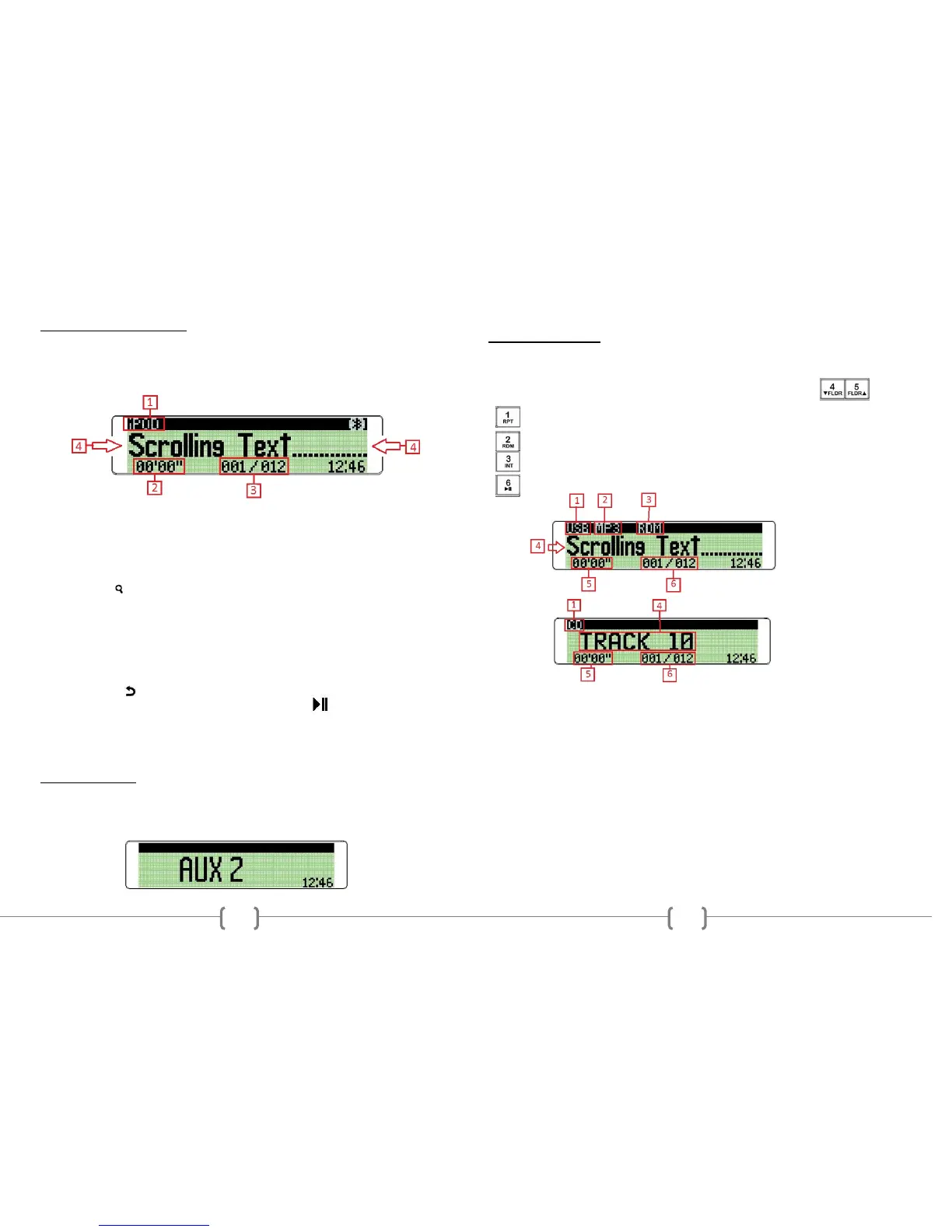
1. Operational Mode
2. Shows the elapse time of the audio track.
3. Indicates the file number and number of files in the folder.
4. Displays the Track Title, Artist, and Album information of the file if
available.
When connected, the user can playback specific files or folders. First press the
SEARCH button. The user can then rotate the VOL/SEL knob to select one
of the following search options:
Playlists
Podcasts
Audiobooks
Songs
Albums
Artists
Press the VOL/SEL knob to choose. To return to a previous menu, press
the RETURN button and choose again using the VOL/SEL knob. Use the
radio’s SEEK up/down buttons to change tracks, or the button to PAUSE or
PLAY the track.
To return to the iPod® source from any other source menu, touch MODE on the
front panel until the iPod® icon is shown on the front display.
AUX OPERATION
Press the MODE button on the front panel until the display shows either AUX 1
or AUX2. AUX 1 uses the front 3.5mm audio input while AUX 2 uses the rear
RCA L/R audio inputs. It may be necessary to adjust the VOLUME level of the
AUXILARLY input device if too little or too much signal is present.
13
USB/CD OPERATION
Insert a CD into the disc slot, or connect a USB storage device to the unit. The
radio will automatically switch MODE’S and begin playback after the media is
successfully loaded. Use the SEEK UP/DOWN buttons to change tracks.
If playing compressed digital media, use the FOLDER UP/DOWN
buttons to select the desired folder for playback.
Press and hold this button to REPEAT Track, Folder, All, or Off
Press and hold this button to turn RANDOM on/off
Press and hold this button to select INTRO on/off during playback
Press this button to PAUSE/PLAY the media
1. Operational Mode
2. Compressed media file format
Displays either WMA or MP3 Compressed media file format file formats.
3. Playback Mode of Operation
Displays either RDM, INT, RPT or nothing at all
4. Shows the Track number of the ID3 tag information of the MP3 file.
Press the DISPLAY button to switch from Title, Artist, or Album information
5. Shows the elapse time of the audio track.
6. File number and number of files in the folder.
AUDIO FILE REQUIREMENTS (.MP3/.WMA using ISO9660 formatting)
• The MP3 files with a sampling rate between 16 kHz & 48 kHz. And bitrates between 32 to
384 kbps. (44.1khz/128kbps or higher is recommended)
• The WMA file with a sampling rate of 32, 44.1, or 48 kHz. And a bitrates between 62 to 192
kbps. (44.1khz/128kbps is recommended)
•
NOTE:
This Radio does not support playback of aac (.m4a, MPEG-4) audio.


 To Previous Page