operating faults ..........................................
(current page)
faults
operating faults ....................................
(current page)
2.54
ENG_UD64402_3
Alerte de sortie de voie (HJB - Renault)
LANE DEPARTURE WARNING (4/5)
Operating faults
In the event of a malfunction, the left
and right line indicators (and, depend-
ing on display style, the warning
light) disappear or stay grey on the in-
strument panel.
In some cases, they are accompanied
by the message “Check Front camera”
or the
© warning light on the in-
strument panel.
Consult an approved dealer.
Adjustments (continued)
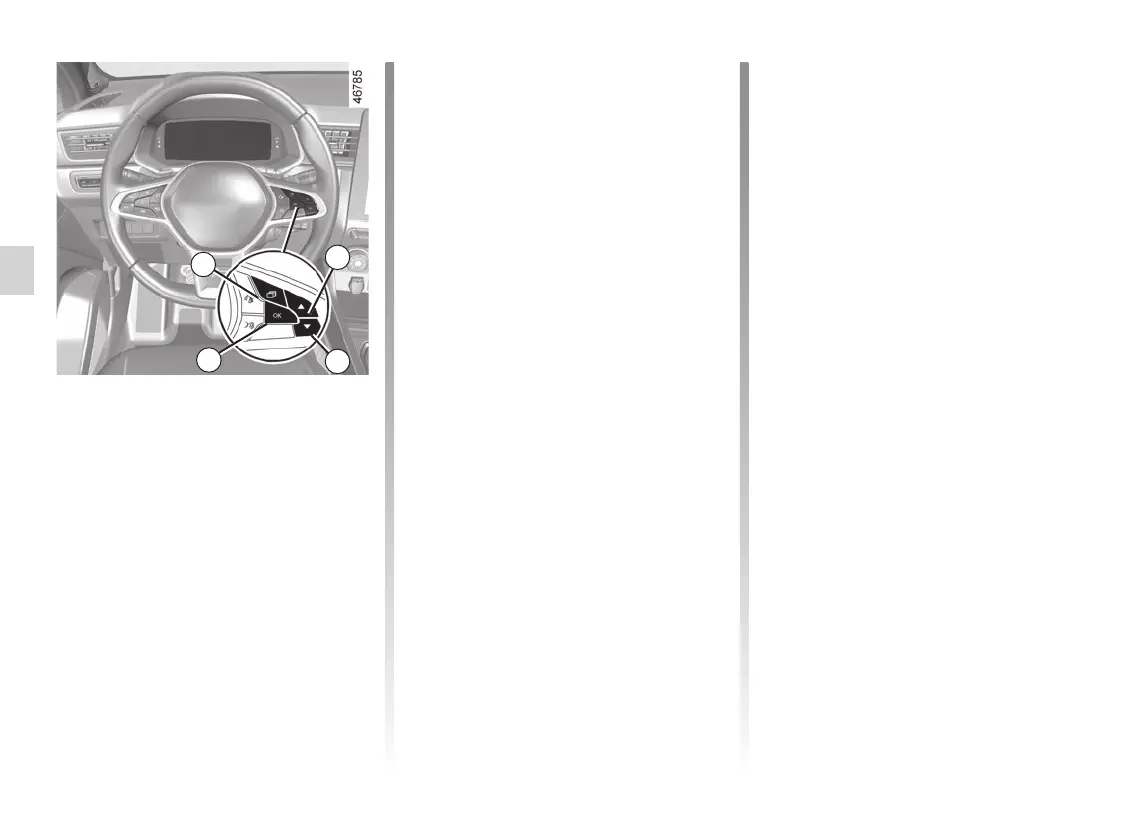
Vehicles not fitted with a multimedia
screen
– With the vehicle stopped, press the
switch 5 as many times as required
to reach the “Vehicle” tab;
– press the 6 or 7 control repeatedly to
reach the “Settings” menu. Press the
switch 8 OK;
– press control 6 or 7 repeatedly to
reach the “DRIVING ASSIST” menu.
Press the switch 8 OK;
– press the 6 or 7 control repeat-
edly to reach the “Lane Departure
Sensitivity” or “Lane Departure
Vibration” menu. Press the switch 8
OK;
– press the 6 or 7 control repeatedly
to adjust the setting. Press the 8 OK
button.
5
6
7
8














 To Next Page