display .......................................................
(up to the end of the DU)
overspeed buzzer ......................................
(current page)
control instruments ....................................
(up to the end of the DU)
range with fuel ...........................................
(current page)
indicators:
instrument panel ..................................
(up to the end of the DU)
fuel level ....................................................
(current page)
fuel level ....................................................
(current page)
trip computer and warning system.............
(current page)
instrument panel ........................................
(up to the end of the DU)
warning lights.............................................
(up to the end of the DU)
1.64
ENG_UD82505_4
Afficheurs et indicateurs (HJB - Renault)
DISPLAYS AND INDICATORS (1/7)
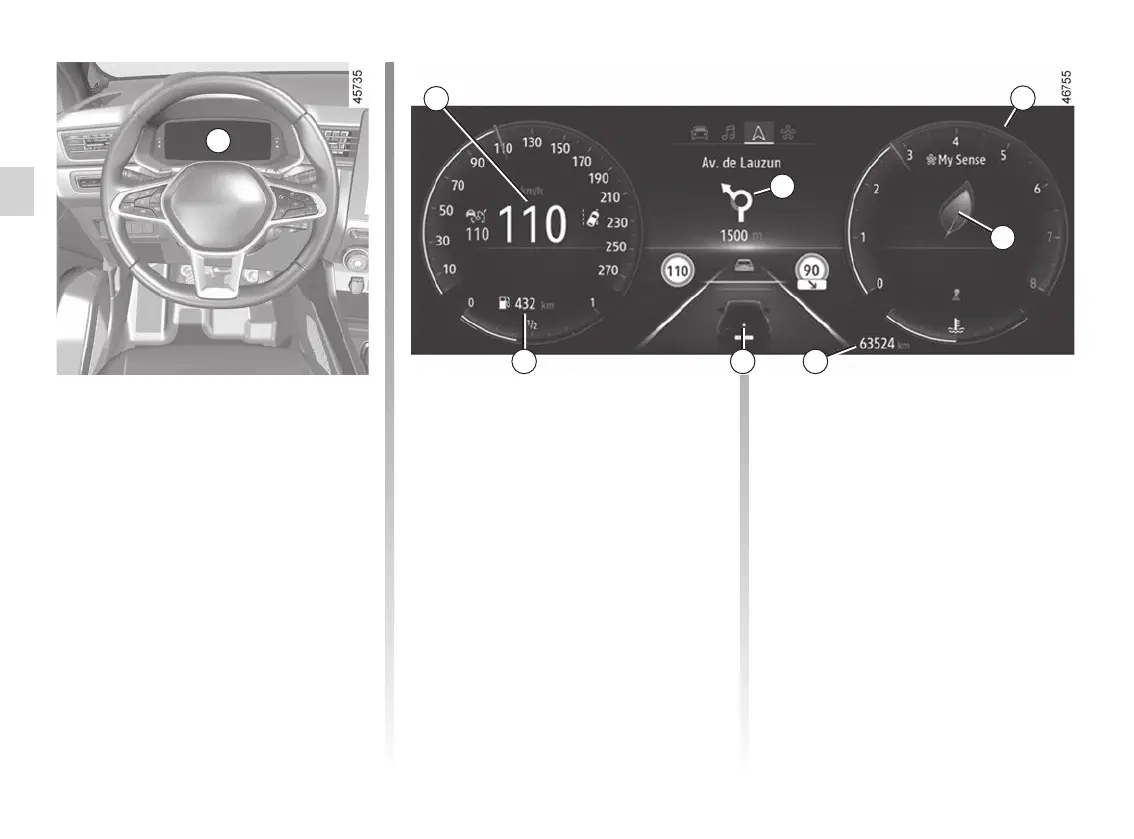
Instrument panel A
It lights up when the ignition is switched
on. In some cases, the appearance of a
warning light is accompanied by a mes-
sage.
Depending on the vehicle, you can cus-
tomise your instrument panel with the
content and colours of your choice.
For vehicles fitted with a multimedia
screen, refer to the multimedia instruc-
tions.
For vehicles not fitted with a multimedia
screen ➥ 1.83.
Speedometer 1
Rev counter 2
(graduations x 1000)
Depending on the selected customisa-
tion, it may not be displayed.
Overspeed buzzer
Depending on the vehicle and coun-
try, the
warning light is dis-
played and a beep sounds. This beep
sounds as soon as the vehicle is trav-
elling at over 75 mph (120 km/h). This
warning light remains lit for as long as
the vehicle is travelling at over 74 mph
(120 km/h).
Driving style indicator 3 ➥ 2.30
A
Total mileage recorder 4 ➥ 1.75
Trip computer 5 ➥ 1.71
Estimated mileage with remaining
fuel 6
The value is displayed after driving
400 metres. ➥ 1.75.
Trip computer and multimedia
information 7
Depending on the vehicle, you can dis-
play information from the multimedia
screen (compass, telephone, naviga-
tion, etc.) or information from the trip
computer.
Please refer to the multimedia instruc-
tions for more information.
1
2
5 4
7
6
3














 To Next Page