multi-view camera......................................
(up to the end of the DU)
driving ........................................................
(up to the end of the DU)
driving aids ................................................
(up to the end of the DU)
driver assistance........................................
(up to the end of the DU)
screens
multimedia screen ................................
(up to the end of the DU)
2.73
ENG_UD61070_2
Caméra 360° (HJB - Renault)
360° camera
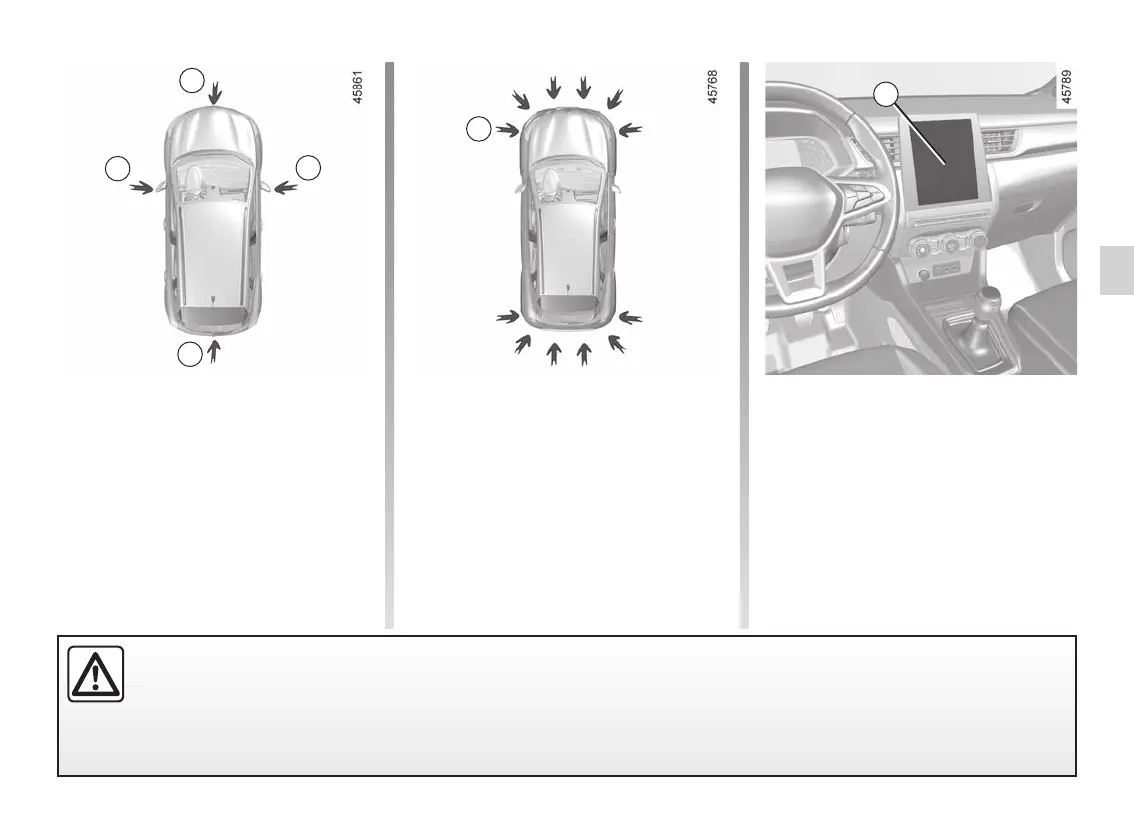
360° CAMERA (1/9)
Using information from cameras 1, 2,
and 3 located in the front bumper, door
mirrors and on the tailgate, as well as
ultrasonic detectors 4 located in the ve-
hicle bumpers, the feature assists with
difficult manoeuvres (e.g. parking) by
displaying the vehicle surroundings.
1
2
2
– front side view (depending on the ve-
hicle): using camera 2 (passenger
side).
The ultrasonic detectors detect obsta-
cles at the front, rear and (depending
on the vehicle) side of the vehicle.
Note: make sure that the cameras are
not obscured (by dirt, mud, snow etc.).
Operation
The cameras transmit four separate
views to the multimedia screen 5.
They enable you to view the vehicle
surroundings:
– front view: using camera 1;
– rear view: using camera 3;
– bird’s eye view: using cameras 1, 2
and 3;
5
3
This function is an additional aid. It cannot, therefore, under any circumstances replace the vigilance or the responsi-
bility of the driver.
The driver should always be ready for sudden incidents while driving: always ensure that there are no small, narrow
moving obstacles (such as a child, animal, pushchair, bicycle, stone, post, etc.) in the blind spot when manoeuvring.
4














 To Next Page