screens
multimedia screen ................................
(current page)
2.63
ENG_UD74937_4
Avertisseur d’angle mort (HJB - Renault)
Activation/deactivation
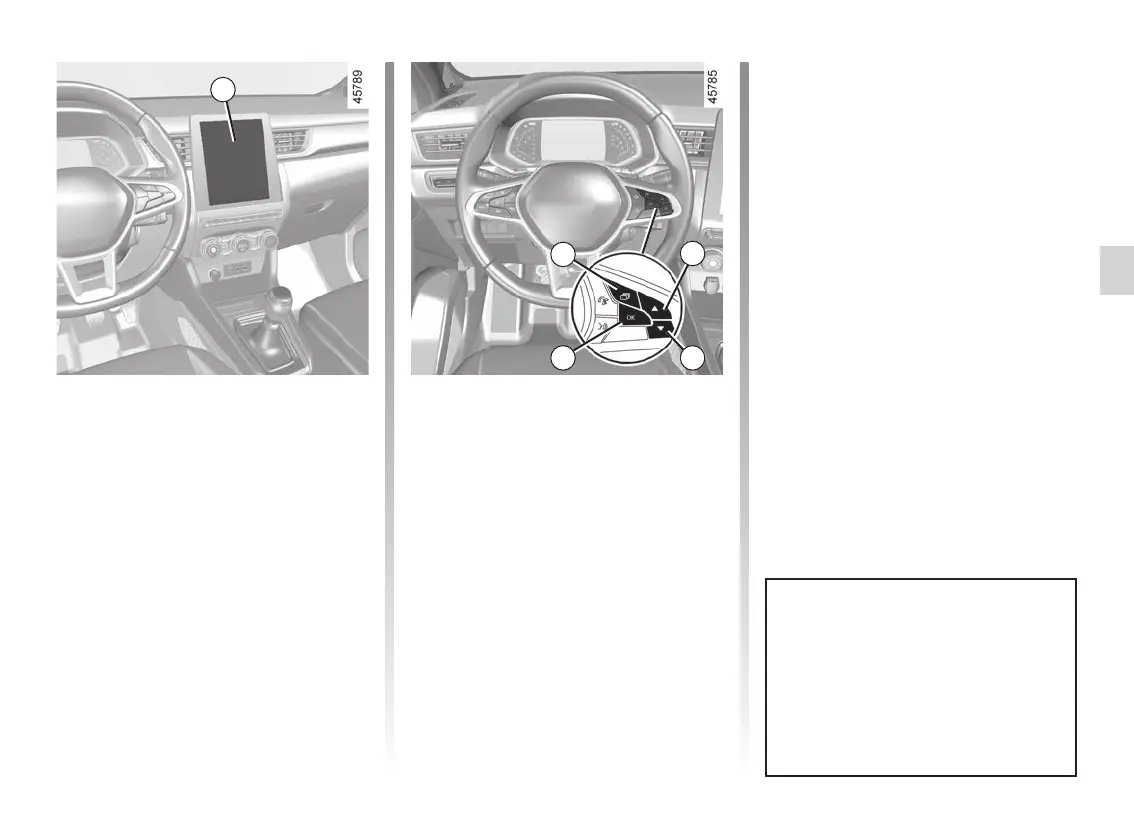
Vehicles fitted with a multimedia
screen 1
To activate or deactivate the function,
refer to the multimedia instructions.
Select “ON” or “OFF”.
Vehicles not fitted with a multimedia
screen
– With the vehicle stopped, press the 2
switch as many times as required to
reach the “Vehicle” tab;
– press the 3 or 4 control repeatedly to
reach the “Settings” menu. Press the
switch 5 OK;
– press the 3 or 4 control repeatedly to
reach the “DRIVING ASSIST” menu.
Press the switch 5 OK;
– press the 3 or 4 control repeatedly to
reach the “Blind spot alert” menu and
press the 5 OK switch;
2
3
1
The system’s detection range oper-
ates according to a standard lane
width. When driving in a narrow
lane, the function can warn you
when a vehicle is detected beyond
the adjacent lane.
BLIND SPOT WARNING (2/7)
45
– press the switch 5 OK again to acti-
vate or deactivate the function:
= function activated
< function deactivated














 To Next Page