2.134
ENG_UD73769_4
Aide au parking (HJB - Renault)
PARKING DISTANCE CONTROL (2/7)
C
A B
2
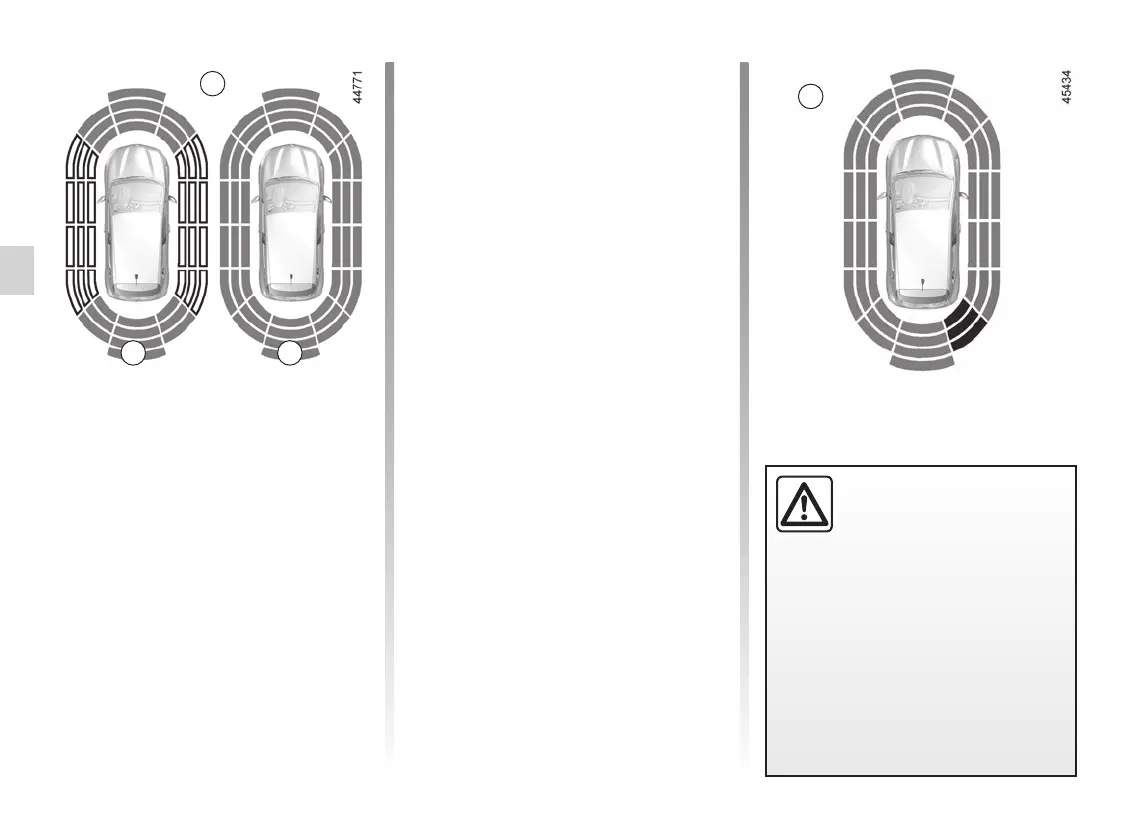
Note: the display 2 shows the vehicle
surroundings and emits beeps.
It is necessary to travel a few metres
before the side detection is activated.
If all areas have a grey background, the
whole area around the vehicle is being
monitored:
– A: analysis of the vehicle surround-
ings in progress;
– B: analysis of the vehicle surround-
ings carried out.
An impact to the under-
side of the vehicle while
manoeuvring (e.g. strik-
ing a post, raised kerb or
other street furniture) may result in
damage to the vehicle (e.g. defor-
mation of an axle).
To avoid any risk of accident, have
your vehicle checked by an ap-
proved dealer.
Note: for vehicles fitted with the “360°
camera” function ➥ 2.73, analysis of the
vehicle surroundings (areas A and B)
is not displayed in “Bird’s eye view” or
“Side view” mode.
Operation
Most objects located less near the
front, rear and sides of the vehicle are
detected.
Depending on the distance of the ob-
stacle, the frequency of the beep will
be higher while approaching it, and
will become a continuous beep around
20 cm away for obstacles to the sides,
and around 30 cm for obstacles to the
front or rear. The green, orange (or
yellow depending on the vehicle) and
red zones will be shown on the C dis-
play.
Note: in the event of a change in tra-
jectory during a manoeuvre, the risk of
collision with an obstacle may be sig-
nalled late.














 To Next Page