automatic gearbox (use) ............................
(up to the end of the DU)
changing gear ............................................
(up to the end of the DU)
driving ........................................................
(up to the end of the DU)
automatic gearbox selector lever...............
(up to the end of the DU)
gear lever...................................................
(current page)
operation....................................................
(current page)
Shift Paddle ...............................................
(current page)
2.152
ENG_UD77256_3
Boîte de vitesses automatique Levier Electronique (HJB - Renault)
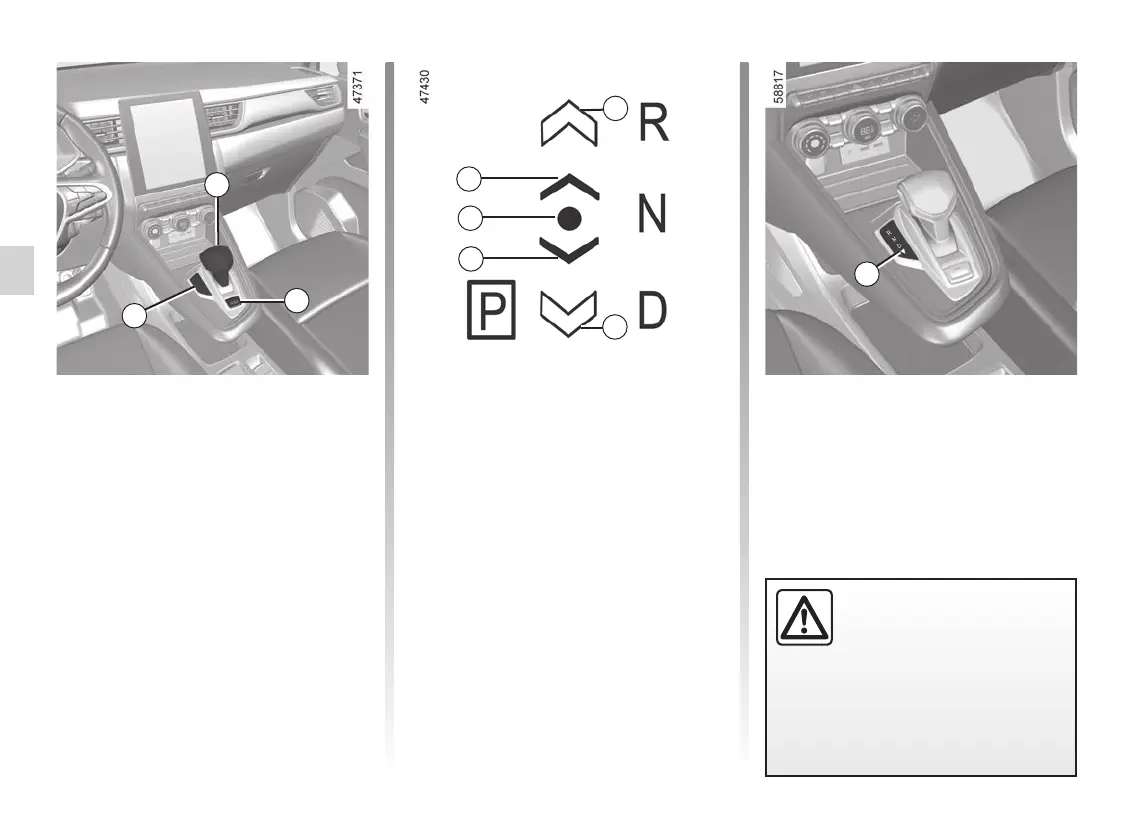
Automatic gearbox, electronic lever, manual lever
Electronic selector lever 1
R: reverse
N: Neutral
D: automatic mode
P : park, button 2
The 3 indicator light displays the gear
engaged.
On the instrument panel, the following
symbols inform you:
4: position of the gear engaged;
5 : position accessible from the cur-
rent position by moving the selector
lever 1 one notch forwards or back-
wards;
6 : position accessible from the cur-
rent position by moving the selec-
tor lever 1 two notches forwards or
backwards.
The 5 or 6 symbols are displayed to in-
dicate the gears that can be selected. If
these symbols are absent this indicates
that the gears cannot be selected from
the current position.
6
5
5
6
4
2
3
1
AUTOMATIC GEARBOX, ELECTRONIC LEVER (1/6)
The 7 triangle comes on when manual
mode is activated.
7
Check that warning light P
on the instrument panel and
the warning light integrated
on the button 2 are acti-
vated before leaving the vehicle.
Risk of loss of immobilisation of
the vehicle.














 To Next Page