multimedia equipment ...............................
(current page)
engine oil level ...........................................
(current page)
1.70
ENG_UD82505_4
Afficheurs et indicateurs (HJB - Renault)
Displays and indicators
Engine oil level low warning
When the engine is started, the instru-
ment panel display alerts you if the min-
imum oil level is reached. ➥ 4.4.
The first time the warning appears, it
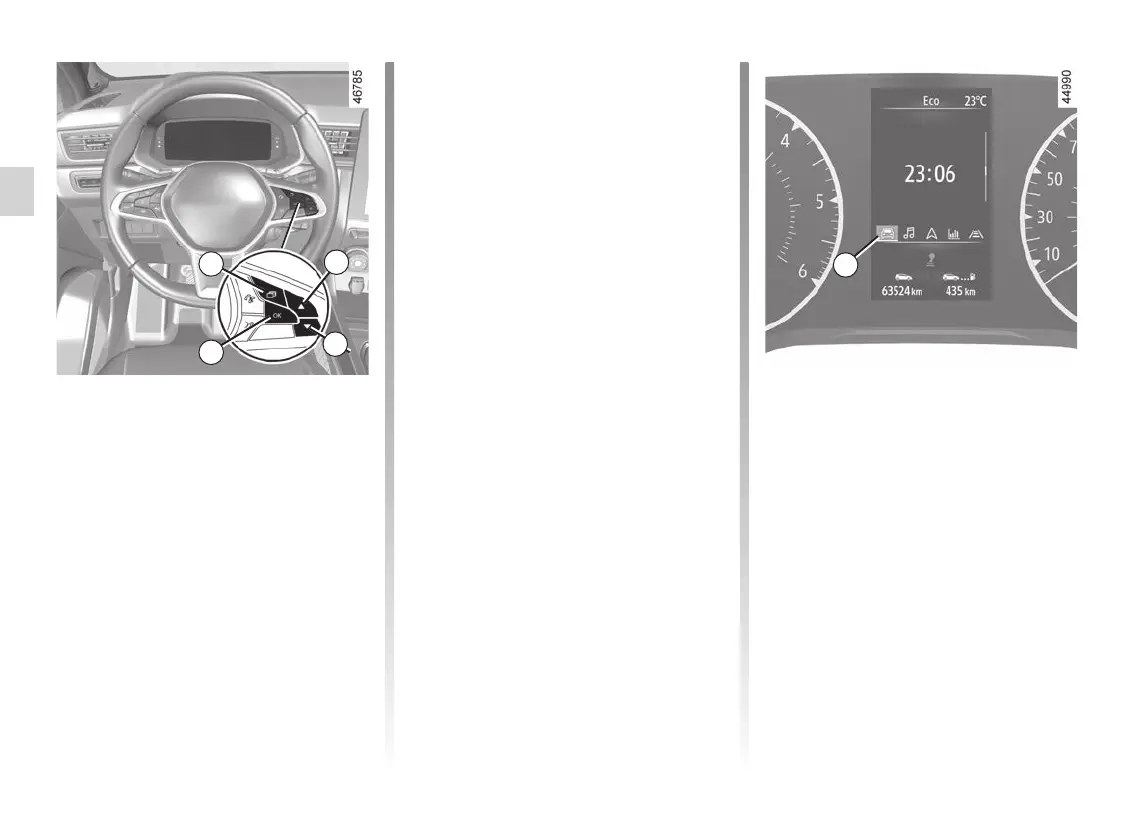
can be cleared by pressing switch 30
“OK”.
Subsequent warnings will disappear
automatically after around 30 seconds.
DISPLAYS AND INDICATORS (7/7)
34
Instrument panel in miles
(option to switch to km/h)
Vehicles not fitted with a multimedia
screen
– With the ignition off, press the 31
switch as many times as required to
reach the vehicle tab 34;
– press the 32 or 33 control repeatedly
to reach the “Settings”, then press
the 30 “OK” switch;
– repeat the same operation to access
“DASHBOARD”, then “Units”.
Vehicles fitted with a multimedia
screen.
Please refer to the multimedia instruc-
tions to select the audio system.
Note: in both cases, once the battery
is switched off, the on-board computer
automatically returns to the original unit
of measurement.
To return to the previous mode, repeat
the same operation.
Please refer to the multimedia instruc-
tions for more information.
31
32
33
30














 To Next Page