1
4
4
NU710_6_G2-FRA 11/04/05 9:12 Page 2.32
J77 - NU710-5
C:\Documentum\Checkout\NU710_6_T2-ENG.win 28/4/2005 13:03
-page32
2.32
AUTOMATIC GEARBOX (continued)
Accelerating and overtaking
Depress the accelerator pedal fully
(sothatitgoesbeyondthe
kickdown point).
This will enable you to change
down to the optimal gear within the
engine range.
Driving in manual mode
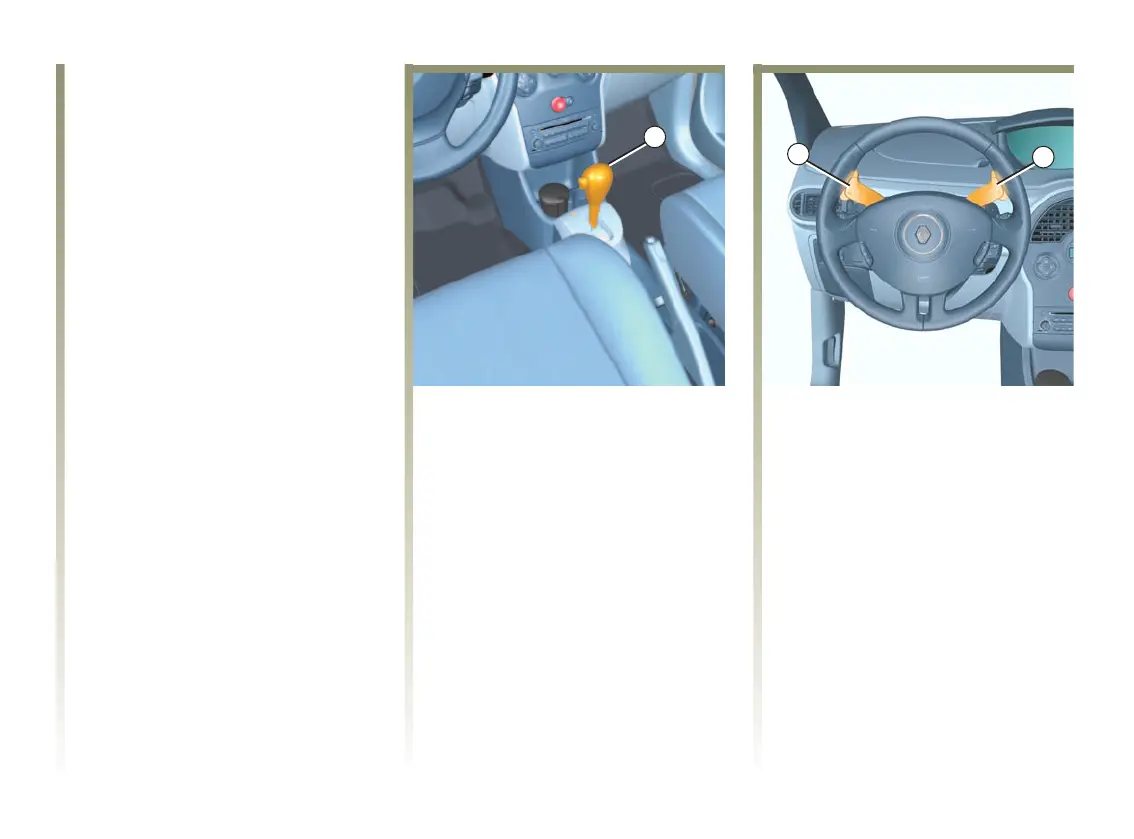
With the gear lever 1 in position D,
pull the lever to the left (changing
gear using the lever).
Changing gear using the lever
Pushing the lever repeatedly allows
you to change gears manually.
- to move down through the gears,
push the lever backwards.
-tomoveupthroughthegears,
push the lever forwards.
The gear selected is displayed on
the instrument panel.
Changing gear using the
paddles 4
The right-hand switch is used for
changing up and the left-hand
switch for changing down through
the gears.
The park, neutral and reverse
positions are not accessible using
the paddles.
Particular cases
In certain driving conditions (e.g.:
engine protection, electronic
stability program operational: E.S.P.
etc.) the “automated system” may
change the gear automatically.
Likewise, to prevent “incorrect
manoeuvres”, a gear change may be
refused by the system: in this case
the gear display flashes for a few
secondsasawarning.












 To Next Page