RH850/F1Kx, RH850/F1K Series Hardware Design Guide
R01AN3841ED0110 Rev. 1.10 Page 97 of 108
August 8, 2019
When the Nexus debug mode is used, the ports of the JP0 port group are automatically switched to the debug interface
mode.
• JP0_0: DCUTDI input
• JP0_1: DCUTDO output
• JP0_2: DCUTCK input
• JP0_3: DCUTMS input
• JP0_4:
DCUTRST input
• JP0_5: DCURDY
output
• JP0_6: EVTO
(depending on device)
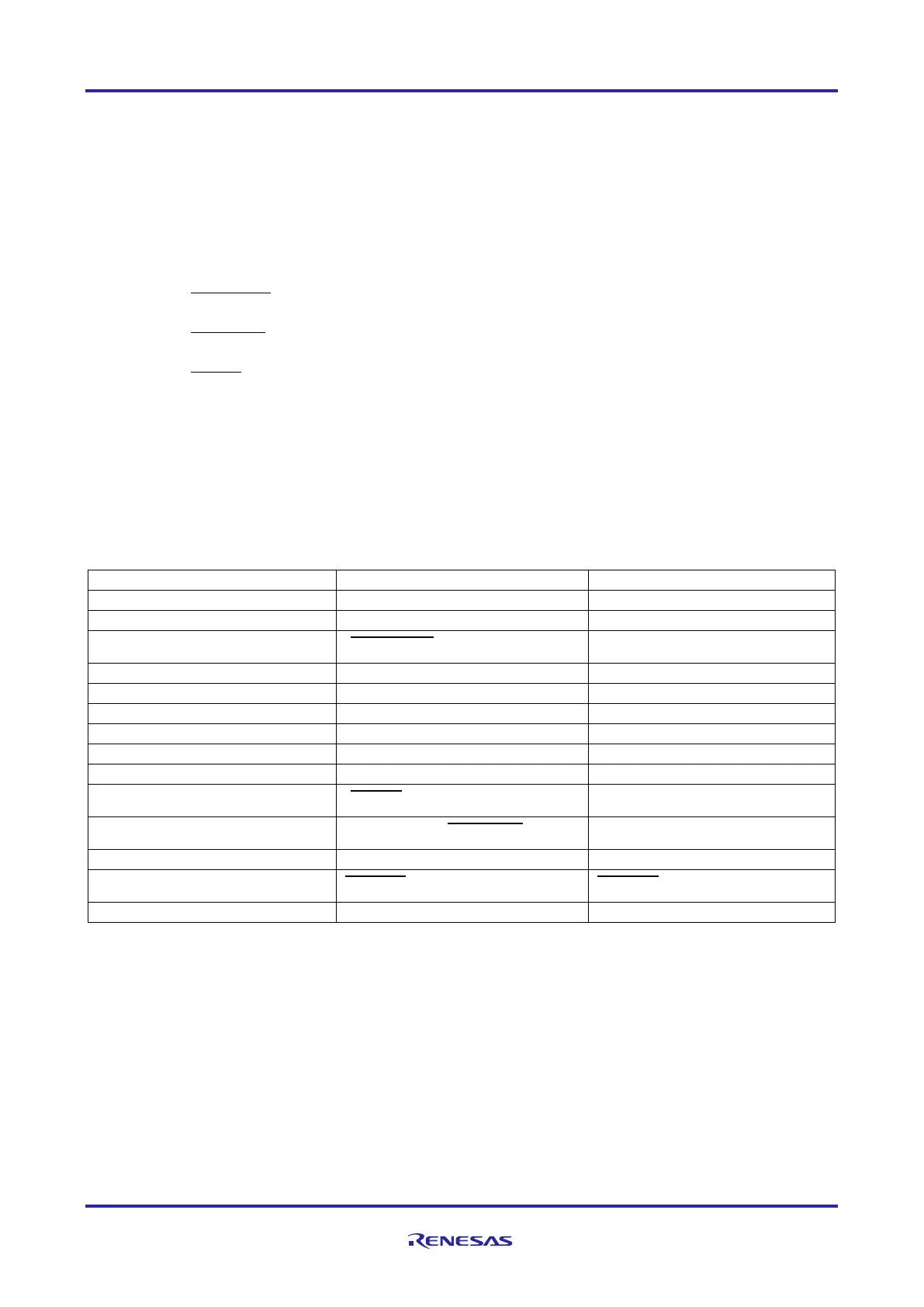
The debug interface signal connection of the E1/E2 interface is given in the table below:
Table 70: Debug interface signal connection
E1/E2 Interface Connector
3 ( DCUTRST ) JP0_4
10 ( EVTO ) JP0_6
Note 2
11 LPDCLKOUT/( DCURDY ) JP0_5
13
RESET
RESET
The Nexus interface signals marked with (text) are supported by 3rd party development tools
and not by E1/E2 emulator.


 To Next Page
 Loading...