45
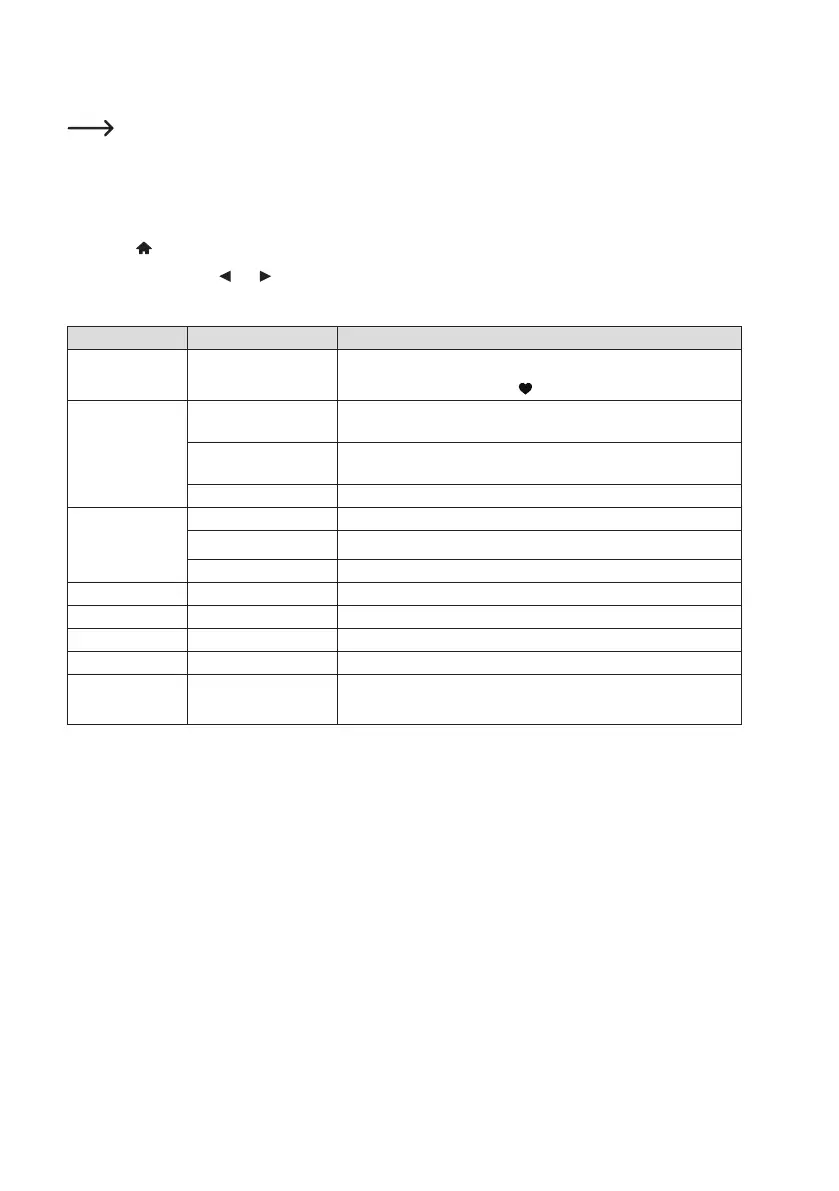
e) Menu operation and overview
Belowyouwillndanoverviewofalltheitemsthatyoucanselectinthemenu.Inaddition,thereisashort
description of what you can set in which option or which function is behind the corresponding item.
A detailed description of all functions can be found further on in this manual.
Pleasenotethatindividualcongurationitemsortheirtranslationmaychangeduetosoftwareupdates.
1. Use the
button (8) to call up the menu.
2. Use the arrow buttons
and (9) and the rotary knob (11) to navigate the menu.
3. Selectafunctionorconrmamenuitembypressingtherotaryknob(11).
Menu level 1 Menu level 2 Brief description
My Favourite Selecting the favourites list
Direct selection via the button
(12)
Internet Radio Skytune Searching for Internet radio stations by various criteria
Search (Skytune) Search for Internet radio stations by station name
History Search for Internet radio stations by the last stations you listened to
Play music UPnP Accessing your media server
My playlist Access to your media server's playlist
Clear My Playlist Delete your media server's playlist
Storage Play a microSD memory card
DAB Radio Search and receive DAB radio stations
FM Radio Search and receive FM radio stations
Bluetooth Pairing and playback of Bluetooth
®
devices
Sleep timer Activating/setting the sleep timer
Direct selection via the Sleep button (5)


 To Next Page