56
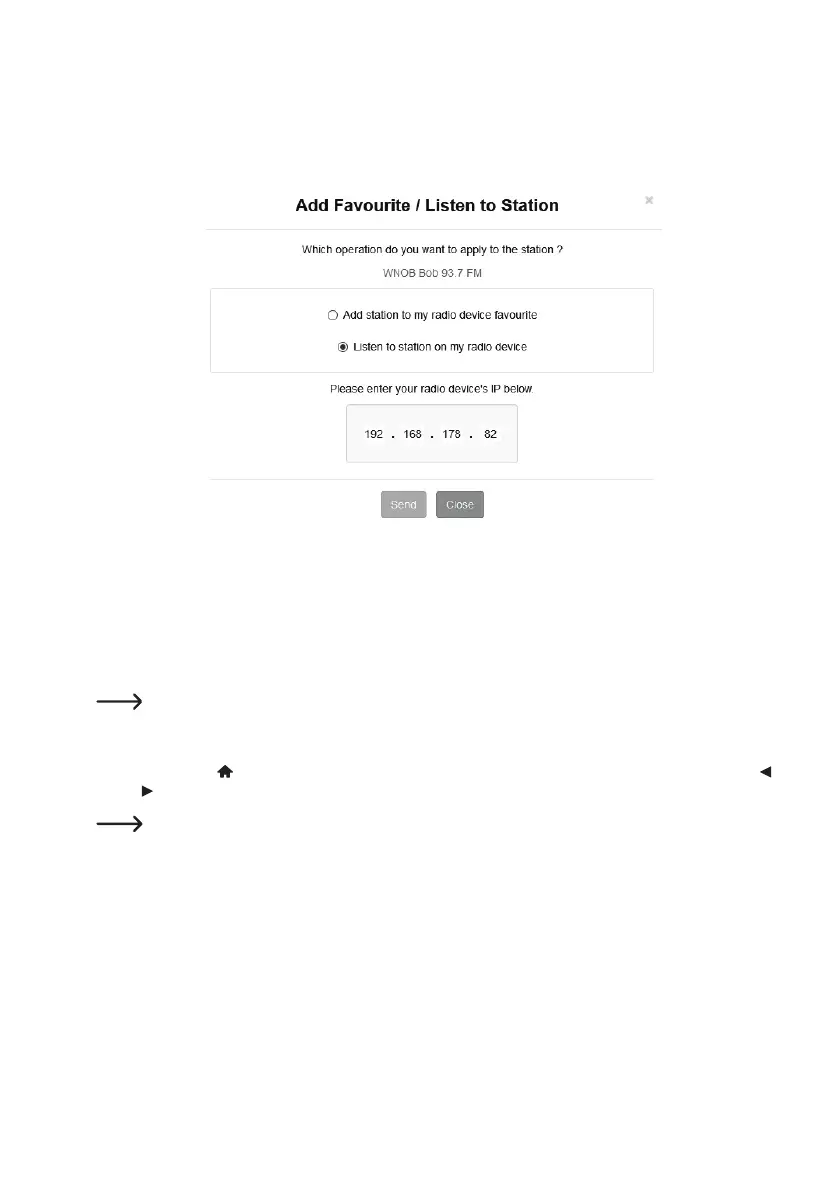
5. A window opens in which you enter whether the station should be added to the favourites list (Add station...) or
played (Listen to station...).
6. EntertheIPaddressoftheInternetradiointherespectiveeld.
7. Select SEND to carry out the action or CLOSE to cancel it.
8. The page for direct management via your browser opens automatically (see previous chapter)
l) Bluetooth
®
playback
Before transmission between your Bluetooth
®
device and the Internet radio is possible, both devices must be paired
with each other. This process is called “Pairing”.
If a Bluetooth
®
device is already paired with the Internet radio, pairing is automatically restored as soon as
both devices are within range and Bluetooth
®
mode is enabled on the Internet radio, i.e. “pairing” must be
carried out only once. However, this function may have to be activated on your Bluetooth
®
device.
1. Press the button
(8) and select the menu item “BLUETOOTH” using the rotary knob (11) or arrow buttons
and (9).
The menu item “BLUETOOTH” can also be accessed directly by pressing the MODE button (28).
2. Presstherotaryknob(11)toconrmtheselection.
3. Switch on your Bluetooth
®
device with which the Internet radio is to be paired and enable pairing mode (see
instructions for the corresponding device). Your device will search for available Bluetooth
®
devices.
4. When the Internet radio has been found, its name (RF-IR-200) appears on the display of your Bluetooth
®
device.
5. Select the name of the Internet radio on your Bluetooth
®
device.


 To Next Page