4-2
REM
s t a R M sE R i E s Us E R Ma n U a l
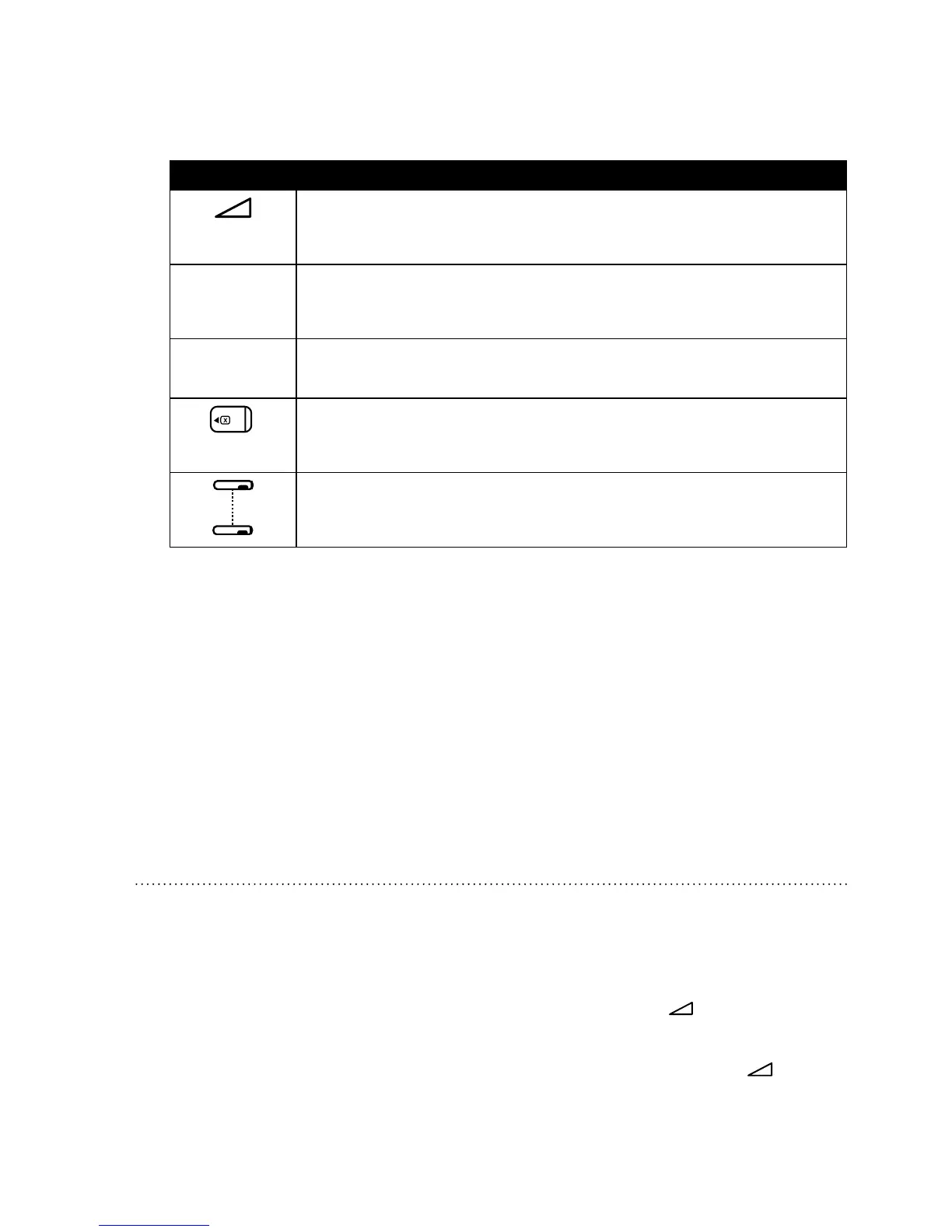
SymbolsalsoappearontheActiveDisplayscreenorStandbyscreentoindicatewhencertain
conditionsareturnedonordetected.esesymbolsaredescribedbelow:
sy M b o l dE s C R i p t i o n
Ramp – You can initiate the ramp feature by pressing the Ramp button.
The ramp symbol displays on the Active Display screen when the ramp
function is active.
Mask
Leak
Mask Leak Alert – This ashing text displays on the Active Display screen
if the Mask Alert setting is enabled and the device detects an excessive
mask leak.
Auto
Off
Auto-O – This ashing text displays on the Standby screen if the Auto-
O setting is enabled and the device detects a mask disconnect.
SmartCard – This symbol appears if a SmartCard is inserted in the device.
If the SmartCard is inserted incorrectly, this symbol will ash intermit-
tently.
Modem – This symbol appears if a modem is connected to the device.
(Note: This symbol will vary in appearance depending on the type of
modem being used.)
4. Putonyourmaskassemblywhentheairstartstoow.
5. Make sure that no air is leaking from your mask into your eyes. If it is, adjust the mask and
headgearuntiltheairleakstops.Seetheinstructionsprovidedwithyourmaskformore
information.
Note: A small amount of mask leak is normal and acceptable. Correct large mask
leaks or eye irritation from an air leak as soon as possible.
6. Ifyouareusingthedevicewhilesleeping,tryplacingthetubingfromthedeviceoveryour
headboard. is may reduce tension on the mask.
Note: If you are having trouble with your mask, refer to the instructions supplied with the mask.
4.2 Us i n g t h E Ra M p fE a t U R E
edeviceisequippedwithanoptionalrampfeaturethatyourhomecareprovidercanenableor
disable.isfeaturereducestheairpressurewhenyouaretryingtofallasleepandthengradually
increases(ramps)thepressureuntilyourprescriptionsettingisreached,allowingyoutofallasleep
more comfortably.
Iframpisenabledonyourdevice,afteryouturnontheairow,pressthe
button on the top of
thedevice.YoucanusetheRampbuttonasoftenasyouwishduringthenight.
Note: If the ramp feature is disabled, nothing will happen when you press the
button.




 To Next Page