How to Download the
App Software
STEP 1
Use your Android mobile device to
log into the GOOGLE PLAY STORE.
STEP 2
Type “Reverie Nightstand” in the
search column.
STEP 3
Select the Reverie Nighstand app.
STEP 4
Click install to download the app.
NOTE: When you open the app
the Bluetooth module will connect
to your device automatically.
NOTE: Make sure the Reverie
Nightstand App is the last app
open on your phone before locking
(putting your phone in sleep mode)
Reverie Nightstand
Android App User Guide
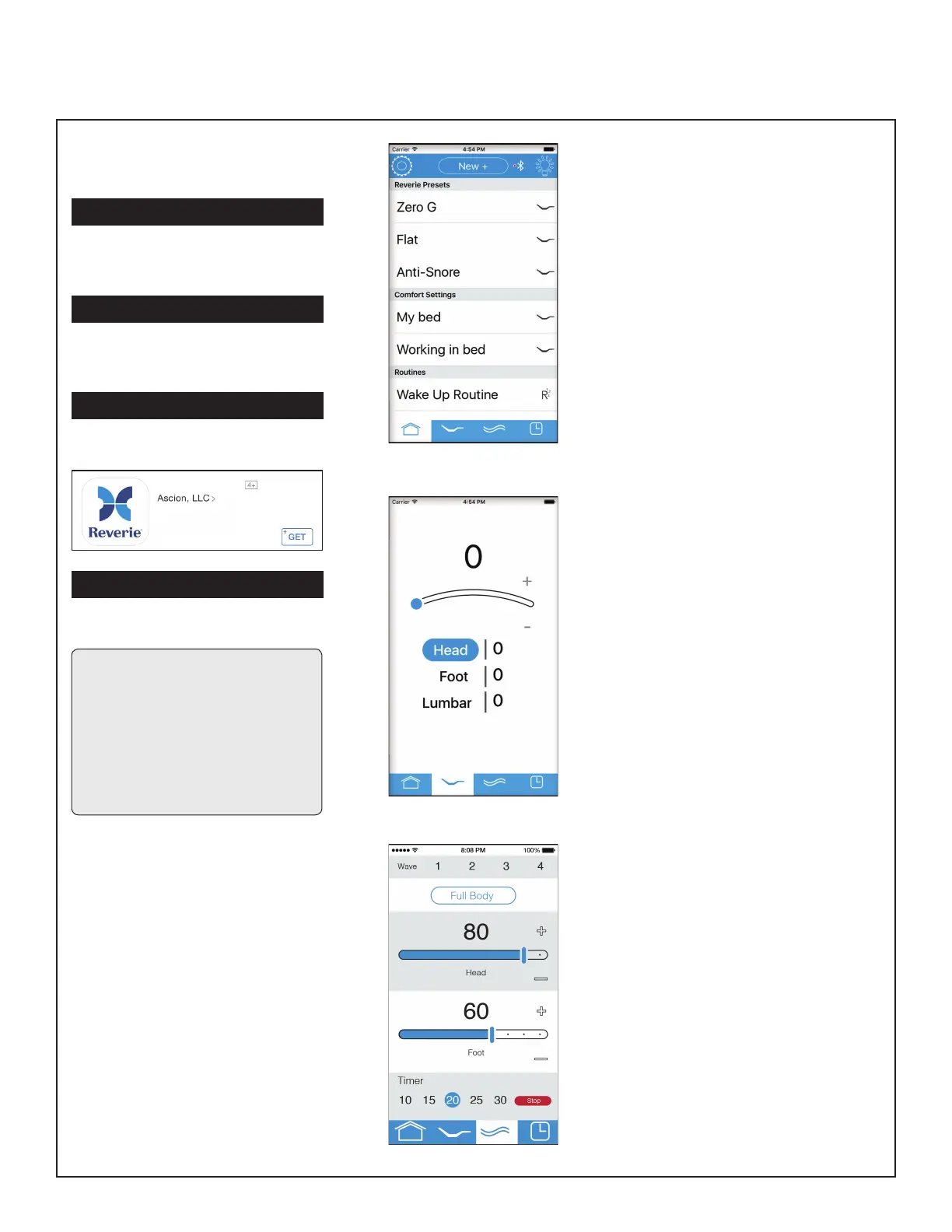
Home Screen
• Key features, functions and settings are
accessible from the home screen.
- Settings, Preset List, Comfort
Settings, Routines, Bluetooth,
Nightlight, Home Tab, Position Tab,
Massage Tab, and Alarm Tab.
• Reverie Presets - Zero Gravity,
Anti-Snore, and Flat are right at your
ngertips.
• Comfort Setting - Press “New +” to
program a unique head, foot and/or
massage combination.
• Routines - Press “New +” to program
a set of saved or new comfort settings
into a series of timed positions.
Position Control
• Control your head and foot elevation.
• Select the part of the bed you would
like to elevate or lower (head or foot).
- Use your nger to slide the blue dot
along the curve to your desired
elevation or press and hold the plus
or minus symbol to adjust elevation.
• Your position on a scale of 1-100 will
appear at the top of the screen and
next to the head or foot position.
Massage
• Control your massage intensity and
duration.
• Full body - Turns on the full body
function.
• Wave - Select number of alternating
pulses at the head and foot of the bed.
• Head and Foot control - Select
massage intensity in the head and foot
sections of the bed.
- Use your nger to slide the blue
button to your desired intensity or
press and hold the plus or minus
symbol to adjust intensity.
• Timer - Select your desired massage
duration.
• Stop - Turns the massage off.



 To Next Page