MINI Quick Start Guide
10 ©2023 REVOPOINT 3D ALL RIGHTS RESERVED
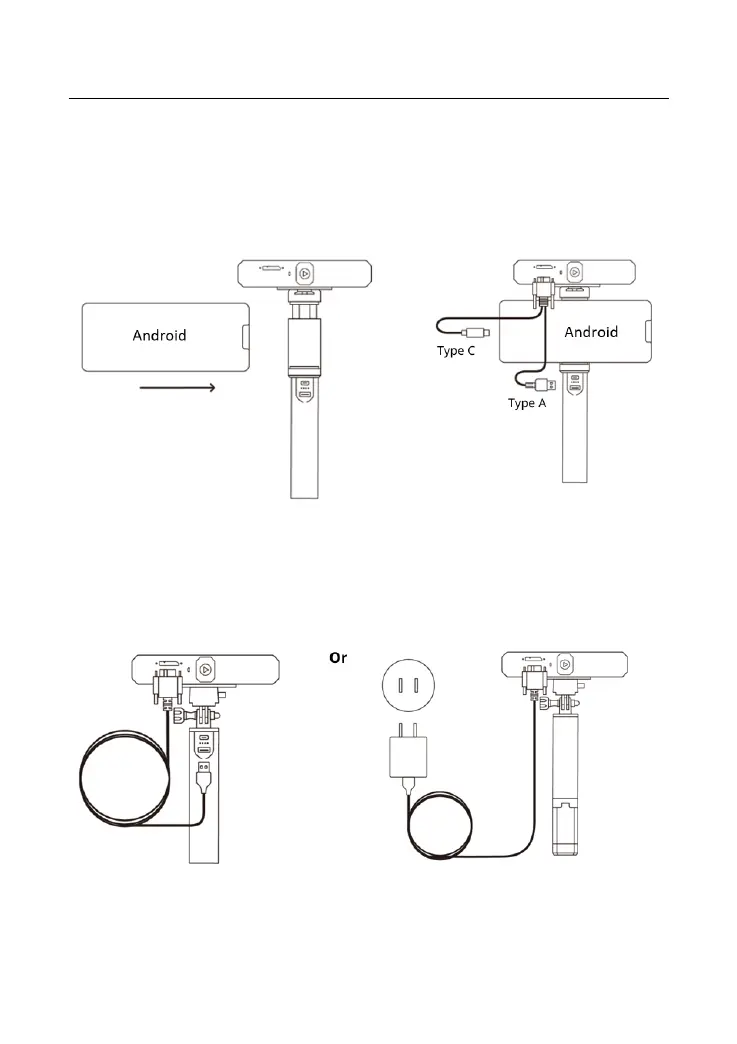
Step 3: Pull open the Phone Holder’s clamps and fit your smartphone.
Step 4: Connect the Micro-B end of the 2-in-1 Mobile Cable to the MINI’s
port.
Note: You can prepare a power bank yourself or go to Revopoint Store
to buy one.
Connect the MINI to a Phone Via Wi-Fi
Both Android and iOS Phones are compatible.
Step 1: Power the MINI on via the Power Bank Handle or a Socket.
Step 2: Connect the Smartphone to the MINI.



 To Next Page