Form CP-MAPSIII-D21, Doc No 303070, Page 35
LED Lights (4 above) Description Troubleshooting
Quick green-off-green Communication with controller is established and working. -
Slow red-off-red Communication is not established and no data is passing to card. 1.Conrmcardisrmlypluggedin.
2.ConrmBMSProtocolissettoBACnetMSTP
8.1 BACnet
®
MSTP (cont’d)
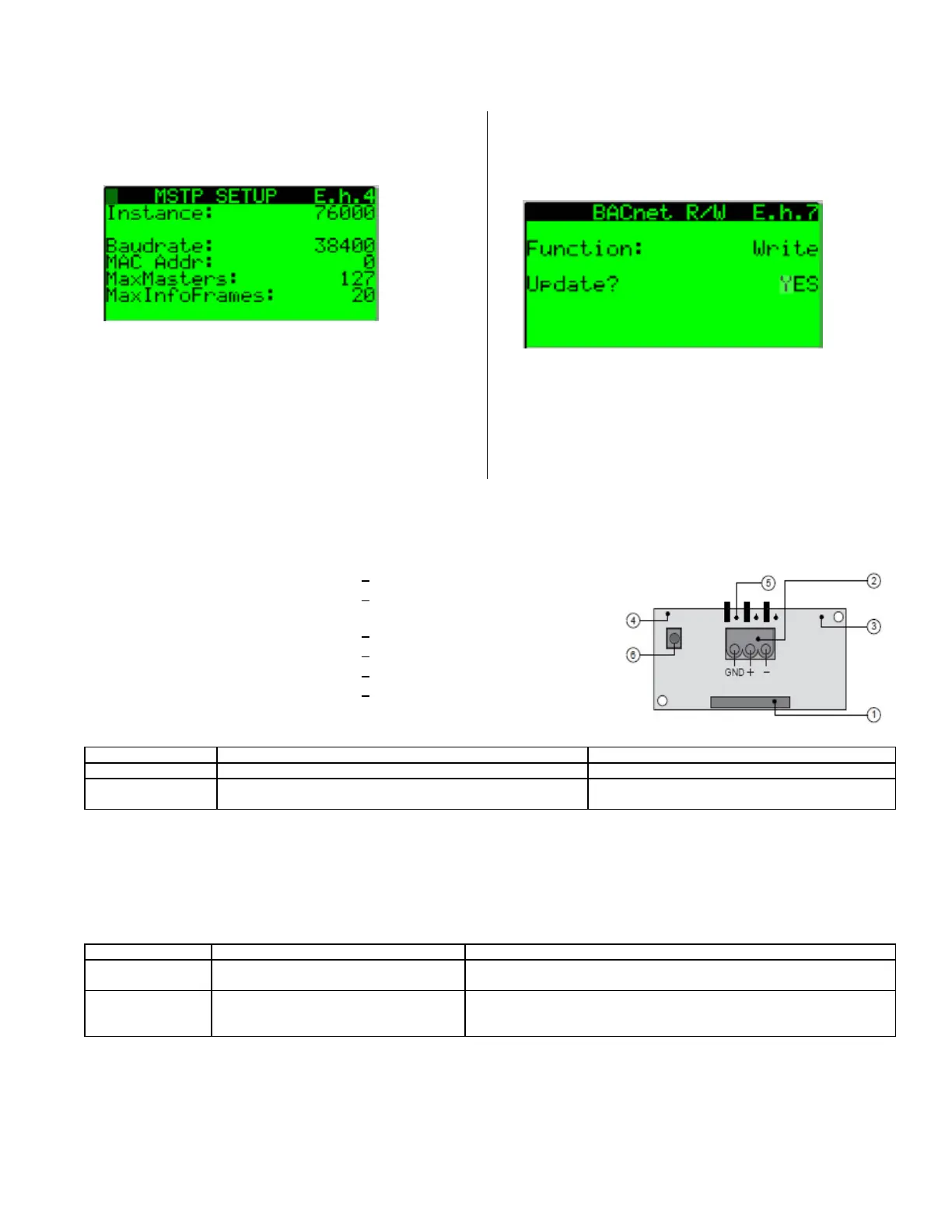
1) Serial port connection
2) Terminal block for BACnet
®
network
(GND, +, -)
3) MSTP status LED
4) Controller status LED
5) Line resistance jumpers
6)Factorycongurationpushbutton
BACnet
®
Communication Card
Layout
5. From Screen E.h.4 Set the desired values for the
Instance:,Baudrate:, and Mac Addr:. typcally the
MaxMasters: and MaxInfoFrames: do not need to be
modied.
Press the enter key in succession until the cursor
isashingintheuppermostlefthandcornerofthe
screen and use the down arrow key to navigate to the
next screen.
6. ThemodiedvaluesfromthepreviousscreenE.h.4
will need to be saved. From Screen E.h.7 press the
enterkeytoaccesstheFunction:eldandusetheup
arrow key to set the value to Write and then press the
enterkeytoaccesstheupdateeldandusetheup
arrow key to set the value to yes. After a two second
pulse the update value will return to the value of NO.
themodiedbacnetvaluesarenowsaved.
After saving the new setpoints, the controller must
be power cycled to complete the process. Once the
power has been restored and the bacnet card has
initialized, return to the MSTP Setup screen E.h.4 to
conrmthechangeswereaccepted.
The BACnet
®
communication card has two sets of LEDs (Controller Status and
MSTP Status), a push button, and three jumpers. The controller status LED
indicates the status of communication between the card and the controller. It is
located above the push button.
The MSTP status LED lights are located on the bottom side of the communi-
cation card below the controller status LED. The MSTP LED indicates the sta-
tus of communication between the card and the network. Wait at least one
minute after setting the communication parameters and plugging in the com-
munication cable before determining the status of the network communication.
LED Lights (3 above) Description Troubleshooting
Green with
occasional red
Communication with network is established
and working.
-
Green and red both
on
Communication is not established and no
data is passing to the card.
1.Conrmsystemandcardbaudratearethesame.
2.ConrmcardMaxMasterisequaltoorgreaterthantheStation(MAC)
Address of the Master with the highest address.
The push button on the communication card is used to return the card to
factoryconguration.Readandfollowtheprocedurebelowtoresetthecard.
1. With controller OFF, depress and hold the push button located on the
BACnet board while powering the controller back ON.
Continue to hold the button, while watching the Status LEDs. Wait at least
20seconds;theStatusLEDwillashSLOWLY3times,red-off.
8.0 Communication Cards (Cont’d)


 To Next Page