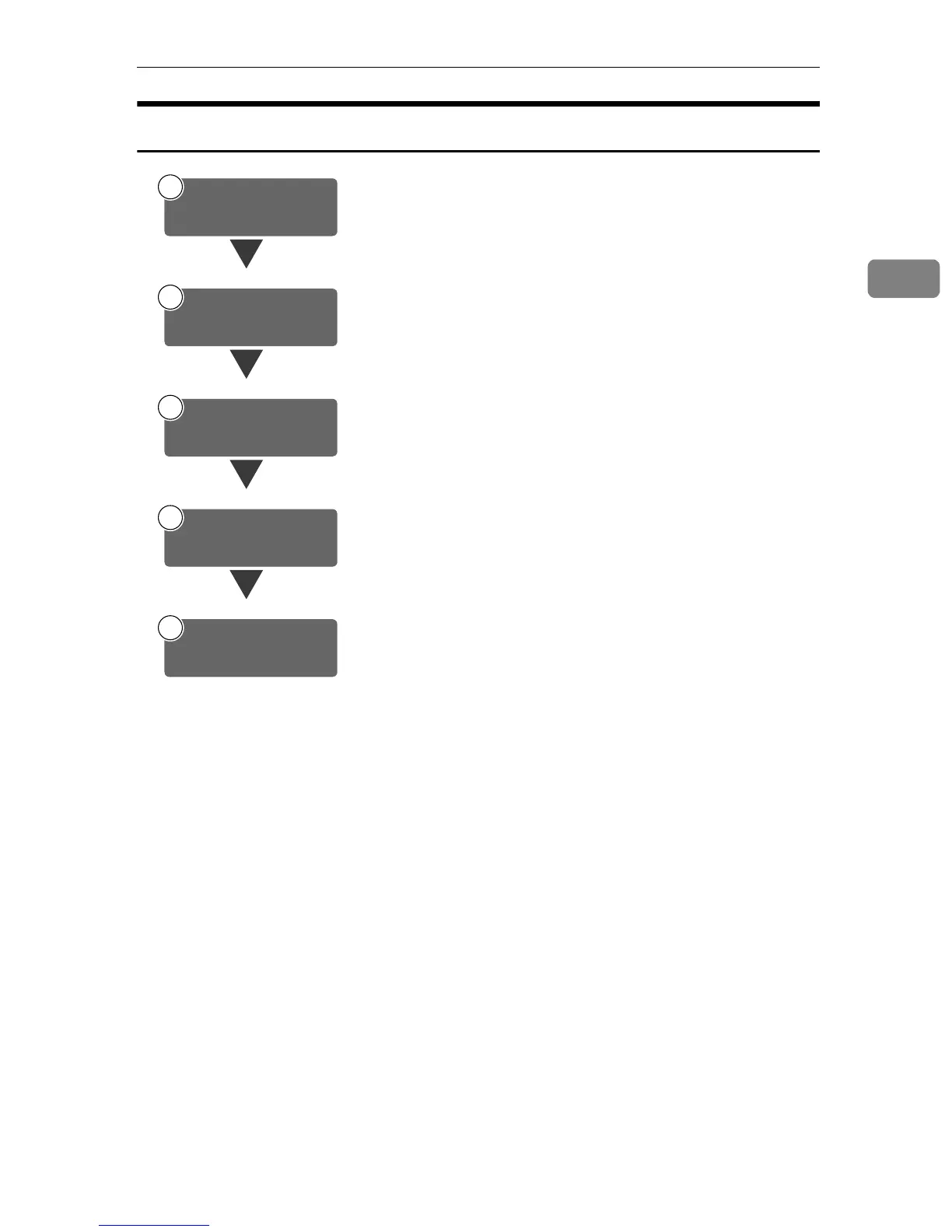
Preparation Sequence
15
2
Using E-mail
Connect the machine to the network with an Ethernet cable or
IEEE 1394(option) cable or Wireless LAN(option).
⇒General Settings Guide
Check the network or the destination settings in System Set-
tings, and change if required.
⇒General Settings Guide
Make settings for sending e-mail such as mail information lan-
guage and file type priority.
⇒ p.16 “Initial Scanner Setup”
Make settings for sending e-mail for the SMTP server using the
computer's Web browser.
⇒ p.29 “Making E-mail Settings”
Set up a mail server as necessary.
For information about setting up, refer to the instruction manu-
als of the e-mail server to be used and the software to be in-
stalled.
1
Connect to Network
2
Make System Settings
3
Make Scanner
Settings
4
Make E-mail Settings
5
Install Software







 To Next Page