Using the Document Server
86
7
Deleting Stored Files
You can delete files that are no longer
needed.
Limitation
❒ Delivery waiting files cannot be
deleted.
A
AA
A
Display the list of stored files.
Reference
⇒ p.82 “Viewing a List of
Stored Files”
B
BB
B
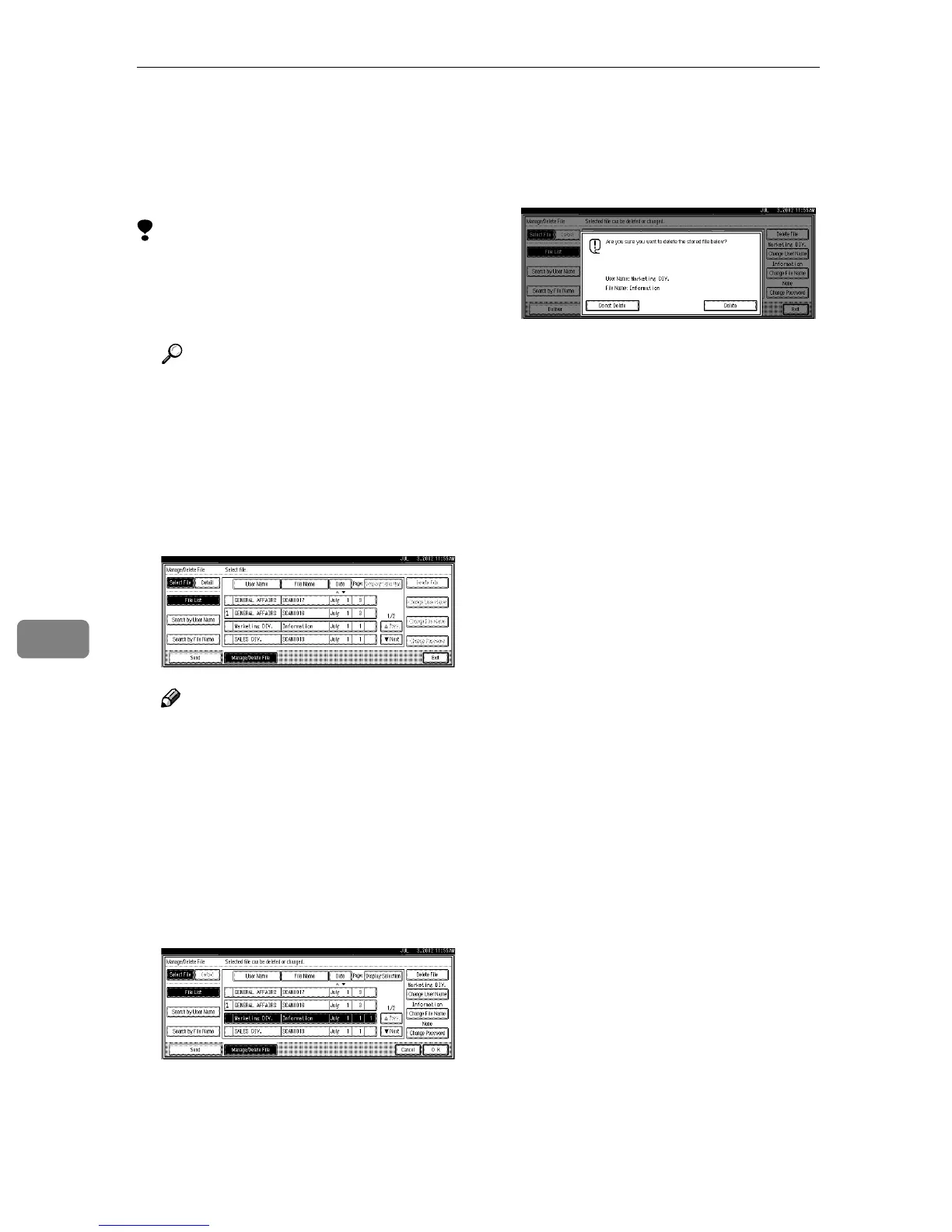
Press [Manage/Delete File].
The Manage/Delete File screen is
displayed.
C
CC
C
Select the file to be deleted.
Note
❒ Up to 30 files can be selected.
❒ When you select a password
protected file, the Password
screen is displayed. Enter the
correct password, and then
press [OK]. When more than one
file are selected, the Password
screen is displayed for each file.
D
DD
D
Press [Delete File].
A confirmation message is dis-
played.
E
EE
E
Press [Delete].
The file is deleted.
F
FF
F
Press [Exit].







 To Next Page