Delivering Stored Scan Data by the Network Delivery Scanner
56
5
F
FF
F
Make the scan settings.
To make the scan settings, call up
stored settings or make the settings
individually.
Reference
⇒ p.18 “Setting Scanner Fea-
tures”
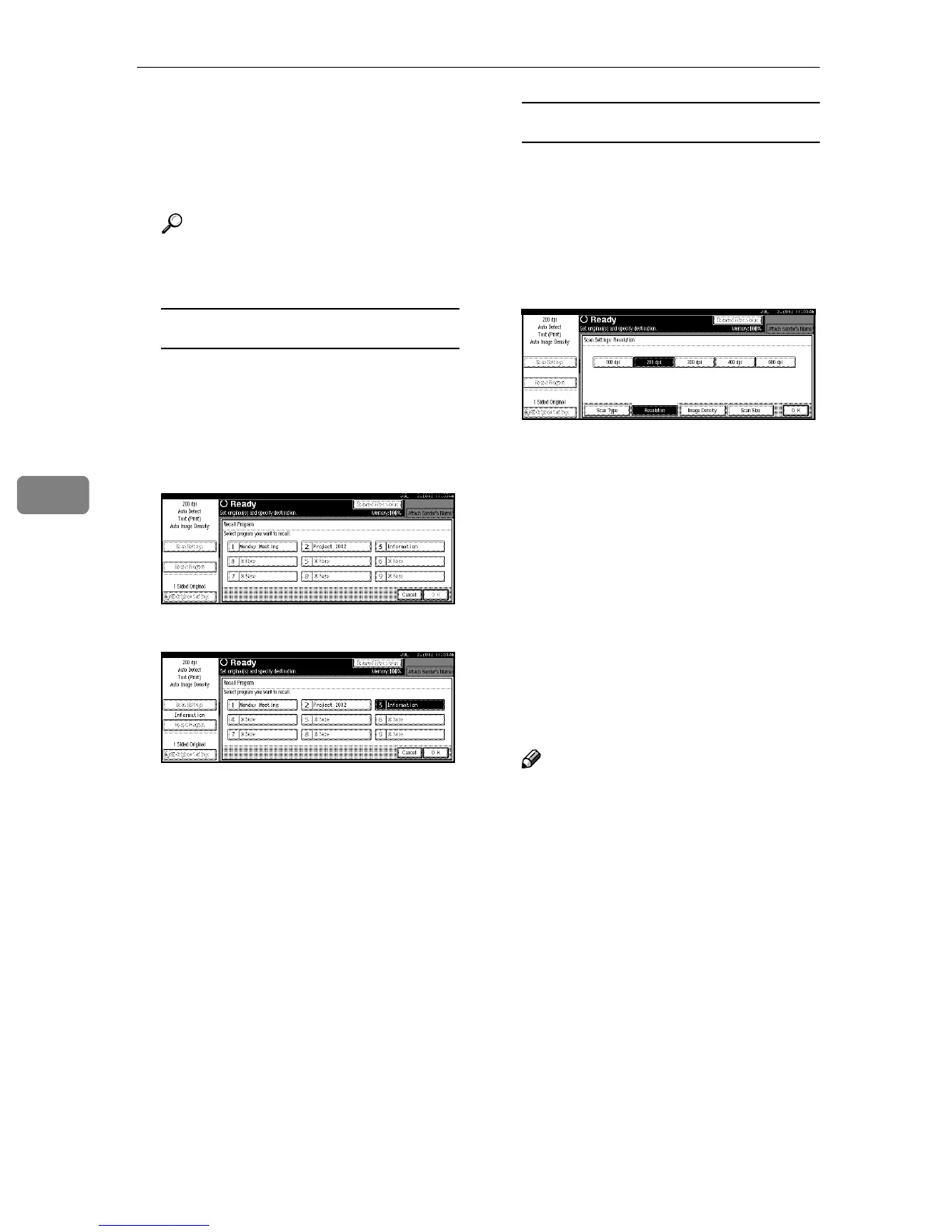
Calling up stored scan settings
A Press [Recall Program].
The Recall Program screen is
displayed.
B Select a user program of scan
settings.
C Press [OK].
The selected user program set-
tings are applied.
Making the settings individually
A Press [Scan Settings].
The screen for making scan set-
tings is displayed.
B Select resolution, original size,
and other items to change the
corresponding setting.
Scan settings are made in the
same way they are programed.
See p.18 “Setting Scanner Fea-
tures”.
C Press [OK].
The scan settings are applied.
G
GG
G
Select the destination.
Four methods are available for se-
lecting a destination: selecting it
from the list, by specifying a short
ID number, by searching it, or by
directly typing the e-mail address.
Note
❒ When using ScanRouter V2 Pro-
fessional, the destination list is
updated automatically.







 To Next Page