13
2. Configuring the Printer for
the Network
Configuring the Printer for the Network
with the Operation Panel
After installing optional Network In-
terface Board, configure it for the net-
work using the printer's operation
panel.
If you use TCP/IP, you should assign
the IP Address and Subnet Mask. You
can also set the Gateway Address us-
ing the printer's operation panel.
You can protect the network setting
using the printer's operation panel.
This menu helps you to prevent net-
work setting being accidentally
changed.
Reference
For more information about using
this machine as a network printer,
see “Quick Configuration Guide”
which is included as a PDF File on
the CD-ROM labeled “Printer
Drivers and Utilities”. Read this
manual as your first choice before
referring to the paper version of
the Quick configuration Guide
which comes with optional Net-
work Interface Board Type 450-E.
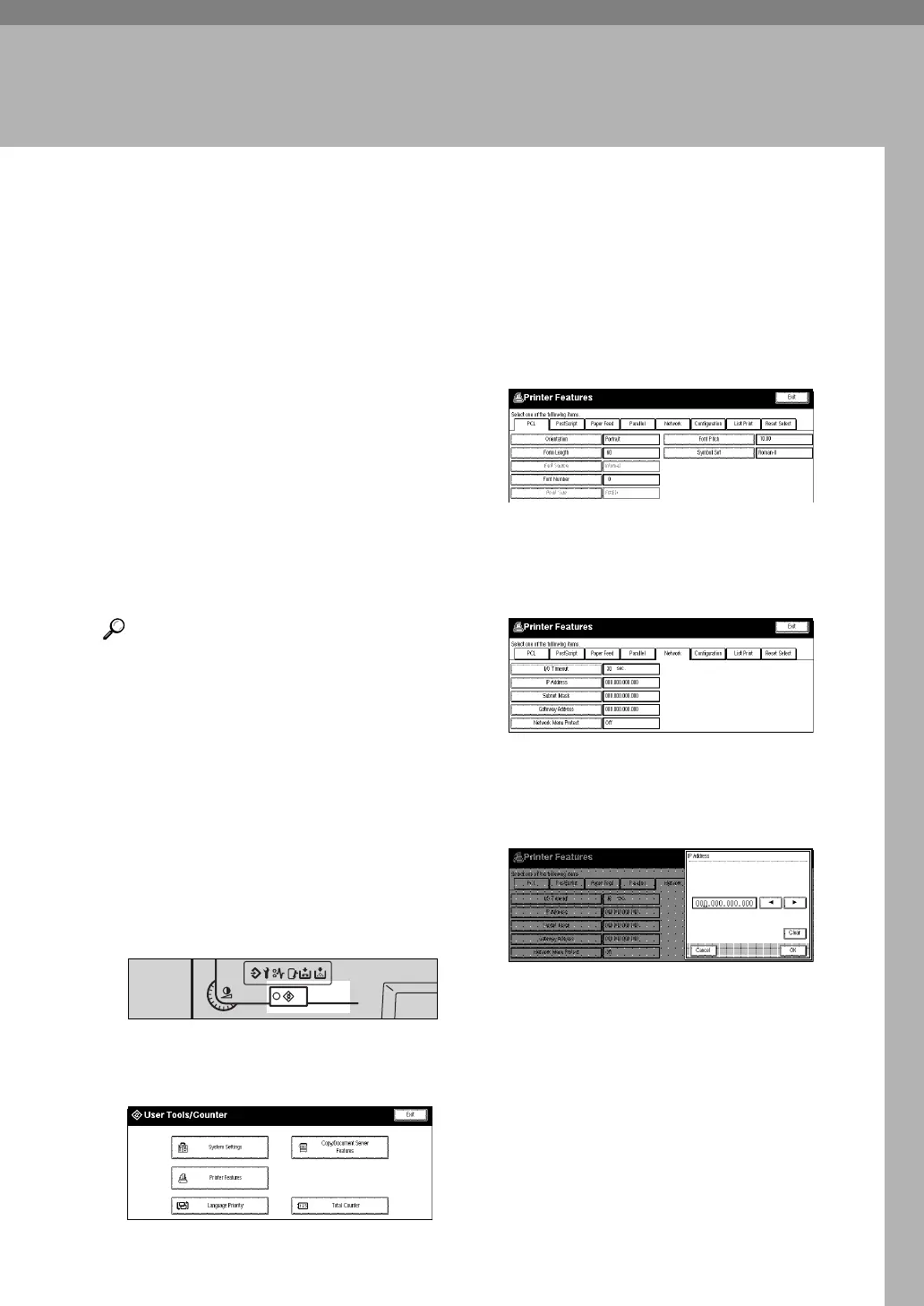
A Press {
User Tools/Counter
}.
The following screen appears on
the panel display.
B Press
[
Printer Features
]
.
The following screen on the panel
display.
C Press
[
Network
]
.
The following screen appears on
the panel display.
D Press
[
IP Address
]
.
The following screen appears on
the panel display.
TSPS040N
Screen
Contrast
User Tools/
Counter



 To Next Page